
Dynamic QR Platform
Create QR codes Instantly
Website URL
Send users to any webpage
Website URL
Website URL
Send users to any webpage
Wi-Fi
Let users connect instantly
Wi-Fi
Wi-Fi
Let users connect instantly
Menu
Create a digital menu
Menu
Menu
Create a digital menu
Start a chat with one tap
Start a chat with one tap
Image
Showcase visuals
Image
Image
Showcase visuals
Show a downloadable file
Show a downloadable file
09 Aug 2026 • 10 min read
QR Codes for School Fundraisers: Donation Pages, Sponsor Recognition, and Volunteer Sign-Ups
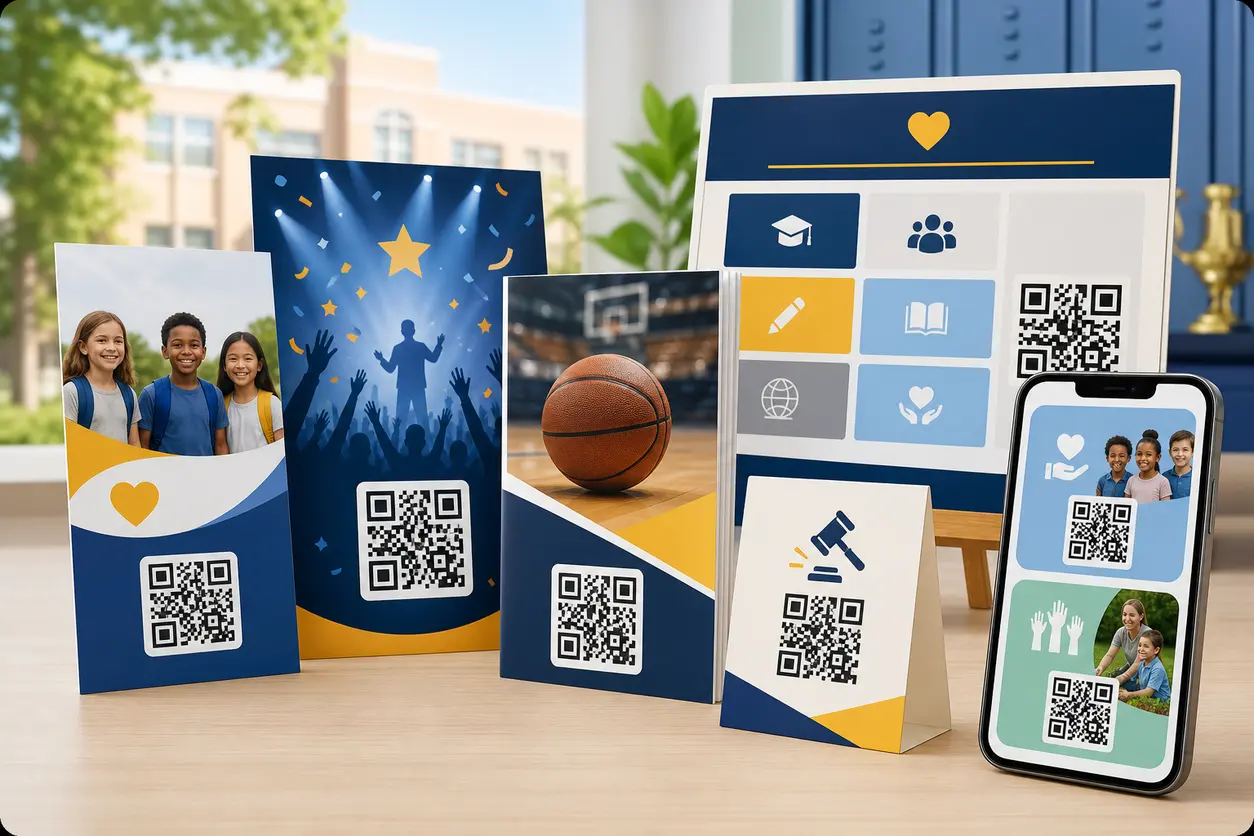
A practical guide for PTA/PTO leaders, booster clubs, and school administrators using a school fundraiser QR code system across flyers, posters, programs, auction tables, newsletters, and sponsor signage. Learn how to assign separate dynamic QR codes to donations, volunteer forms, auction catalogs, sponsorship packages, and post-event updates, then track which placements actually drive giving.
IntroductionWhy one generic donation QR code is usually a mistakeBuild one fundraiser system, not one codeBest school fundraiser QR code placements by materialUse dynamic QR codes for school fundraisingA naming convention that keeps campaigns organizedAdd UTM tracking so your donation platform data stays usefulWhat the landing page should look likeDonation CTA examples that fit school materialsAccessibility and parent-trust considerationsA simple measurement framework for scan-to-donation performanceA practical campaign exampleWhat to look for when choosing a QR tool for school fundraisersFinal takeawayFAQ
A strong school fundraiser QR code setup fixes that gap between seeing and acting. But the best results usually do not come from putting one generic donation code on everything. They come from building a simple, trackable QR system where each placement has a clear job.
That is the real opportunity for PTA/PTO leaders, school administrators, booster clubs, and parent volunteers: create one fundraiser workflow that works across every printed touchpoint and measure what actually brings in donations.
With QR Rapid, you can create separate dynamic QR codes for each fundraising action, update destinations without reprinting materials, customize the scan experience, and compare performance across placements.
Why one generic donation QR code is usually a mistake
Many schools start with a single QR code that points to a donation page and place it everywhere. That feels simple, but it creates three problems:
- You lose intent. A parent scanning a flyer at home is different from a sponsor scanning a banner at a game.
- You lose measurement. If every scan goes through the same code, you cannot tell whether posters, programs, or newsletters are actually driving donations.
- You lose flexibility. Fundraising campaigns change fast. A silent auction closes, volunteer needs shift, and sponsor packages get updated.
A better approach is to use multiple dynamic QR codes tied to specific actions and placements.
Build one fundraiser system, not one code
Think of your campaign as a set of connected QR destinations.
Core QR codes most schools need
| QR code purpose | Best destination | Typical placement |
|---|---|---|
| Main donation QR code | Mobile-friendly donation page | Flyers, posters, event signs |
| Volunteer sign-up QR code | Short form for shifts or roles | Check-in tables, newsletters, concession stands |
| Auction catalog QR code | Digital item list or bidding page | Auction tables, program inserts |
| Sponsorship package QR code | Sponsor info page or PDF | Sponsor outreach packets, business leave-behinds |
| Sponsor recognition QR code | Thank-you page listing sponsors | Sponsor boards, game signage |
| Impact update QR code | Post-event results page | Follow-up flyers, newsletters, thank-you signs |
This structure lets each audience scan into the right next step instead of landing on a catch-all page.
Best school fundraiser QR code placements by material
The placement should match the context and the action you want.
Flyers sent home
Use a donation-focused QR code with a very direct CTA. Parents are usually scanning quickly while sorting papers.
Best destination: donation page or event landing page with one prominent donate button.
CTA examples:
- Scan to support the 5th grade field trip
- Scan to donate in under a minute
- Scan to help fund new band uniforms
Keep the destination simple. If the flyer is already explaining the event, the QR code should not send people to a crowded homepage.
Event posters around campus
Posters work best for broad awareness and last-minute action.
Best destination: event page, ticket page, or donation page depending on timing.
A dynamic QR code matters here because you can reuse the same printed poster through the fundraiser timeline, a pattern that also works well for QR codes for event management. Early on, the code can point to event details. During the event, you can redirect it to donations or volunteer needs. Afterward, you can route it to an impact update.
Auction tables
Auction events are one of the clearest cases for separate QR codes.
Best destinations:
- digital auction catalog
- item-specific details page
- checkout or bidding instructions
- donation add-on page for guests who want to give beyond bidding
Avoid using one room-wide code for every table if your auction has many categories. Table-level or section-level codes make it much easier to see which items and sections drove engagement.
Sports programs and booster materials
Printed game programs are high-intent sponsor and donor placements because readers are already engaged with the school community.
Best destinations:
- team donation page
- sponsorship renewal page
- concession volunteer form
- season fundraising page
If you sell program sponsorships, a separate sponsor package PDF QR code can also help local businesses learn about next season's opportunities.
Classroom newsletters
Newsletters are ideal for recurring, lower-pressure asks.
Best destinations:
- volunteer form
- wishlist page
- classroom fundraising page
- post-event results page
Because these often circulate weekly, dynamic QR codes are useful for rotating from sign-up to donation to recap without changing the layout.
Sponsor boards and recognition signs
Sponsor signage should do more than display logos. It can also drive measurable sponsor value.
Best destinations:
- sponsor recognition landing page with logos and links
- community partner page
- future sponsorship interest form
This is a strong differentiator for schools working with local businesses. A sponsor board QR code can both recognize current sponsors and quietly attract next year's sponsors.
Use dynamic QR codes for school fundraising
Static QR codes have one fixed destination. That works for permanent links, but school fundraising is rarely fixed.
Dynamic QR codes are usually the better fit because you can:
- update a donation link if your giving platform changes
- swap a volunteer form when shifts fill up
- redirect from event details to live auction access
- replace a sponsorship PDF with a landing page
- send supporters to a thank-you or impact update after the campaign ends
- track scans by individual code and placement
For most schools, that flexibility is the difference between a usable system and a reprint problem. If you want to understand the tradeoff more clearly, Dynamic vs Static QR Codes explains why this approach is usually better for changing campaigns.
QR Rapid is especially helpful here because it lets teams manage multiple codes under one campaign, edit destinations without replacing signs, and review scan activity by code instead of guessing what worked.
A naming convention that keeps campaigns organized
Once you have more than three or four codes, naming becomes important. If your dashboard is full of titles like "donation qr final" and "poster new," reporting gets messy fast.
Use a naming convention that includes campaign, audience, placement, and action.
Recommended format
School-Campaign-Audience-Placement-Action
Examples
- Lincoln-FallFest-Parents-Flyer-Donate
- Lincoln-FallFest-Visitors-GymPoster-Donate
- Lincoln-FallFest-Parents-Newsletter-Volunteer
- Lincoln-Auction-Guests-TableA-Catalog
- Lincoln-Athletics-Community-Program-Sponsor
- Lincoln-FallFest-All-FollowUp-Impact
This makes it easy to sort by event, compare placement types, and identify which code belongs where.
Add UTM tracking so your donation platform data stays useful
If your donation platform or analytics tool supports UTMs, add them to each QR destination. This helps you compare not just scans, but downstream behavior.
Simple UTM structure for school fundraising
- utm_source=print
- utm_medium=qr
- utm_campaign=fall_fest_2026
- utm_content=flyer_donate
Then create a different utm_content value for each placement:
- poster_gym
- program_football
- newsletter_grade4
- auction_table_baskets
- sponsor_board_main
This creates a clean bridge between QR Rapid scan data and your donation or form reporting.
What the landing page should look like
A school fundraiser QR code only works if the destination is mobile-friendly and focused.
For donation pages
Keep the page short and reassuring:
- fundraiser name
- what the money supports
- school or booster organization name
- donation amounts or custom amount field
- simple payment path
- contact or verification detail for trust
For volunteer forms
Use the fewest fields possible:
- name
- email or phone
- preferred shift
- role preference
- student grade or team, if needed
For sponsorship pages
Include:
- sponsorship tiers
- what businesses receive
- event date or season timeline
- contact person
- quick inquiry form or package PDF
For impact updates
After the event, reuse the same placement by redirecting the code to a short thank-you page that shows results, next steps, or funded outcomes. That closes the loop with parents and sponsors and builds trust for the next campaign.
Donation CTA examples that fit school materials
The call to action on the print piece matters almost as much as the code itself. Avoid vague prompts like "Scan me."
Use direct, specific language tied to the school goal.
Good CTA examples
- Scan to donate to the spring music trip
- Scan to sponsor a student athlete
- Scan to view auction items and bid
- Scan to volunteer for concession shifts
- Scan to support new library books
- Scan to see what your gift will fund
- Scan to become a community sponsor
- Scan for this year's fundraiser results
The best CTA tells people exactly what happens after the scan.
Accessibility and parent-trust considerations
School fundraising involves families, caregivers, grandparents, and community members with different comfort levels. Your QR setup should feel easy and trustworthy.
Accessibility checklist
- Use high contrast between the QR code and background
- Keep adequate quiet space around the code
- Print the destination short URL below the QR code for people who cannot scan
- Make landing pages mobile-friendly and readable without pinching
- Use clear button labels like Donate Now or Volunteer Sign-Up
- Avoid tiny codes on crowded flyers
Parent-trust checklist
- Put the school, PTA/PTO, or booster club name near the QR code
- State what the scan leads to before asking for action
- Use branded landing pages where possible
- Mention how funds will be used
- Include a contact email or office reference on the destination page
- Do not send users to confusing third-party pages with no school context
Trust matters more in school fundraising than in many other QR campaigns. If a parent is unsure whether the page is official, they may leave without donating.
A simple measurement framework for scan-to-donation performance
Do not stop at scan counts. The goal is action.
Track each placement using the same comparison framework:
| Placement | QR purpose | Scans | Completed donations or forms | Conversion insight |
|---|---|---:|---:|---|
| Backpack flyer | Donate | 120 | 18 donations | Good reach, moderate conversion |
| Gym poster | Donate | 75 | 6 donations | Visible but weaker intent |
| Football program | Sponsor/Donate | 48 | 9 actions | Lower volume, stronger intent |
| Auction table A | Catalog | 62 | 21 bid interactions | Strong event engagement |
| Classroom newsletter | Volunteer | 34 | 12 sign-ups | High-fit audience |
| Sponsor board | Sponsor interest | 15 | 3 inquiries | Small volume, high-value leads |
You do not need fancy attribution to learn from this. Compare each placement on:
- Scans: Did people notice the code?
- Conversion rate: Did the destination match the intent?
- Action quality: Did the scan produce a donation, volunteer sign-up, sponsor inquiry, or catalog engagement?
- Timing: Did performance change before, during, or after the event?
Over time, this tells you where to invest printing space and design attention.
A practical campaign example
Imagine a booster club running a fall sports fundraiser.
- The game program QR code links to a team donation page.
- The concession stand QR code links to a volunteer shift form.
- The stadium sponsor banner QR code links to sponsor recognition and next-season sponsor interest.
- The auction table QR codes link to category-specific item pages.
- After the fundraiser ends, the main event poster QR code is redirected to a thank-you page showing what the campaign funded.
Nothing needs to be reprinted. The system stays organized because each code has a role, a clear name, and placement-level tracking.
What to look for when choosing a QR tool for school fundraisers
For this use case, the tool matters because school campaigns are multi-step and time-sensitive.
Prioritize:
- dynamic QR codes
- easy destination editing
- code-level analytics
- branded customization
- simple landing page support
- form and link flexibility
- organized campaign management
QR Rapid fits this workflow well because it supports the practical needs school teams actually have: multiple codes for one fundraiser, fast edits when plans change, branded experiences that feel official, and reporting that helps you compare print placements instead of relying on one generic code.
Final takeaway
The best school fundraiser QR code strategy is not one code pasted onto everything. It is a structured system that matches each printed placement to a specific next action.
When you assign separate dynamic QR codes to donations, volunteer forms, auction catalogs, sponsorship packages, sponsor recognition, and post-event updates, you make the experience easier for families and easier to measure for your team.
If you want to build that system without reprinting every time a link changes, QR Rapid's QR code generator gives your school one place to create, customize, update, and track fundraiser QR codes across the full campaign.
Start with one event, name each code clearly, add UTM tags, and compare results by placement. By the next fundraiser, you will know exactly which scans turn into support.
FAQ
Should a school fundraiser use one QR code or several?
Several is usually better. Use separate dynamic QR codes for donations, volunteer sign-ups, auction catalogs, sponsor information, and post-event updates so you can match intent and measure each placement.
What is the best destination for a school fundraiser QR code on a flyer?
A mobile-friendly donation page is usually the best fit for a flyer, especially if the flyer already explains the fundraiser. Keep the landing page focused on one action.
How can booster clubs track which printed materials drive donations?
Create a different QR code for each placement and add unique UTM parameters to each destination. Then compare scan data in QR Rapid with donation or form completions in your fundraising platform.
Can we reuse the same printed QR code after the fundraiser ends?
Yes, if it is a dynamic QR code. You can redirect it from an event page or donation form to a thank-you page, impact update, or next campaign without reprinting.
What makes a school fundraising QR code feel trustworthy to parents?
Put the school or booster club name near the code, explain exactly where the scan leads, use a branded landing page, include contact details, and clearly state what the funds support.
Where should schools place QR codes for volunteer sign-ups?
Good placements include classroom newsletters, concession stands, check-in tables, event posters, and parent handouts where supporters are already thinking about helping.
Similar Blogs
The latest industry news, interviews, technologies, and resources.
 September 14, 2026
Appointment Booking QR Code Workflows for Service Businesses
Appointment Booking QR Code Workflows for Service Businesses
Read post
 August 15, 2026
QR Codes for Google Reviews: How to Get More Customer Reviews from In-Store Signage
QR Codes for Google Reviews: How to Get More Customer Reviews from In-Store Signage
Read post

Join 2,000+ subscribers
Stay in the loop with everything you need to know.
We care about your data in our privacy policy