
Dynamic QR Platform
Create QR codes Instantly
Website URL
Send users to any webpage
Website URL
Website URL
Send users to any webpage
Wi-Fi
Let users connect instantly
Wi-Fi
Wi-Fi
Let users connect instantly
Menu
Create a digital menu
Menu
Menu
Create a digital menu
Start a chat with one tap
Start a chat with one tap
Image
Showcase visuals
Image
Image
Showcase visuals
Show a downloadable file
Show a downloadable file
07 Aug 2026 • 10 min read
QR Codes for Equipment Maintenance Logs: Scan-to-Report Inspections, Repairs, and Service History
A practical guide for facilities teams, manufacturers, fleet operators, and rental businesses using a QR code equipment maintenance log to connect each asset to instructions, inspection forms, fault reporting, service requests, and maintenance history. Learn how to structure one QR code per machine, choose durable labels, update destinations after repairs, track scans by asset, and avoid exposing sensitive internal data.
IntroductionWhy this works for maintenance teamsThe basic setup: one unique code per assetWhat the QR code should openThe mobile form fields to includeHow dynamic updates help after repairsLabel placement and durability checklistPractical use cases by asset typeHow to track scans by asset without overpromising analyticsHow to avoid exposing sensitive internal dataStatic vs dynamic for a QR code equipment maintenance logA simple rollout plan for small teamsThe practical takeawayFAQ
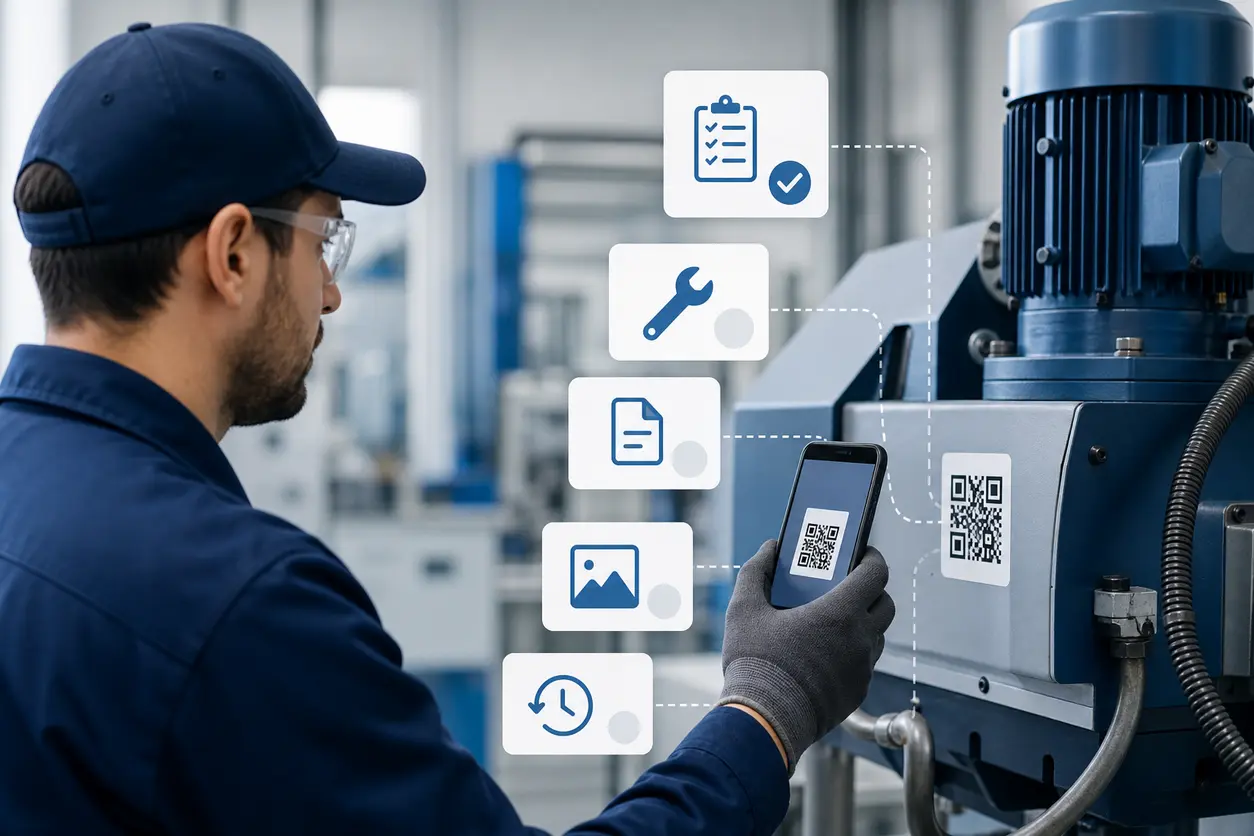
A QR code equipment maintenance log gives each machine a mobile front door. Staff scan the label on the asset and go straight to the current instructions, inspection form, repair request workflow, or maintenance history for that exact item.
For smaller teams, this does not need to start with a full CMMS rollout. A practical setup often begins with a QR code generator , a simple destination structure, and one code per asset. With QR Rapid, you can create dynamic QR codes that point to a PDF, image, form, or landing page, then update the destination later without replacing the label.
Why this works for maintenance teams
Most maintenance delays happen before the repair itself:
- the right manual is hard to find
- inspection records are incomplete
- fault reports miss the asset ID
- photos stay on personal phones
- service history is stored in too many places
A QR code on the asset reduces that friction. Instead of asking staff to search for the right file or remember the reporting process, you attach the workflow to the machine itself.
That matters for:
- facilities managers maintaining HVAC, kitchen, and building systems
- small manufacturers running multiple machines with different service schedules
- property maintenance teams servicing shared equipment across sites
- fleet operators tracking inspections and fault reports by vehicle or forklift
- equipment rental businesses giving staff and customers access to current instructions and return-condition reporting
The basic setup: one unique code per asset
The most important rule is simple: use one QR code per machine, tool, vehicle, or asset record.
Do not use one general maintenance code for an entire room or equipment category if you want clean reporting. A shared code creates ambiguity. You lose the ability to know which item was scanned and your form submissions become harder to trust.
A better structure looks like this:
- Walk-in freezer compressor 01 -> unique QR code
- Forklift FL-07 -> unique QR code
- Roof HVAC unit RTU-3 -> unique QR code
- Rental pressure washer RW-14 -> unique QR code
- Shared conference room projector PRJ-2 -> unique QR code
If each asset has its own QR Rapid dynamic QR codes, you can manage updates at the asset level and review scan activity by code. That is the simplest way to make scan tracking useful without adding extra process overhead.
What the QR code should open
The destination matters more than the code itself. For most teams, the best destination is not a raw file link. It is a lightweight mobile page that acts as the asset hub.
Recommended destination structure
Build a simple asset page with these sections:
- Asset identity
- asset name
- internal ID or serial reference
- location
- model
- last service date
- Primary actions
- View operating instructions
- Complete inspection checklist
- Report a fault
- Request service
- View maintenance history
- Supporting files
- PDF manual
- quick-start sheet
- photo of control panel or part layout
- warranty or vendor contact details
- Status notes
- out of service notice
- temporary operating guidance after repair
- next scheduled maintenance window
In QR Rapid, that destination can be a linked PDF QR code, image, form, or landing-page-style asset resource, depending on how you want the scan experience to work.
When a direct file works best
A direct PDF is useful when the main need is immediate access to:
- a cleaning checklist for kitchen equipment
- a daily pre-use forklift inspection form in PDF format
- a laminated quick-reference procedure that you want available digitally too
When a landing page works better
A simple mobile asset page is better when users need several options from one scan, such as:
- report a fault
- open the manual
- see the last repair notes
- review photos of approved operating settings
For most maintenance workflows, the landing-page approach is more flexible and reduces the need to create multiple labels per asset.
The mobile form fields to include
If the code is meant to capture inspections or service requests, keep forms short enough to complete in the field.
Inspection checklist fields
Use fields such as:
- asset ID, prefilled if possible
- location
- date and time
- inspector name
- pass or fail checks
- meter or hour reading if relevant
- notes
- photo upload for damage or wear
- signature if your workflow requires it
Fault reporting fields
Use fields such as:
- asset ID
- fault category
- severity level
- problem description
- equipment still operational: yes or no
- photo or video upload
- requester name
- callback details
Service completion fields
If supervisors or technicians update records after repairs, include:
- work completed
- parts replaced
- date returned to service
- follow-up required
- updated instructions or attachments
The goal is not to build a heavy enterprise workflow. The goal is to make sure the person scanning can submit a useful, asset-specific record in under two minutes.
How dynamic updates help after repairs
This is where dynamic QR codes are genuinely valuable for maintenance.
The label on the equipment should stay the same even when the destination changes. After a repair, you may need to:
- replace an outdated manual with a revised version
- switch the destination from an out-of-service notice back to the standard asset page
- add a post-repair operating note
- link a new inspection checklist after a component change
- update a vendor service contact
With a dynamic code in QR Rapid, you update the destination instead of reprinting the sticker. That matters most for equipment that is hard to relabel, already deployed across several sites, or exposed to wear.
Label placement and durability checklist
The QR workflow only works if the code remains scannable in real conditions.
Where to place the label
Place the code where the user naturally pauses before use, inspection, or troubleshooting:
- near the operator panel on kitchen equipment
- on the service access panel of HVAC units
- inside a forklift cab or near the daily checklist location
- on the main body of a rental tool, not on a removable accessory
- near the charging dock or underside tag area for shared office assets
Avoid placing the label:
- on hot surfaces
- over vents or seams
- where grease, abrasion, or pressure washing will quickly destroy it
- on curved or textured areas that distort the code
- where scanning requires awkward body position or unsafe reach
Durability checklist
Choose a label material based on the asset environment:
- laminated polyester or vinyl for indoor equipment
- chemical-resistant labels for kitchens, janitorial carts, or cleaning-heavy spaces
- UV-resistant labels for rooftop HVAC or outdoor rental gear
- tamper-evident labels if asset swapping is a concern
- metal or rigid asset tags for long-life equipment in harsh settings
Before rollout, test every label for:
- scan speed on both iPhone and Android
- readability under low light
- durability after cleaning
- size at actual viewing distance
- contrast after adding branding or color
A small, pretty code that fails in the field is worse than a plain code that scans every time.
Practical use cases by asset type
Kitchen equipment
Attach a code to ovens, mixers, dishwashers, and refrigeration units so staff can:
- open cleaning steps
- log temperature or condition checks
- report faults with photos
- confirm the last service date
This is especially useful in multi-site food operations where procedures change but labels stay in place.
HVAC units
For rooftop units, split systems, and boiler controls, a QR code can open:
- startup or shutdown instructions
- filter replacement checklist
- service notes by unit
- current troubleshooting guide for that exact model
Keep sensitive electrical documentation off the public web if the unit is accessible to tenants or visitors.
Tools and shop equipment
Shared drills, saws, compressors, and bench equipment are often used by many people but maintained by few. A QR code can help staff:
- confirm check-out condition
- report damage immediately
- view approved operating instructions
- access replacement-part diagrams
Forklifts and fleet assets
A forklift maintenance QR code works well for daily inspections and quick fault escalation. One scan can open the inspection form for FL-07 instead of a generic vehicle form that leaves room for data entry mistakes.
For small fleet operations, the same approach works for trailers, service vans, sweepers, and utility vehicles.
Rental equipment
Rental teams can use asset QR labels internally for prep, turnaround, and service history. For customer-facing equipment, the code can point to simplified operating guidance and return-condition reporting, while deeper internal maintenance records stay restricted.
Shared office assets
Printers, coffee machines, AV carts, and conference room hardware are low-risk but high-friction assets. A QR code on each item can reduce help-desk back-and-forth by linking to:
- quick instructions
- toner or supply request forms
- issue reporting
- known-fix notes
How to track scans by asset without overpromising analytics
If you want asset-level visibility, the reliable approach is straightforward: create a separate QR code for each asset and name it clearly in QR Rapid.
For example:
- HVAC-RTU-03-Service
- FL-07-Daily-Inspection
- KITCH-OVEN-02-Maintenance
That naming convention makes it easier to review scan activity by code and connect each code to a specific machine or location.
A few practical tips:
- keep asset IDs consistent with your existing maintenance records
- use folders or naming prefixes by site or asset class
- distinguish internal-only codes from customer-facing rental codes
- avoid printing a code before you finalize the asset naming standard
If you need more detailed reporting later, a clean asset-by-asset code structure gives you a much better starting point than a single generic link.
How to avoid exposing sensitive internal data
Not every maintenance document should sit behind a scannable sticker.
Be careful with:
- internal vendor pricing
- technician contact lists with personal numbers
- security-sensitive equipment details
- private building infrastructure notes
- incident reports that include personal information
Safer options include:
- linking the QR code to a simplified asset page instead of the full internal folder
- separating customer-facing instructions from internal repair notes
- using a public-safe quick guide for accessible equipment
- removing sensitive details from PDFs before linking them
- creating different codes for internal and external use when needed
As a rule, assume any label placed on accessible equipment may be scanned by someone outside your team.
Static vs dynamic for a QR code equipment maintenance log
A static code can work for a permanent page that will never change, but most maintenance workflows change often enough that static becomes expensive.
Choose a dynamic code when you expect to:
- update forms
- replace manuals
- change service contacts
- post temporary out-of-service instructions
- refine the asset page over time
That flexibility is the main reason QR Rapid fits this use case well. You can start with a simple asset page today and improve the destination later without replacing every label in the building, yard, or fleet.
A simple rollout plan for small teams
If you are starting from scratch, do not label every asset on day one.
Use this rollout sequence:
- Pick 10 to 20 high-friction assets.
- Create a standard asset page or destination template.
- Generate one QR Rapid dynamic code per asset.
- Print and test durable labels in the real environment.
- Train staff on one scan action: inspect, report, or view instructions.
- Review which destinations need simplification after the first month.
This keeps the project manageable and gives you a repeatable template before full deployment.
The practical takeaway
A good QR code equipment maintenance log does not try to replace every maintenance system at once. It solves a more immediate problem: getting the right instructions, forms, and service context in front of the person standing at the machine.
If you want a low-friction place to start, build your first asset template in QR Rapid, create one dynamic code for one real machine, and test the scan workflow with your team. Once that first asset page works, expanding to forklifts, HVAC units, kitchen equipment, tools, rental gear, and shared office assets becomes a repeatable process instead of another operations project that stalls.
FAQ
Should each machine have its own QR code or can multiple assets share one?
Use one QR code per asset whenever you want reliable inspections, fault reports, or scan history. Shared codes are only suitable for general instructions that are identical across several items.
What is the best destination for an equipment maintenance QR code?
For most teams, a mobile asset page works best because it can link to instructions, forms, photos, and service history from one scan. A direct PDF works when the only goal is to open one document quickly.
How do I keep maintenance records private if the equipment is publicly accessible?
Link the code to a public-safe summary page rather than a full internal folder, remove sensitive details from files, and separate customer-facing guidance from internal service notes when needed.
What label material should I use for maintenance QR codes?
Choose based on the environment: laminated vinyl or polyester for general indoor use, chemical-resistant labels for kitchens or cleaning-heavy areas, UV-resistant labels for outdoor equipment, and rigid tags for harsh industrial settings.
Can I update the destination after a repair without replacing the sticker?
Yes, if you use a dynamic QR code. That lets you change the linked manual, form, or asset page after repairs while keeping the same printed label on the equipment.
What is the easiest way to track scans by asset?
Create a separate QR code for each asset and use a clear naming convention in QR Rapid, such as site plus asset ID. That keeps scan activity tied to a specific machine instead of a generic maintenance link.
Similar Blogs
The latest industry news, interviews, technologies, and resources.
 September 14, 2026
Appointment Booking QR Code Workflows for Service Businesses
Appointment Booking QR Code Workflows for Service Businesses
Read post
 August 15, 2026
QR Codes for Google Reviews: How to Get More Customer Reviews from In-Store Signage
QR Codes for Google Reviews: How to Get More Customer Reviews from In-Store Signage
Read post

Join 2,000+ subscribers
Stay in the loop with everything you need to know.
We care about your data in our privacy policy