
QR Rapid
QR Codes for
  • Restaurants
  • Gym and Wellness
  • Event Management
  • Business Services
  • Work Environment
  • Social Media
  • Design
  • Life Hack
Explore all use cases→
QR Codes on
  • Product packaging
  • Flyers and posters
  • Storefronts and window signs
  • Brochures and catalogs
  • Event tickets and badges
Where to use QR codes→
QR Types
  • Website URL
  • Wi-Fi
  • Menu
  • WhatsApp
  • Image
  • PDF
  • MP3
  • Video
  • Email
  • Text
  • vCard
  • Crypto
  • List of links
  • Coupon
  • SMS
  • Event
  • APP
  • Social media
View all QR types→
AINew

Rapid, inside your dashboard

  • Create with Rapid
  • Rapid Insights

Connect your AI assistant

  • MCP server
  • Claude
  • ChatGPT
View all AI→
  • Blogs
  • FAQ
  • Chrome Extension
  • QR Size Calculator
QR Rapid

Create, customize, manage, and track QR codes for business, marketing, events, and everyday use.

QR Types

Website URL

Wi-Fi

Menu

WhatsApp

Image

PDF

MP3

Video

Email

QR Codes for

Restaurants

Gym and Wellness

Event Management

Business Services

Social Media

Work Environment

Design

Life Hack

Where to Use QR Codes

Company

Rapid AI

Chrome Extension

Plans & Pricing

Blogs

About Us

Legal

Terms and Conditions

Privacy Policy

Cookies Policy

Help

FAQ

QR Size Calculator

Contact Us

2026 © QR Rapid All rights reserved - QR Code is a trademark of DENSO WAVE INCORPORATED

QR codes for designers

Make the QR code part of the design.

Create and style your QR in QR Rapid, export it as SVG, then place it into Figma, Illustrator or InDesign. Build the layout in the tools you already use—and with supported dynamic QR codes, update destinations and review scan activity after the work ships.

See the workflow ↓
Export — SVG · PDF · PNG · JPEGFile-based. No plugin.
QR RAPID — QR PREVIEW · DOWNLOAD

Scan it to test, or download to share and print.

Download
campaign-qr.svgSVG
POSTER_A2_MATERIAL-MEMORY — 420 × 594 MM
Kunsthal Vest14.03 — 30.06.2026
Material
Memory
Ceramics, textiles and the objects we keep.
campaign-qr.svg · 34 × 34 mm
01 Style in QR Rapid→02 Export .svg→03 Place & compose
KUNSTHAL VEST14.03—30.06
Material
Memory
campaign-qr.svg
01 / Make & placeThe workflow

From QR Rapid to your artboard.

One file moves through the job. You style the code where it's generated, then treat the SVG like any other asset in the layout.

  1. A
    QR Rapid
    Create & style
  2. B
    campaign-qr.svg
    Export SVG
  3. C
    Figma · Illustrator · InDesign
    Place in the design file
  4. D
    Published work
    Compose, proof, ship
A · Create & style — QR Rapid
FrameLogoShape
Border Style
Border ColorSelect or customize your brand color.
Custom
Shape Style

Pick the destination, then set pattern, corners, colour and logo to suit the brand.

B · Export SVG
SVG● FOR LAYOUT
PDF
PNG
JPEG

SVG scales with the artboard. Raster formats are there for slides and screens.

C · Place
FigmaDrag in, or Place image ⇧⌘K
IllustratorFile › Place… ⇧⌘P
InDesignFile › Place… ⌘D

The same way you place a logo or an icon. Nothing to install.

D · Compose
norraETHIOPIA GUJI · WASHED
Brew guide inside the code.
n
X 104 mmY 168 mmW 18 mmH 18 mm

Set it in the hierarchy with type, image and margins like any other element.

campaign-qr.svg — styled
campaign-qr.svg — exported
campaign-qr.svg — linked
campaign-qr.svg — in layout
File-based workflow. No native Figma or Adobe plugin required.
02 / StyleIdentity system

Treat the QR like a brand asset, not a sticker.

Specify the code the way you'd specify a logo lockup: a defined treatment that belongs to the system and repeats consistently across every application.

Norra — Identity v2.1Norra Coffee Roasters — Identity guidelines v2.1p.14 · QR treatment
norra
Forest#23392E
Oat#EAE0CC
Copper#B8683A
Char#151A16
AaAa
DISPLAY — GROTESK EXPANDED
TEXT — SERIF ITALIC
norraGUJI · 250 G
n
APPLICATION
Retail bag, back label
QR TREATMENT — PRIMARY
n
1
2
3
4
n
1
2
3
4
MIN. CLEAR SPACE
4 modules, all sides
FILE
norra-qr-primary.svg
  1. 1
    Pattern / body
    Dots, echoing the roast-bean motif on the bag.
  2. 2
    Finder / corners
    Soft square, matched to the logotype's terminals.
  3. 3
    Colour
    Forest on Oat. Dark modules, light ground.
  4. 4
    Logo
    The n mark, centred and kept small.
03 / ProtectPreflight
AUREL_BARRIER-SERUM_CARTON_BACK · 60 × 90 MM · SHOWN 800%
AUREL30 ML / 1 FL OZ
Barrier serum. Two drops, morning and night, on damp skin.
Ingredients: Aqua, Glycerin, Squalane, Niacinamide, Panthenol, Ceramide NP, Sodium Hyaluronate, Tocopherol, Phenoxyethanol, Citric Acid.
22 MM INCL. QUIET ZONE
Scan to watch
the two-drop ritual.
A · QUIET ZONE
4 modules clear. No type, no image.
B · CONTRAST
Dark modules #3A2A24 on light #F6ECE4.
C · SIZE
Set at final size. Scan the printed proof.

Design around the scan.

A styled code still has to read from a phone at arm's length. Run these checks before the file goes to anyone else.

AUREL CARTON · CROPPED TO CODE
  • AQuiet zone: 4 modules clear.
  • BDark modules on a light ground.
  • CTest at final size. Scan the proof.
  1. ☐ 1Keep a clear quiet zone around the code.
  2. ☐ 2Scale proportionally. Never stretch or skew.
  3. ☐ 3Don't let type or artwork cover the corners or modules.
  4. ☐ 4Test at the intended final size.
  5. ☐ 5Scan the finished output before a large run.
✓ PROPORTIONAL
✕ DISTORTED
NEW
SEASON
✕ COVERED

QR Rapid styles and exports the code. It doesn't inspect your printed output — scan a proof.

04 / UseApplications

See it in the work.

In good layouts the code takes its place in the hierarchy. It rarely leads.

AUREL
Barrier
serum
30 ML
NIACINAMIDE 4%
Packaging — skincare cartonQR → Video · ritual
NDW — 2026Exhibitions · Talks · Studios
Nordic
Design
Week
59.91° N · 10.75° E
12–14
September
Oslo
Programme, speakers & locationsScan →
Poster — cultural, A1QR → Website · programme
INTERVIEW · P.42The quiet economy of good tools
Full interview
on film
Editorial — magazine spreadQR → Video · interview
CASE STUDY 03 · HARBOUR LINEWayfinding for a city ferry network
Full case study
PDF, 24 pages
4BERTH →PIER4Harbour LineFerries · Ferjer→ Aker Brygge10:15→ Nesodden10:40→ Hovedøya11:05 LivedeparturesSCAN
Presentation — client pitch deckQR → PDF · case study
Studio GrenvikMaja Lind
Creative director
[email protected]
Selected
work, 2026
Collateral — studio cardQR → Website · portfolio
NDW — 2026Exhibitions · Talks · Studios
Nordic
Design
Week
59.91° N · 10.75° E
12–14
September
Oslo
Programme, speakers & locationsScan →
Poster · QR → Website
AUREL
Packaging · QR → Video
INTERVIEW · P.42The quiet economy of good tools
Full interview
on film
Editorial · QR → Video
CASE STUDY 03 · HARBOUR LINEWayfinding for a city ferry network
Full case study
PDF, 24 pages
4BERTH →PIER4Harbour LineFerries · Ferjer→ Aker Brygge10:15→ Nesodden10:40→ Hovedøya11:05 LivedeparturesSCAN
Presentation · QR → PDF
Studio GrenvikMaja Lind
Creative director
[email protected]
Selected
work, 2026
Collateral · QR → Website
SWIPE · 1 / 5
05 / Hand offAfter approval

The file leaves your desk. The QR can keep working.

Handoff / Aurel_Launch_Final
campaign.inddLayout
campaign-print.pdfFor print
campaign-qr.svgLinked asset
↓→
Goes to
Client sign-off
Printer
Shelf, wall, page, screen

Once artwork is approved and distributed, reopening it is expensive: new proofs, new sign-off, new files to chase.

For supported dynamic QR types, the destination lives in QR Rapid, not in the artwork. If the page behind the code changes, you update it there. The layout and the printed code stay as they are.
  1. 14 MARArtwork approved
  2. 02 APR40,000 cartons printed
  3. 20 APROn shelf
  4. 09 MAY · IN QR RAPIDRitual video replaced with v2Artwork untouched.
Destination changes apply to supported dynamic QR types. Static codes encode the destination directly.
06 / MeasureAfter distribution

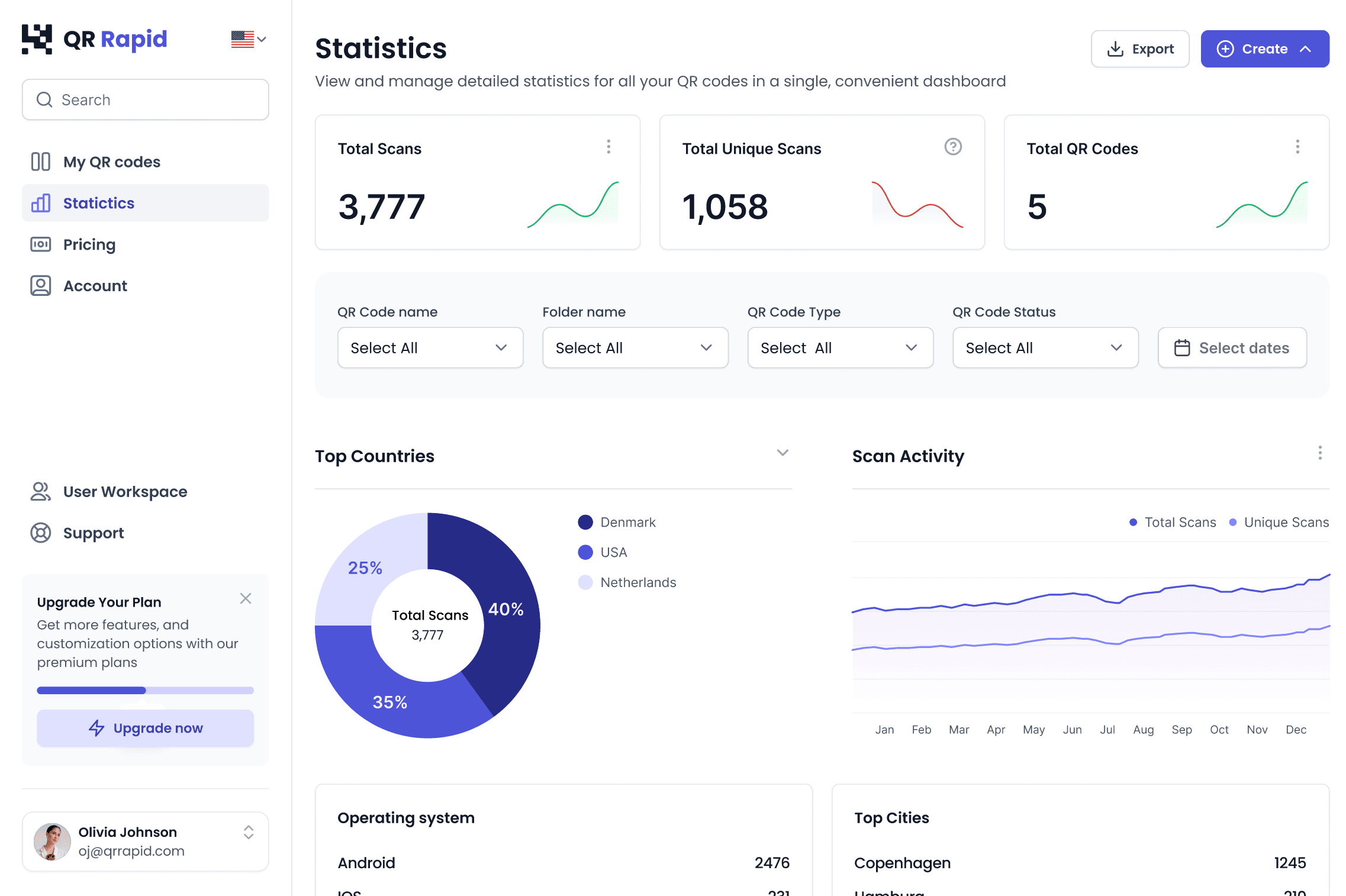
See which execution gets scanned.

Give each placement its own dynamic QR code. Separate codes let you analyze how different physical executions perform after distribution.

poster-a.svgposter-b.svgcarton.svgbrochure.svg
QR Rapid Statistics — total scans and unique scans
QR Rapid Statistics — scan activity over time
QR RAPID › STATISTICS — EXAMPLE DATA
MATERIAL
MEMORY
Poster A — type-ledspring26_poster-a.svg
Material
Memory
Kunsthal Vest
14.03 — 30.06.2026
Poster B — image-ledspring26_poster-b.svg
AUREL
Carton backspring26_carton.svg
Spring
brochure
Brochure, p.3spring26_brochure.svg
QR Rapid Statistics dashboard
QR RAPID › STATISTICS — EXAMPLE DATA
Total scans
Every scan of that code.
Unique scans
Shown over time in Scan Activity.
Locations
Where scans came from, broadly.
Scan activity
When scans happened over time.
07 / RevealDestinations

Choose what the design reveals.

  • Website URLThe case study behind the posterCampaign page, product page, portfolio, programme.
    nordic design week / programme
    NDW 2026Programme · Speakers · Map
    Programme
    12–14 Sept
    FRI 12Opening: Material futuresSAT 13Studio tours, GrünerløkkaSUN 14Talks: The quiet object
  • PDFThe lookbook that won't fit the flyerLookbook, specification sheet, guide, report.
    Case study 03Harbour Line4PDF · 24 PP
    4BERTH →PIER4Harbour LineFerries · Ferjer→ Aker Brygge10:15→ Nesodden10:40→ Hovedøya11:05 LivedeparturesSCAN
    03 · PIER SYSTEMOne totem per pier, read from the gangway
    14
  • ImageThe full artwork, at full sizeSupporting artwork, gallery, visual material.
    Material Memory — installation01–08
  • VideoThe film the print can only hint atProduct film, motion work, demo, behind the scenes.
    MATERIAL MEMORY — FILM
    00:3201:24

FAQ: QR codes for design

Yes. Export it from QR Rapid as SVG and place it like any other file. There's no plugin; it's a file-based workflow.

Use SVG for layout work. It scales with the artboard, so you can set the code at whatever size the layout needs. PNG and JPEG are there for slides and screens, and PDF is also available from the Download menu.

They can. Low contrast, a large logo, or type and artwork crowding the modules all make a code harder to read. Keep dark modules on a light ground, keep a clear quiet zone, and scan the exported file before it goes into the layout.

There's no single minimum. It depends on how far away people scan from, how much the code contains and how it's styled. Set the code at its final size, keep the quiet zone clear, and scan a printed proof before a large run.

For supported dynamic QR types, yes. The destination lives in QR Rapid, not in the artwork, so you update it there and the printed code stays as it is. Static codes encode the destination directly and cannot be changed after printing.

Yes. Give each placement its own dynamic QR code and use distinct names for each execution. QR Rapid records analytics for dynamic codes, so separate codes let you analyze how different placements perform in Statistics.

Create the QR before you build the layout.

Style it, export it and bring it into your existing design workflow.