QR Rapid
QR Codes for
  • Restaurants
  • Gym and Wellness
  • Event Management
  • Business Services
  • Work Environment
  • Social Media
  • Design
  • Life Hack
Explore all use cases→
QR Codes on
  • Product packaging
  • Flyers and posters
  • Storefronts and window signs
  • Brochures and catalogs
  • Event tickets and badges
Where to use QR codes→
QR Types
  • Website URL
  • Wi-Fi
  • Menu
  • WhatsApp
  • Image
  • PDF
  • MP3
  • Video
  • Email
  • Text
  • vCard
  • Crypto
  • List of links
  • Coupon
  • SMS
  • Event
  • APP
  • Social media
View all QR types→
AINew

Rapid, inside your dashboard

  • Create with Rapid
  • Rapid Insights

Connect your AI assistant

  • MCP server
  • Claude
  • ChatGPT
View all AI→
  • Blogs
  • FAQ
  • Chrome Extension
  • QR Size Calculator
QR Rapid

Create, customize, manage, and track QR codes for business, marketing, events, and everyday use.

QR Types

Website URL

Wi-Fi

Menu

WhatsApp

Image

PDF

MP3

Video

Email

QR Codes for

Restaurants

Gym and Wellness

Event Management

Business Services

Social Media

Work Environment

Design

Life Hack

Where to Use QR Codes

Company

Rapid AI

Chrome Extension

Plans & Pricing

Blogs

About Us

Legal

Terms and Conditions

Privacy Policy

Cookies Policy

Help

FAQ

QR Size Calculator

Contact Us

2026 © QR Rapid All rights reserved - QR Code is a trademark of DENSO WAVE INCORPORATED

Social media QR codeAll your profiles, one code on everything you print.

One scan opens a page with your photo, your name, a short line about you and a big button for each platform you’re on, in the order you choose. Add a platform later without reprinting.
Create a social media QR codeThe 14 platforms
Template 1
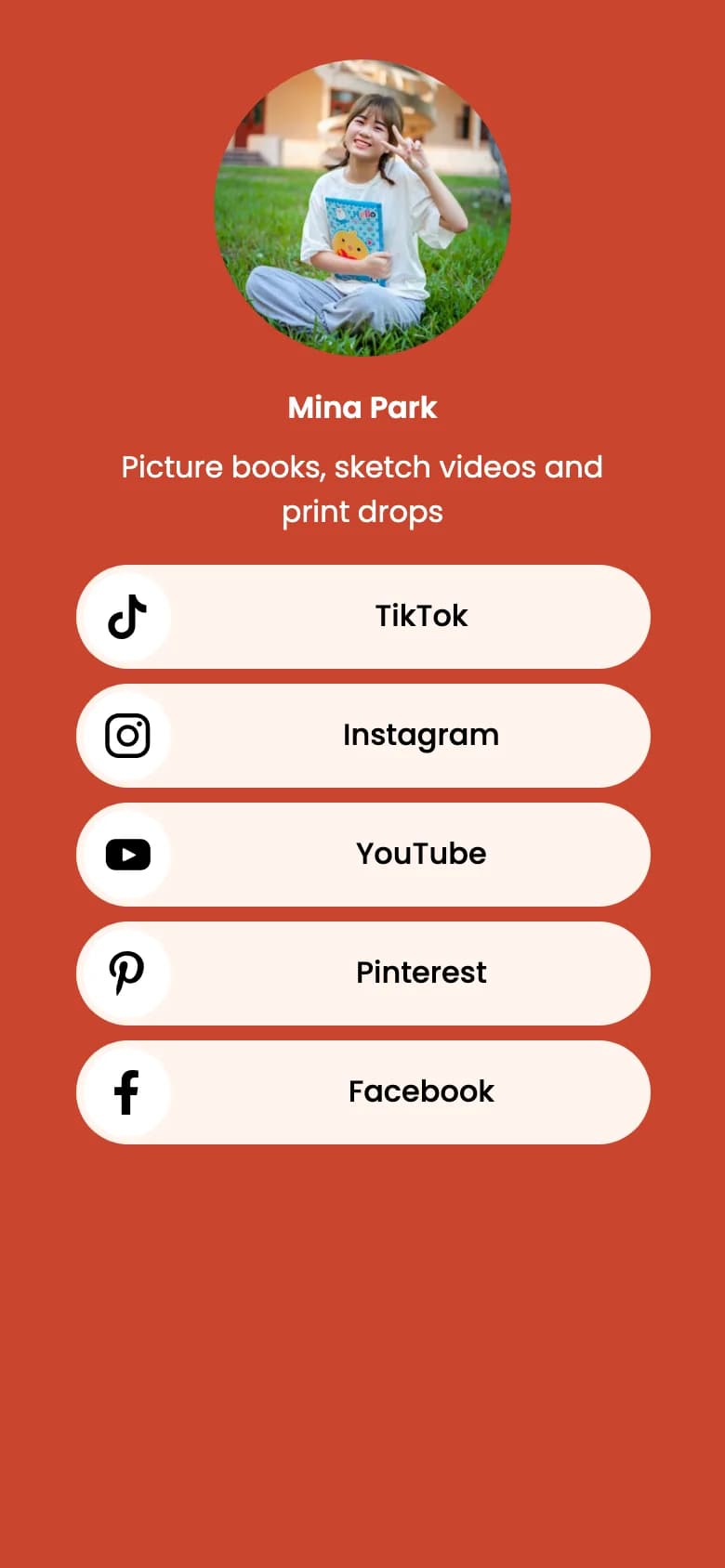
QR Rapid social media page in template 1 for a sample creator, illustrator Mina Park: coral background, a round photo of her sitting on grass holding a picture book, the line Picture books, sketch videos and print drops, and rounded buttons for TikTok, Instagram, YouTube, Pinterest and Facebook.
Template 5
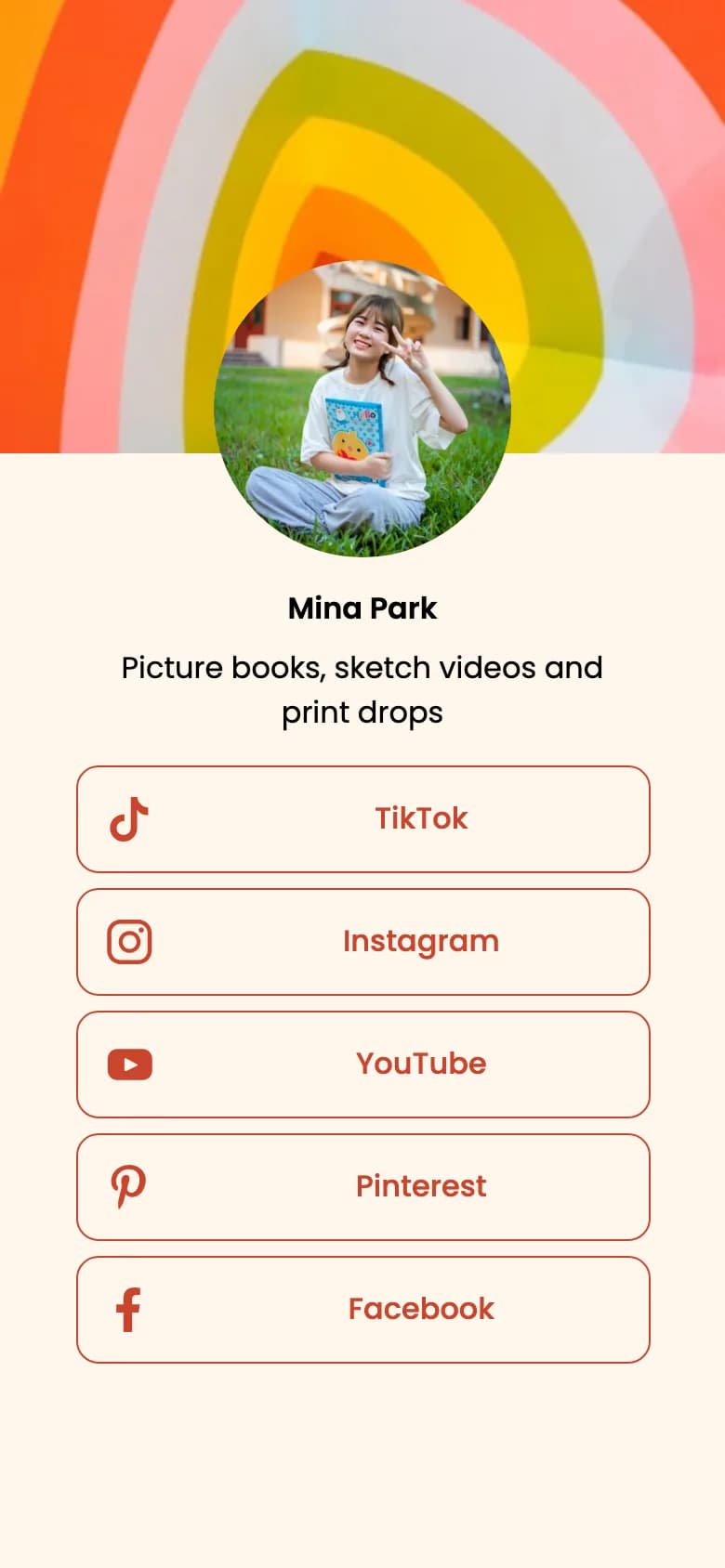
The same creator page in template 5: the artwork banner above a light cream page with outlined coral platform buttons.
Template 4
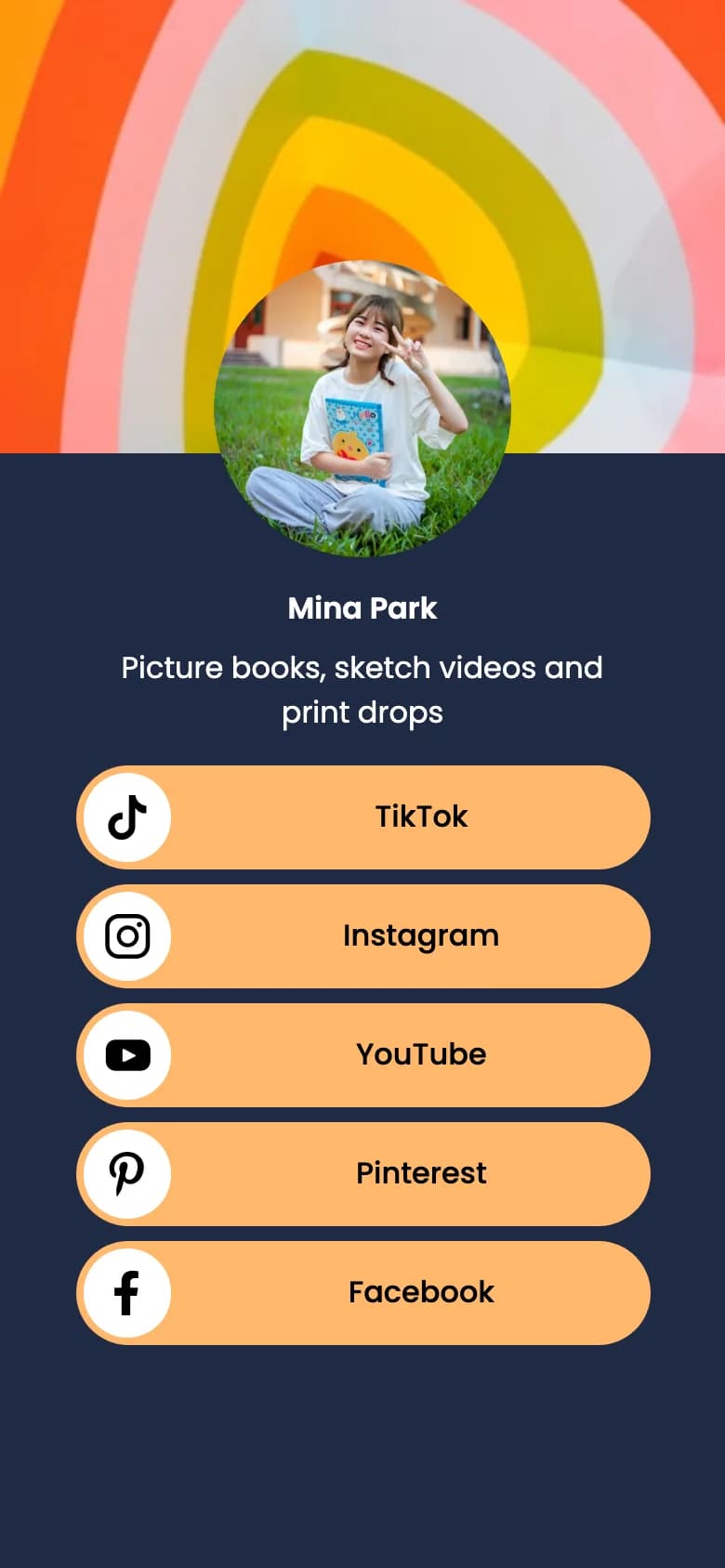
The same creator page in template 4: a banner of colourful nested arches artwork, the round profile photo overlapping it, and five orange platform buttons on navy.

Printed by

  • Creators on prints, zines and merch tags
  • Cafés and bars on cups, menus and the counter
  • Boutiques on swing tags and parcel inserts
  • Photographers and makers on business cards and stall signs

Real QR Rapid social media pages for a sample creator, in three of the six templates.

Fourteen platforms to choose from, in the order you set

Add a link for each profile you want on the page. QR Rapid checks that each link belongs to the platform you picked, so an Instagram button can’t point at another site.

  • 01Facebook
  • 02Instagram
  • 03LinkedIn
  • 04YouTube
  • 05X
  • 06WhatsApp
  • 07Threads
  • 08TikTok
  • 09Pinterest
  • 10Discord
  • 11Telegram
  • 12Messenger
  • 13GitHub
  • 14Snapchat

Your busiest platform goes first

Buttons appear in the order you set, and each one can be moved up or down in the editor. Put the platform where you post most, and where a new follower will see something recent, at the top. A channel you rarely update belongs at the bottom, or not on the page at all.

The order isn’t fixed after printing. If you start posting more on YouTube than on Instagram, move it up; the code on your packaging doesn’t change.

Order you added them
  1. Facebook1
  2. Instagram2
  3. YouTube3
  4. TikTok4
  5. Pinterest5
Order for a TikTok-first maker
  1. TikTok1
  2. Instagram2
  3. YouTube3
  4. Pinterest4
  5. Facebook5

Social media or list of links?

Both put several destinations behind one code. The difference is what the buttons are.

This page

Social media QR code

One large button per platform, named after the platform, with its icon. Up to 14 platforms, in your order, plus a short line under your name. Nothing else: no shop link, no booking form.

Choose it when all you want is followers.

Five platform buttons on the sample social media page: TikTok, Instagram, YouTube, Pinterest and Facebook.
Real page, cropped

Profiles as icons, plus your own links

List of links QR code

Your social profiles shrink to a row of icons under “Find me on”, and the big buttons become whatever you write: “Shop the spring collection”, “Book a wheel class”, each with an optional thumbnail.

Choose it when at least one link isn’t a profile.
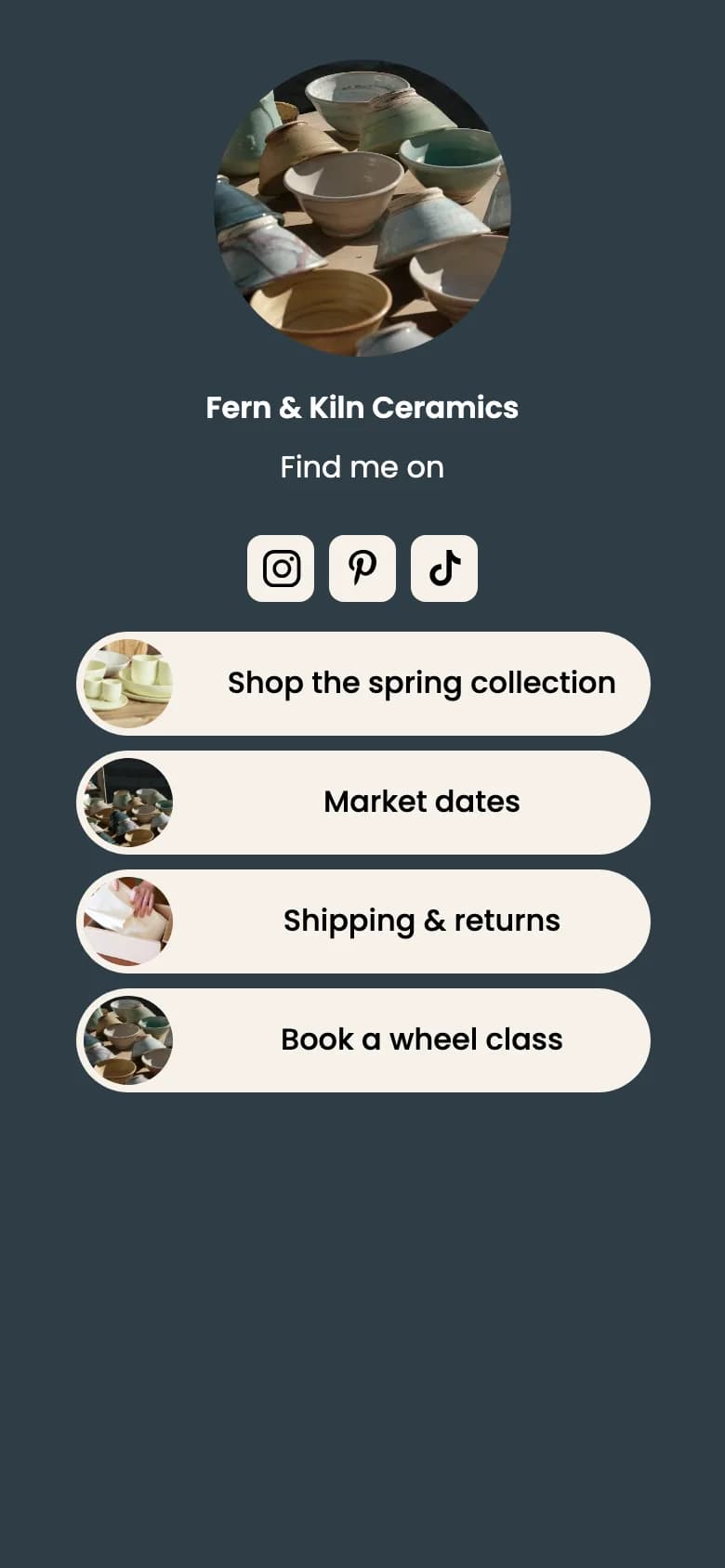
The sample list of links page: Instagram, Pinterest and TikTok icons under Find me on, then four custom buttons with thumbnails.
Real page, cropped

Need both followers and a shop link? Use the list of links QR code; it includes the same 14 platforms as icons.

One code instead of a row of platform codes

Each platform can give you its own code. Printing four of them side by side asks people to decide before they scan, takes four times the space, and can’t be changed once printed.

Four platform codes

Instagramcode
TikTokcode
Facebookcode
YouTubecode
  • People have to choose a platform before they scan
  • Four squares to fit on a label or a card
  • Add a platform later and the print is out of date

One social media code

A real code. Scan it and it opens this page on qrrapid.com.

  • People scan first, then tap the platform they already use
  • One square, so it can be printed larger and scanned from further away
  • Add, remove or reorder platforms from the dashboard after printing
  • Scans counted by date, country, city and device

Print it at the moments people want to follow you

Print a line beside the code that says what they’ll find. The frame text is yours to write; these are examples.

Event booth sign

“Scan to follow along”

Big enough to scan from the queue.

opens
The QR Rapid social media page that the booth sign’s code opens: a sample creator’s photo and name, Find me on, and a button for each platform.

Cup sleeve · counter

“Follow for the next market”

Instagram · TikTok · Facebook

Business card · back

“Find us everywhere”

Every profile behind one square.

Packaging insert

“See how it was made”

Studio videos and the next drop, one scan from the box.

A sample event booth sign, shown beside the real QR Rapid social media page its code opens, with a sample cup sleeve, business card back and packaging insert. All four codes are real and open this page on qrrapid.com.

Sample print. All four codes are real and open this page on qrrapid.com. The phone shows a real QR Rapid social media page for a sample creator.

Write the frame text

The frame text is yours to write, so say what people get: “Follow the making-of” says more than “Scan me”.

Check every profile is public

A private or empty account on the first button is a wasted scan. Open each link on your phone before printing.

Test the printed proof

Scan it at real size, on an iPhone and an Android phone, from where people will stand.

Planning codes for a shop, a creator brand or an agency client? The QR codes for social media guide covers counter cards, packaging inserts and business cards in more detail.

Social media QR code questions

Platforms, order, editing and what scanning opens.

Which platforms can a social media QR code link to?

Fourteen: Facebook, Instagram, LinkedIn, YouTube, X, WhatsApp, Threads, TikTok, Pinterest, Discord, Telegram, Messenger, GitHub and Snapchat. Add as few or as many of them as you use; at least one is required.

Can I choose the order of the platform buttons?

Yes. Move each platform up or down in the editor, and the page shows the buttons in that order. Put the platform you’re most active on first.

Can I add a link to my website or shop?

Not on a social media code: it only links to profiles on the 14 supported platforms. If you also want a shop, booking page or any other web link, use a list of links QR code, which shows your profiles as icons and adds your own labelled buttons.

What happens when someone scans the code?

Their phone opens a QR Rapid page with your name, an optional short description of up to 50 characters, your images and a button for each platform. Tapping a button opens that profile.

Can I add or remove platforms after printing?

Yes. Add a platform, remove one, change the order or the design in your dashboard, and the printed code opens the updated page.

Can I change how the page looks?

Choose one of six templates, set the background and button colours, and add a profile photo and a background image. Templates 4 to 6 show the background image as a banner across the top.

Will I see how many people scan it?

Your dashboard shows total scans, estimated unique visitors, scan activity over time, countries, cities, operating systems and devices. Use a separate code per placement, such as packaging and a stall sign, to compare them.

Pick your platforms, set the order, print one code.

Choose a template and colours, then download the code as SVG, PNG, JPEG or PDF. Every account starts with a 7-day free trial, no credit card required. See plans and pricing.

Create a social media QR code

Not quite the right fit?

Compare all 18 QR code types
  • List of links QR codeAdd your shop, bookings or any web page alongside your profiles.
  • WhatsApp QR codeOpen a chat with you directly, with a message ready to send.
  • Video QR codeShow one video on its own page, from YouTube or an upload.