QR Rapid
QR Codes for
  • Restaurants
  • Gym and Wellness
  • Event Management
  • Business Services
  • Work Environment
  • Social Media
  • Design
  • Life Hack
Explore all use cases→
QR Codes on
  • Product packaging
  • Flyers and posters
  • Storefronts and window signs
  • Brochures and catalogs
  • Event tickets and badges
Where to use QR codes→
QR Types
  • Website URL
  • Wi-Fi
  • Menu
  • WhatsApp
  • Image
  • PDF
  • MP3
  • Video
  • Email
  • Text
  • vCard
  • Crypto
  • List of links
  • Coupon
  • SMS
  • Event
  • APP
  • Social media
View all QR types→
AINew

Rapid, inside your dashboard

  • Create with Rapid
  • Rapid Insights

Connect your AI assistant

  • MCP server
  • Claude
  • ChatGPT
View all AI→
  • Blogs
  • FAQ
  • Chrome Extension
  • QR Size Calculator
QR Rapid

Create, customize, manage, and track QR codes for business, marketing, events, and everyday use.

QR Types

Website URL

Wi-Fi

Menu

WhatsApp

Image

PDF

MP3

Video

Email

QR Codes for

Restaurants

Gym and Wellness

Event Management

Business Services

Social Media

Work Environment

Design

Life Hack

Where to Use QR Codes

Company

Rapid AI

Chrome Extension

Plans & Pricing

Blogs

About Us

Legal

Terms and Conditions

Privacy Policy

Cookies Policy

Help

FAQ

QR Size Calculator

Contact Us

2026 © QR Rapid All rights reserved - QR Code is a trademark of DENSO WAVE INCORPORATED

Coupon QR codeAn offer in the window. A code on their phone.

A coupon QR code opens a hosted offer: a photo, a badge, your terms, and a discount code the customer copies and shows at the till or types at checkout. Change the offer any time; the printed sticker stays up.

Create a coupon QR code
Alder & Rye

20%

off dinner for two

Scan for your code

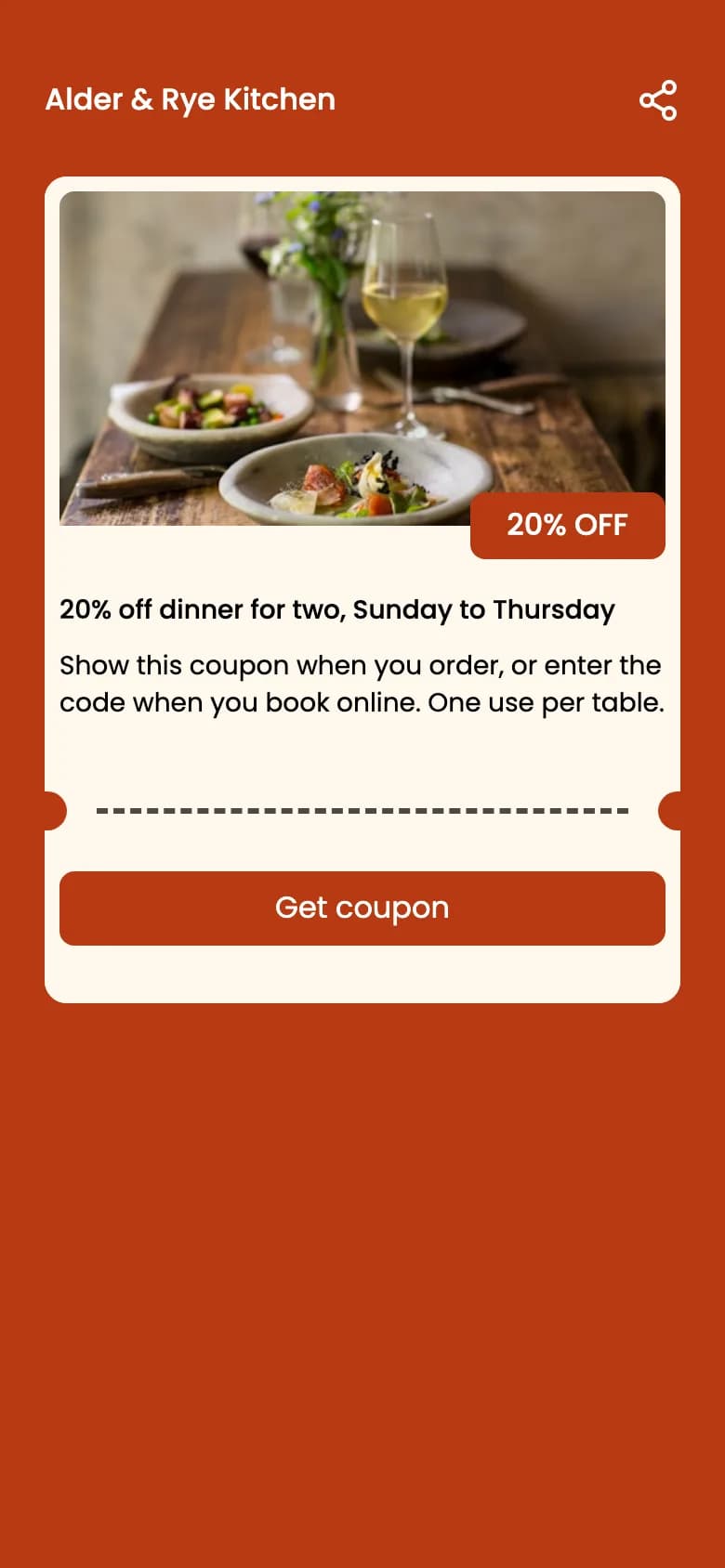
First coupon screen for Alder & Rye Kitchen: a photo of plated food and a glass of white wine, a “20% OFF” badge, the title “20% off dinner for two, Sunday to Thursday”, a short description and a Get coupon button.
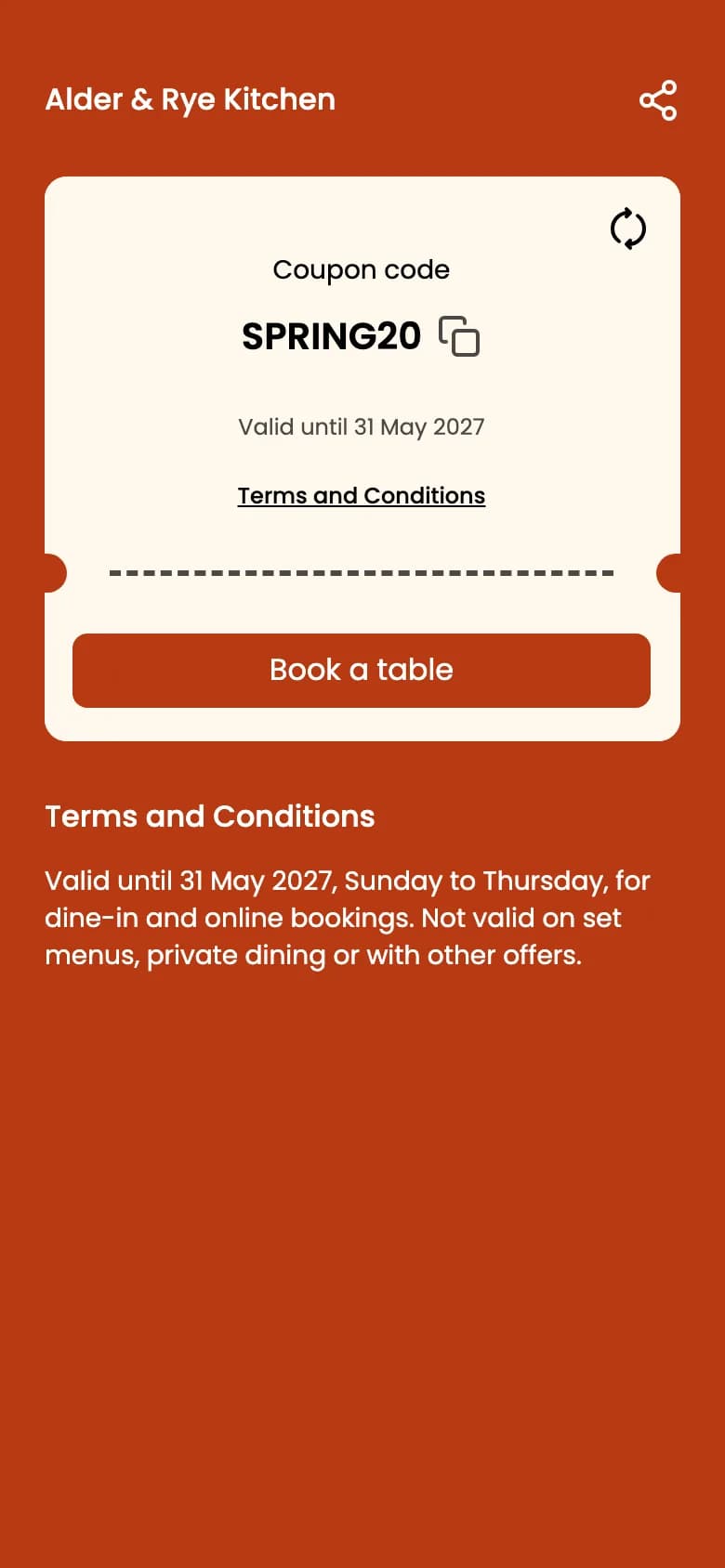
Second coupon screen: “Coupon code” SPRING20 with a copy icon, “Valid until 31 May 2027”, a Terms and Conditions link, a Book a table button and the terms text below.
A round window sticker whose code opens this page, next to two phones showing the top of the hosted coupon: the offer screen and the code screen.

Sample restaurant and offer. The phones show the top of QR Rapid’s two coupon screens; the sticker’s code opens this page.

From window to till

The code is shown to the customer. Your checkout does the rest.

  1. 1

    Scan

    The offer opens in the phone’s browser: your photo, the badge, the title, and a “Get coupon” button.

  2. 2

    Get the code

    The second screen shows the discount code large, with a copy button, the valid-until date and your terms. A second button can open your booking page or shop.

  3. 3

    Your till applies it

    The customer shows or types the code. Your POS, booking system or online shop gives the discount, so create the same code there first.

What QR Rapid doesn’t do: it doesn’t validate the code, count redemptions or limit uses. Your dashboard counts scans of the coupon code; your checkout’s discount report counts the orders.

First coupon screen for Alder & Rye Kitchen: a photo of plated food and a glass of white wine, a “20% OFF” badge, the title “20% off dinner for two, Sunday to Thursday”, a short description and a Get coupon button.
Second coupon screen: “Coupon code” SPRING20 with a copy icon, “Valid until 31 May 2027”, a Terms and Conditions link, a Book a table button and the terms text below.
Screen one sells the offer; screen two shows the code. Both use the two brand colours you choose.

Four offers, four places to print them

The badge, title, code and date are all yours to write. Give each placement its own code and the scans tell you which window, sleeve or insert gets looked at; your checkout tells you which one sells.

  • Alder & Rye Kitchen

    20% OFF

    Dinner for two, Sunday to Thursday

    SPRING20

    valid until 31 May 2027

    Show at the table or enter when booking

    Window sticker

    Turns passers-by into a first visit.

  • Fern & Filter

    FREE

    Your 6th coffee, on us

    SIXTH

    valid until 30 Jun 2027

    Show the code at the counter

    Cup sleeve and receipt

    Brings this week’s customer back next week.

  • Spring Trade Day

    2 FOR 1

    Tickets for the Saturday session

    STD-2FOR1

    valid until 14 Apr 2027

    Enter at online checkout

    Event flyer and poster

    Gives a printed promo a code the box office can check.

  • Marlow Plant Co.

    £10 OFF

    Your next order over £60

    THANKS10

    valid until 31 Dec 2027

    Enter at checkout on our site

    Parcel insert

    A reason for an online buyer to order again.

Fictional businesses and offers. Every code opens this page; yours would open your coupon. Codes are up to 20 characters, badges up to 20.

What changes the morning after the date

The valid-until date is the last day the offer works on the page, checked against each shopper’s own calendar date. Want to run it longer? Set a later date and the same printed code shows the offer as valid again.

Up to and on the date

  • “Valid until 31 May 2027” under the code
  • Copy button copies the code
  • Redeem button opens your website

From the day after

  • “Expired on 31 May 2027”, in red, and an Expired label on the offer
  • Copying the code is blocked with a message
  • Redeem button greys out and reads “Offer Expired”

End it at your checkout too. Expiry changes the coupon page only. A code someone wrote down still works wherever your till or online shop accepts it, so switch it off there on the same date.

Coupon QR code questions

Does QR Rapid apply the discount or validate the code?

No. The coupon page shows your offer and your code. The discount is applied by your till, booking system or online shop when the code is entered there, so create the same code in that system first.

Can I track how many coupons were redeemed?

Not in QR Rapid. Your dashboard counts scans of the coupon QR code, with countries, cities, devices and times. Redemptions are counted by the system that accepts the code, such as your POS or e-commerce discount report.

What happens when the coupon expires?

From the day after the valid-until date, the code line reads “Expired on” that date, copying the code is blocked, an Expired label appears on the offer, and the redeem button turns grey and reads “Offer Expired”.

Does expiry switch the code off at my checkout?

No. The expiry only changes the coupon page. If the code still works in your till or online shop, someone who wrote it down could still use it, so end it there on the same date.

How long can the coupon code be?

Up to 20 characters. Shoppers copy it with one tap, but some will read it aloud or type it, so short codes without look-alike characters such as O and 0 work best.

Can I extend the offer or change it after printing?

Yes. Change the date, the code, the badge or the whole offer from your dashboard, and printed coupons open the new version. Update your checkout to match.

What can the sales badge say?

Anything up to 20 characters, such as “20% OFF”, “2 FOR 1” or “FREE DELIVERY”. It is a label you write; QR Rapid doesn’t calculate prices or discounts.

Change next month’s offer without printing new stickers

  1. 1

    The offer

    Photo, company name, badge, title, description. “Get coupon” unless you rename it.

  2. 2

    The code

    The exact code your checkout accepts, the valid-until date, terms, and a button to your site.

  3. 3

    The design

    Two brand colours for the page; dots, corners, a frame such as “Scan for 20% off” and your logo on the code. Download SVG, PNG, JPEG or PDF.

✂ keep this partCreate a coupon QR code

Every account starts with a 7-day free trial, no credit card required.

Running a café? Pair it with a menu QR code.

Not quite the right fit?

Compare all 18 QR code types
  • URL QR codeWhen the offer already lives on a sale page on your site.
  • Menu QR codePut this week’s specials and prices behind a table code.
  • Event QR codeFor a sale day or launch with a date, a location and a calendar button.