QR Rapid
QR Codes for
  • Restaurants
  • Gym and Wellness
  • Event Management
  • Business Services
  • Work Environment
  • Social Media
  • Design
  • Life Hack
Explore all use cases→
QR Types
  • Website URL
  • Wi-Fi
  • Menu
  • WhatsApp
  • Image
  • PDF
  • MP3
  • Video
  • Email
  • Text
  • vCard
  • Crypto
  • List of links
  • Coupon
  • SMS
  • Event
  • APP
  • Social media
View all QR types→
AINew

Rapid, inside your dashboard

  • Create with Rapid
  • Rapid Insights

Connect your AI assistant

  • MCP server
  • Claude
  • ChatGPT
View all AI→
FAQBlogsChrome Extension
QR Rapid

Create, customize, manage, and track QR codes for business, marketing, events, and everyday use.

QR Types

Website URL

Wi-Fi

Menu

WhatsApp

Image

PDF

MP3

Video

Email

QR Codes for

Restaurants

Gym and Wellness

Event Management

Business Services

Social Media

Work Environment

Design

Life Hack

Where to Use QR Codes

Company

Rapid AI

Chrome Extension

Plans & Pricing

Blogs

About Us

Legal

Terms and Conditions

Privacy Policy

Cookies Policy

Help

FAQ

QR Size Calculator

Contact Us

2026 © QR Rapid All rights reserved - QR Code is a trademark of DENSO WAVE INCORPORATED

  1. Where to use QR codes
  2. /
  3. Flyers and posters

QR codes on flyers and postersA code on the sheet that people actually scan.

Where the code sits on the page, the few words beside it, how it holds up from arm’s length to across a street, and which QR type the sheet calls for. Then one code per placement, so you can see which flyer or poster gets scanned.

Create a URL QR codeCreate an event QR code
Sat 15 May 202710 AM – 5 PM

Riverside
Makers
Market

Ceramics, print, wood and food from 40 local stalls. Riverside Wharf.

Scan for the stallholders

Hollow Lane Choir

New voices welcome

Scan to book a taster night

Choir · TueChoir · TueChoir · TueChoir · TueChoir · Tue
A riso-style poster for a fictional market on 15 May 2027 taped to a blue wall, and a pink community notice with tear-off tabs. Each has a code that opens this page.

Illustrations of printed pieces with fictional events and businesses. Every code on this page opens this page; yours would open your event, offer or website.

Which type

Choose by what the sheet asks people to do

Read your headline and ask what you want someone to do next. That answer picks the QR type.

  1. 01

    Come on the day

    “Sat 15 May, 10–5, Riverside Wharf”

    Event QR code: A page with the start and end time, the location with a map link, and add-to-calendar buttons.

  2. 02

    Use this offer

    “20% off dinner, Sunday to Thursday”

    Coupon QR code: The offer and its discount code, with a valid-until date. After that date the page shows the offer as expired. Your till or checkout applies the code; QR Rapid doesn’t validate or redeem it.

  3. 03

    Find out more or sign up

    “Open evenings every Thursday”

    URL QR code: A page on your website, or a sign-up form you already use.

  4. 04

    Pick one of several

    “Line-up, tickets, volunteering”

    List of links QR code: A mobile page with a button for each link.

Print a dynamic code. Every type except Wi-Fi can be dynamic, so if the date moves or the offer changes after the run, you edit the destination and the sheets already up still work. A static code is fixed to what you typed and isn’t tracked. A dynamic code works while it’s active in your QR Rapid account; if it’s deactivated (for example when a plan ends), scans show an inactive-code page until you reactivate it.

Planning the whole event? QR codes for events has more ways to use codes around one.
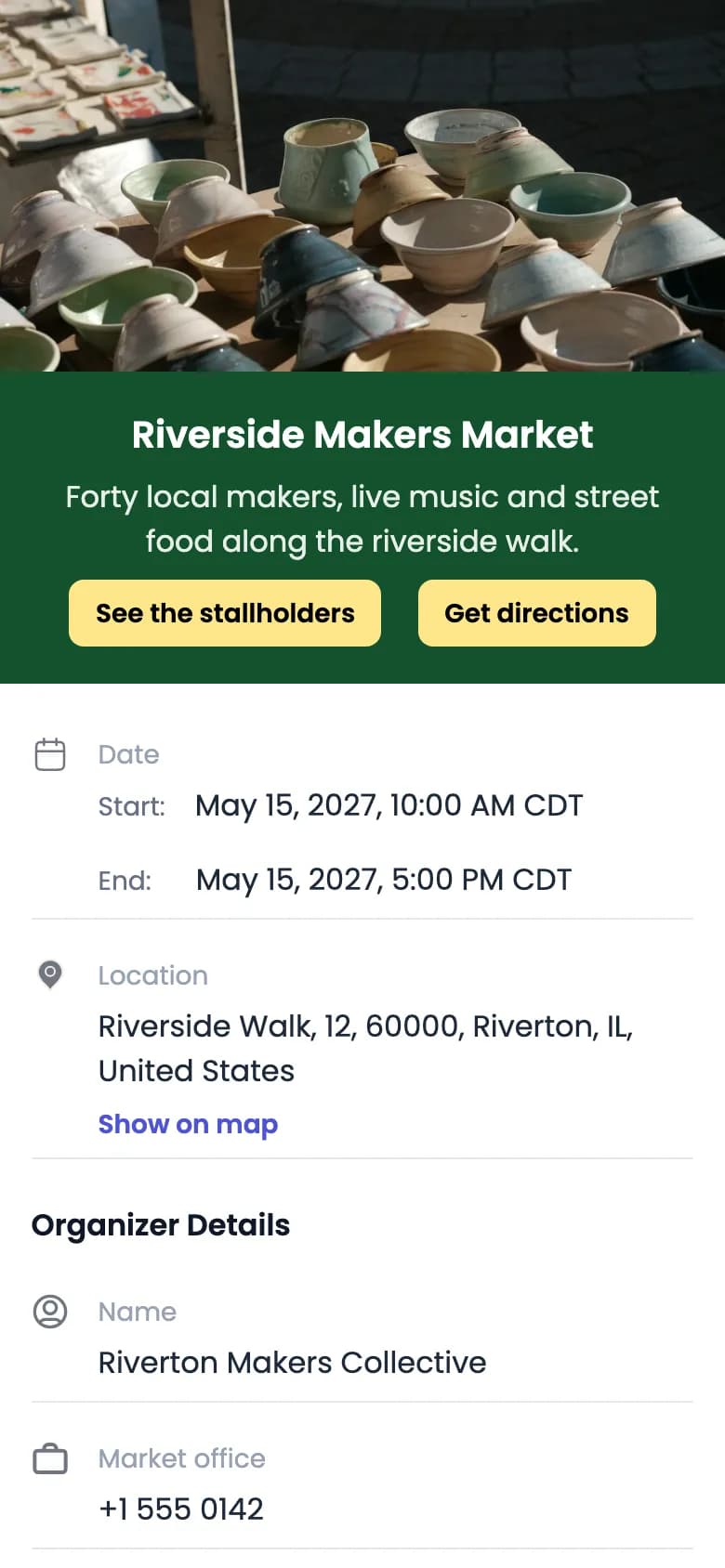
QR Rapid event page for a sample market: photo of a ceramics stall, the title Riverside Makers Market, buttons See the stallholders and Get directions, start May 15, 2027, 10:00 AM CDT, end 5:00 PM CDT, the location with Show on map, and organiser details.
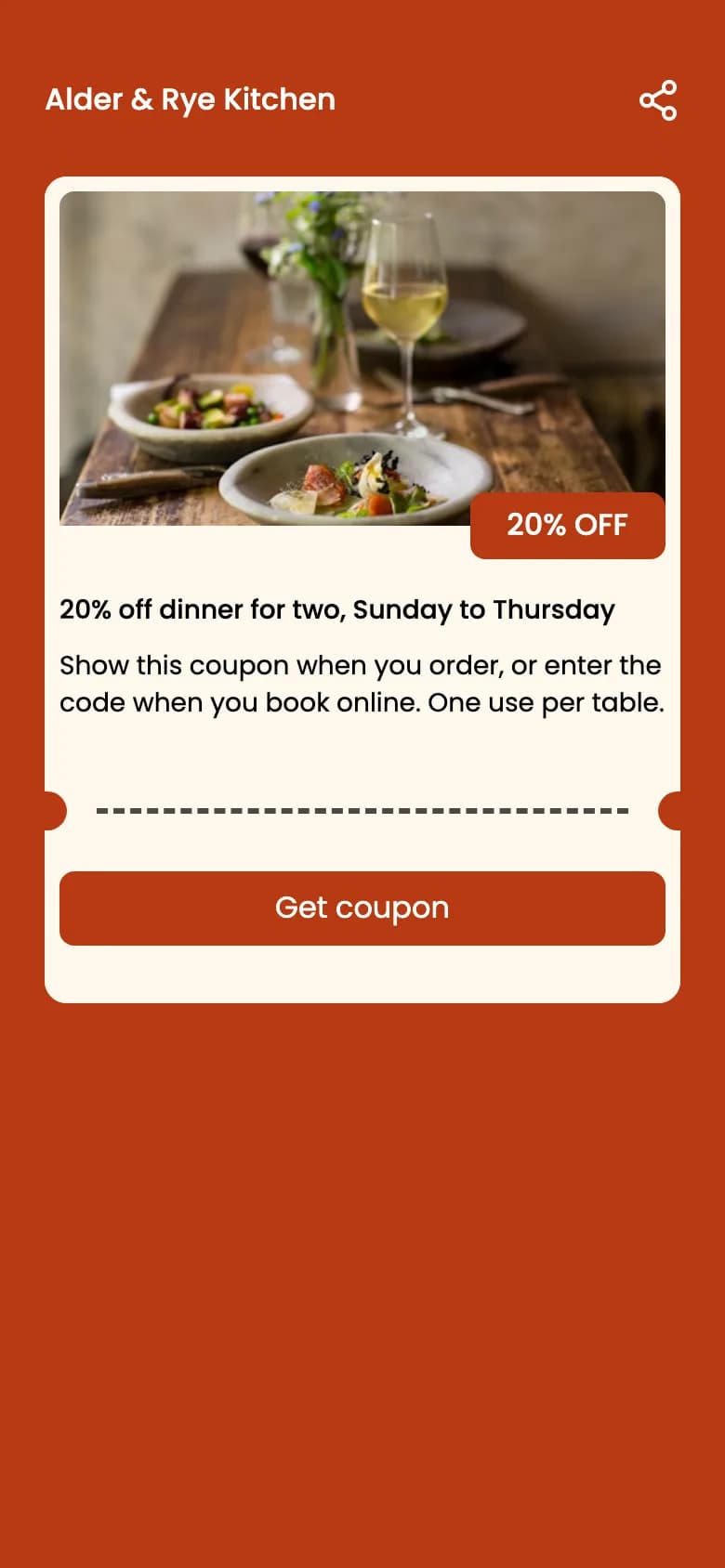
First coupon screen for Alder & Rye Kitchen: a photo of plated food and a glass of white wine, a “20% OFF” badge, the title “20% off dinner for two, Sunday to Thursday”, a short description and a Get coupon button.
Real QR Rapid pages with sample content: an event page, and the top of a coupon’s first screen.
Viewing distance

The farther people stand, the bigger and simpler the sheet

A flyer is read in the hand; a platform poster is read from across the tracks. The same code design won’t suit both.

  • At arm’s length

    Handheld flyer

    • People hold it and have time to read, so the code can stay modest.
    • Keep it clear of the edge where a thumb holds the sheet.
    • Test the printed flyer in your hand, not the PDF on a screen.
  • A step or two back

    Poster on a noticeboard

    • It competes with the sheets around it: a bold headline gets people closer first.
    • Give the code more room than on a flyer, and keep it at a height a phone can reach.
    • Make the line beside it readable from where the headline is.
  • Across a platform or street

    Large poster, seen from afar

    • Bigger and simpler: fewer words on the sheet, a large code, strong contrast.
    • Put the code where people can walk up to it, not above a doorway or behind a barrier.
    • A dynamic code encodes a short QR Rapid link, so its pattern stays simpler than a long address would make it.

There’s no single safe size. Distance, light, the print method and how much the code holds all change it. Print a full-size proof, put it where the sheet will hang, and scan it with a couple of different phones from where people will actually stand.

The call to action

Say what the scan opens. “Scan me” doesn’t.

People scan when they know what they’ll get. Name it in a few words, right beside the code, at a size readable from where they’ll scan. QR Rapid frames carry up to 30 characters of text around the code, so every example here is 30 or fewer.

Scan for the full line-up

A sample code in a black frame with the text “Scan for the full line-up” below it.
WeakEarns the scanChars
  • Scan meScan for the full line-up25
  • Scan hereScan for 20% off dinner23
  • More infoScan to book a taster night27
  • QR codeScan to add to your calendar28
  • Learn moreScan to join the waiting list29
Anatomy of the sheet

Where the code sits, and what it sits next to

6

Open studios

1
fold5

2Sat & Sun, 5–6 June

12 artists, one street

3Scan for the studio map

4
Diagram of a folded A-size flyer for fictional open studios: the photo at the top, the headline, a fold line, then the date and a code with clear space marked around it. The dashed pink line is the safe area inside the trim.
  1. 1

    Headline first

    The thing that stops people: what’s on, or what’s offered. The code isn’t the headline.

  2. 2

    The message the code completes

    Put the code beside the date or the offer it adds to, not alone in a corner.

  3. 3

    A line saying what opens

    Directly next to the code, in the same reading line as the offer.

  4. 4

    Clear space all round

    Keep text, borders and artwork out of a margin around the code.

  5. 5

    Away from folds and trim

    Keep it inside the safe area and off any crease, so it isn’t cut or bent.

  6. 6

    Dark on light, not on the photo

    A dark code on a plain light patch. A busy photo or a pale code on a bright colour can stop it scanning.

Styling the code

In the generator you can change dot and corner styles and colours, add a preset or uploaded logo, and pick one of 17 frames with your call to action. Logos and styled dots are fine when contrast stays strong. Download SVG for the print file; PNG, JPEG and PDF are there too. Working with a designer? QR codes for designers covers styling and artwork files.

Which sheet worked

One code per placement, so you can tell them apart

If the noticeboard and the station poster share a code, their scans arrive together. Give each placement its own dynamic code. Your plan sets how many dynamic codes you can create.

  1. 1

    Create one dynamic code for the campaign.

  2. 2

    Duplicate it once for each place it will be printed.

  3. 3

    Rename each copy after where it’s printed, and move them into one folder.

  4. 4

    In Statistics, filter by folder for the campaign, or by one code for one placement.

Statistics shows each code’s scans over time by hour, day or week, devices and operating systems, countries and cities, and estimated unique visitors. It counts scans, not people.

Spring market print

  • Market · library noticeboardDynamic
  • Market · café counter flyersDynamic
  • Market · station posterDynamic
  • Market · handouts at the stallDynamic
Illustration, not a screenshot of the dashboard.

What happens after the scan is your analytics’ job. QR Rapid has no built-in UTM builder and no attribution beyond the scan. If you use UTM tags, paste an address that already has them as the URL destination; your web analytics reads them.

https://example.com/market?utm_source=library-noticeboard&utm_medium=poster&utm_campaign=spring-market

Flyer and poster QR code questions

Where should the QR code go on a flyer?

Next to the message it completes, usually beside the offer or the date rather than alone in a corner. Leave clear space around it, keep it away from folds and trim edges, and put a short line beside it saying what the scan opens.

How big should a QR code be on a poster?

It depends on how far away people stand, how much the code holds, the print method and the light, so there’s no single safe number. Print a proof at full size, put it where the poster will hang and scan it with a couple of different phones from where people will actually stand.

What should the text next to the code say?

What happens after the scan, in a few words: “Scan for the full line-up”, “Scan for 20% off”, “Scan to book a tour”. QR Rapid frames can carry up to 30 characters of text around the code.

Can I tell which flyer or poster was scanned?

Yes, if each placement has its own dynamic code. Duplicate one code per placement, name each after where it’s printed, and compare them in Statistics. Your plan sets how many dynamic codes you can create. QR Rapid counts scans of each code; what people do on your website afterwards is reported by your own web analytics.

Can I add UTM parameters to a flyer QR code?

Yes. Paste the full address with its utm_source, utm_medium and utm_campaign tags as the URL destination. QR Rapid doesn’t build the tags for you; your web analytics reads them.

Which QR type suits an event flyer?

Event, when the flyer advertises a date: it opens a page with the time, location, a map link and add-to-calendar buttons. Coupon suits an offer with a valid-until date, and URL suits details that already live on your website.

Pick what the sheet should open

Each button opens the generator with that type selected. Design the code in the generator, then create your account to download it.

  • Details or a sign-up form on your website.

    Create a URL QR code
  • A date, a place and add-to-calendar buttons.

    Create an event QR code
  • An offer with a valid-until date.

    Create a coupon QR code

Every account starts with a 7-day free trial, no credit card required.

What QR Rapid doesn’t do for print

  • It doesn’t print or deliver flyers and posters: you download the file and print it where you usually do.
  • There’s no UTM builder: paste an address that already carries its tags.
  • It doesn’t sell tickets, check people in or limit how many times an offer is used.

Read more in the guides

  • QR code lead capture for print campaignsTurning flyers, mailers and handouts into form sign-ups.
  • QR code campaign tracking and offline ROINaming codes, adding UTM tags and measuring print results.
  • QR codes on hiring posters and flyersA worked example for one kind of poster: job applications.

More places to print a QR code

All placements
  • Product packagingBoxes · Labels · Inserts · Instruction cards
  • Storefronts and window signsShop windows · Entrance signs · Window stickers · After-hours signs
  • Brochures and catalogsCatalogs · Brochures · Portfolios · Sales handouts
  • Event tickets and badgesTickets · Conference badges · Exhibitor badges · Festival passes