QR Rapid
QR Codes for
  • Restaurants
  • Gym and Wellness
  • Event Management
  • Business Services
  • Work Environment
  • Social Media
  • Design
  • Life Hack
Explore all use cases→
QR Codes on
  • Product packaging
  • Flyers and posters
  • Storefronts and window signs
  • Brochures and catalogs
  • Event tickets and badges
Where to use QR codes→
QR Types
  • Website URL
  • Wi-Fi
  • Menu
  • WhatsApp
  • Image
  • PDF
  • MP3
  • Video
  • Email
  • Text
  • vCard
  • Crypto
  • List of links
  • Coupon
  • SMS
  • Event
  • APP
  • Social media
View all QR types→
AINew

Rapid, inside your dashboard

  • Create with Rapid
  • Rapid Insights

Connect your AI assistant

  • MCP server
  • Claude
  • ChatGPT
View all AI→
  • Blogs
  • FAQ
  • Chrome Extension
  • QR Size Calculator
QR Rapid

Create, customize, manage, and track QR codes for business, marketing, events, and everyday use.

QR Types

Website URL

Wi-Fi

Menu

WhatsApp

Image

PDF

MP3

Video

Email

QR Codes for

Restaurants

Gym and Wellness

Event Management

Business Services

Social Media

Work Environment

Design

Life Hack

Where to Use QR Codes

Company

Rapid AI

Chrome Extension

Plans & Pricing

Blogs

About Us

Legal

Terms and Conditions

Privacy Policy

Cookies Policy

Help

FAQ

QR Size Calculator

Contact Us

2026 © QR Rapid All rights reserved - QR Code is a trademark of DENSO WAVE INCORPORATED

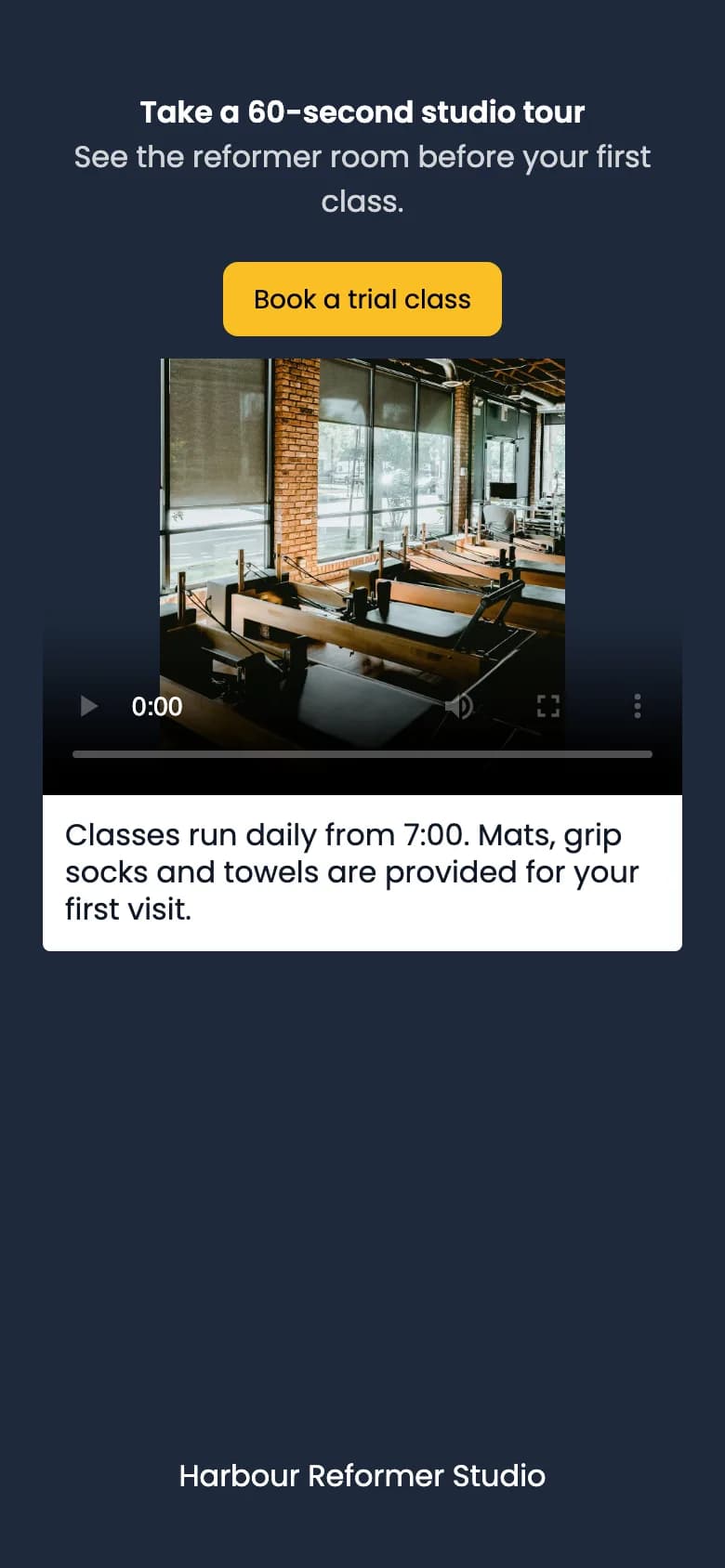
QR Rapid video page on a phone: the title “Take a 60-second studio tour”, a yellow “Book a trial class” button, a video player with a studio poster, a details box about class times, and the studio name at the bottom.

Harbour Reformer Studio

Starter kit

Grip socks · towel · bottle

Scan for the 60-second studio tour

A phone showing the hosted video page for a sample studio, next to a starter-kit box whose code opens this page.

Video QR codeThe demo plays right there, next to the thing.

Link a YouTube video or upload your own file, and QR Rapid builds a page around it: a title, a button such as “Book a trial class”, the player and a few lines of detail. One video per code, swapped any time without reprinting.

Create a video QR code

Sample studio. The phone shows QR Rapid’s hosted video page; the code on the box opens this page.

Now showing: four films and where they’re printed

Suggested runtimes, not limits

  • Harbour Reformer Studio

    Starter kit

    Grip socks · towel · bottle

    Scan for the 60-second studio tour

    Suggested runtime: 0:45–2:00

    Product demo on the box

    Assembly, first use, cleaning, refills. The box has room for a code, not a manual, and a minute of video answers the question before it becomes a support ticket.

  • For sale

    Scan for the walkthrough, then book a viewing

    Suggested runtime: 1:00–3:00

    Property walkthrough

    A tour on the “for sale” board or window card, so people see the layout before they book a viewing. Point the button at your booking page.

  • Printer 2F-03

    Clearing a paper jam

    Scan for the 40-second clip before you call IT

    Suggested runtime: 0:30–1:30

    Instructions at the machine

    A short clip of the right procedure on the printer, shelf or till it applies to, seen at the moment it’s needed rather than in an induction weeks earlier.

  • Spring Trade Day

    Programme

    Scan after the event for the highlights film

    Suggested runtime: 1:00–2:00

    Event highlights

    Print the code on the programme before the event, upload the highlight edit after. The code was printed before the video existed, and it still works.

Sample objects. Every code opens this page; yours would open your video page. Stills are illustrative.

Where the video comes from

A YouTube link, or a file you upload

Both sit on the same QR Rapid page with your title and button around them. Each code plays one video.

Link a YouTube video

  • Paste a watch, youtu.be, embed or Shorts link. The video stays on YouTube and plays in YouTube’s embedded player.
  • No size limit on our side; the thumbnail comes from YouTube.
  • Unlisted videos play if embedding is allowed in YouTube Studio. Private videos can’t play for anyone who scans.
  • Choose it when the video is already on your channel, it’s long, or you want YouTube’s own view counts.

Upload a file

  • MP4, MOV or WebM up to 100 MB. It plays in the browser’s own video player, with your poster image (up to 5 MB) shown before play.
  • No YouTube branding, no related videos.
  • Burn captions into the picture: most people scan with the sound off.
  • Choose it when it’s a short clip for one product or place, or when you want your own poster frame.

Not accepted: Vimeo, TikTok, Instagram or other video links, and AVI, MKV or Ogg files. Export to MP4 and upload it instead, if the video is yours to share.

QR Rapid video page on a phone: the title “Take a 60-second studio tour”, a yellow “Book a trial class” button, a video player with a studio poster, a details box about class times, and the studio name at the bottom.
The sample page with a navy background and a yellow button.

The page around the video, and the cut that replaces it

Only the video is required. The printed code points to a short QR Rapid link, so swap the YouTube link, upload a new edit or change the button and the next scan plays the new version, on boxes already on shelves.

Title
The first line: “Take a 60-second studio tour”. Up to 100 characters.
Description
One sentence that says why it’s worth a minute. Up to 200.
Button
Label and link, between the title and the player: the next step after watching.
Video
The YouTube link or your file, in a full-width player. A 16:9 video fills it.
Details
A box under the player for opening times, part numbers or the small print. Up to 500.
Company
Your name at the foot of the page. Plus a background colour and a button colour.

Your dashboard counts scans, estimated unique visitors, countries, cities, devices and activity over time, not watch time. For YouTube links, YouTube Studio keeps its own viewing figures.

Video QR code questions

Can I use a Vimeo, TikTok or Instagram link?

No. Links must be YouTube links: watch, youtu.be, embed or Shorts. For a video hosted anywhere else, upload the file itself (MP4, MOV or WebM, up to 100 MB), as long as you have the rights to it.

What is the maximum video size?

Uploaded videos can be up to 100 MB. YouTube links have no upload size because the video stays on YouTube and plays in YouTube’s embedded player.

Do people need the YouTube app to watch?

No. The scan opens a QR Rapid page in the phone’s browser, and the video plays on that page. A YouTube link plays in YouTube’s embedded player; an uploaded file plays in the browser’s own video player.

Can I put more than one video on a code?

No, each video QR code holds one video. To offer a series, create a code per video or use a list of links QR code that points to each one.

Will my unlisted or private YouTube video play?

Unlisted videos play for anyone who scans, as long as embedding is allowed in YouTube Studio. Private videos can’t play in an embedded player, so nobody who scans can watch them.

Can I replace the video after printing the code?

Yes. Swap the YouTube link or upload a new file, and change the title, button and poster, from your dashboard. The printed code stays the same.

Can I see how many people watched the video?

QR Rapid shows total scans, estimated unique visitors, countries, cities, operating systems, devices and scan activity over time. It doesn’t measure watch time. For YouTube links, YouTube Studio keeps its own viewing statistics.

Put the film where the question is asked

Add the link or file, write the title and button, design the code with a frame such as “Watch the demo” and your logo, and download SVG, PNG, JPEG or PDF for the packaging artwork. Every account starts with a 7-day free trial, no credit card required. Running a class or a studio? See QR codes for gyms and wellness.

Create a video QR code

Not quite the right fit?

Compare all 18 QR code types
  • MP3 QR codeFor audio-only content such as a guided tour or a voice message.
  • Image QR codeUp to 15 photos in a gallery when stills tell the story better.
  • Social media QR codeSend people to your YouTube channel and other profiles instead.