
Dynamic QR Platform
Create QR codes Instantly
Website URL
Send users to any webpage
Website URL
Website URL
Send users to any webpage
Wi-Fi
Let users connect instantly
Wi-Fi
Wi-Fi
Let users connect instantly
Menu
Create a digital menu
Menu
Menu
Create a digital menu
Start a chat with one tap
Start a chat with one tap
Image
Showcase visuals
Image
Image
Showcase visuals
Show a downloadable file
Show a downloadable file
19 Aug 2026 • 10 min read
QR Codes for Real Estate Sign Riders to Capture Drive-By Leads
A practical guide for real estate agents, brokerages, and listing teams using QR codes on sign riders, directional signs, and property markers to turn roadside interest into measurable buyer inquiries. Learn what to link, how to design mobile-first landing pages, when to use dynamic QR codes, how to track scans by property and sign placement, and how to redirect sold listings into new lead opportunities without reprinting signs.
IntroductionWhy roadside QR codes work differently from other real estate QR campaignsThe best places to use real estate sign QR codesWhat the QR code should open after the scanBuild a mobile-friendly property page, not just a link dumpCopy on the sign rider that turns curiosity into actionStatic vs dynamic QR codes for real estate signsHow to track scan sources by property and sign placementA practical QR Rapid workflow for listing teamsCommon mistakes to avoidWhy this use case is a good fit for QR RapidTurn sign traffic into a measurable lead sourceFAQ
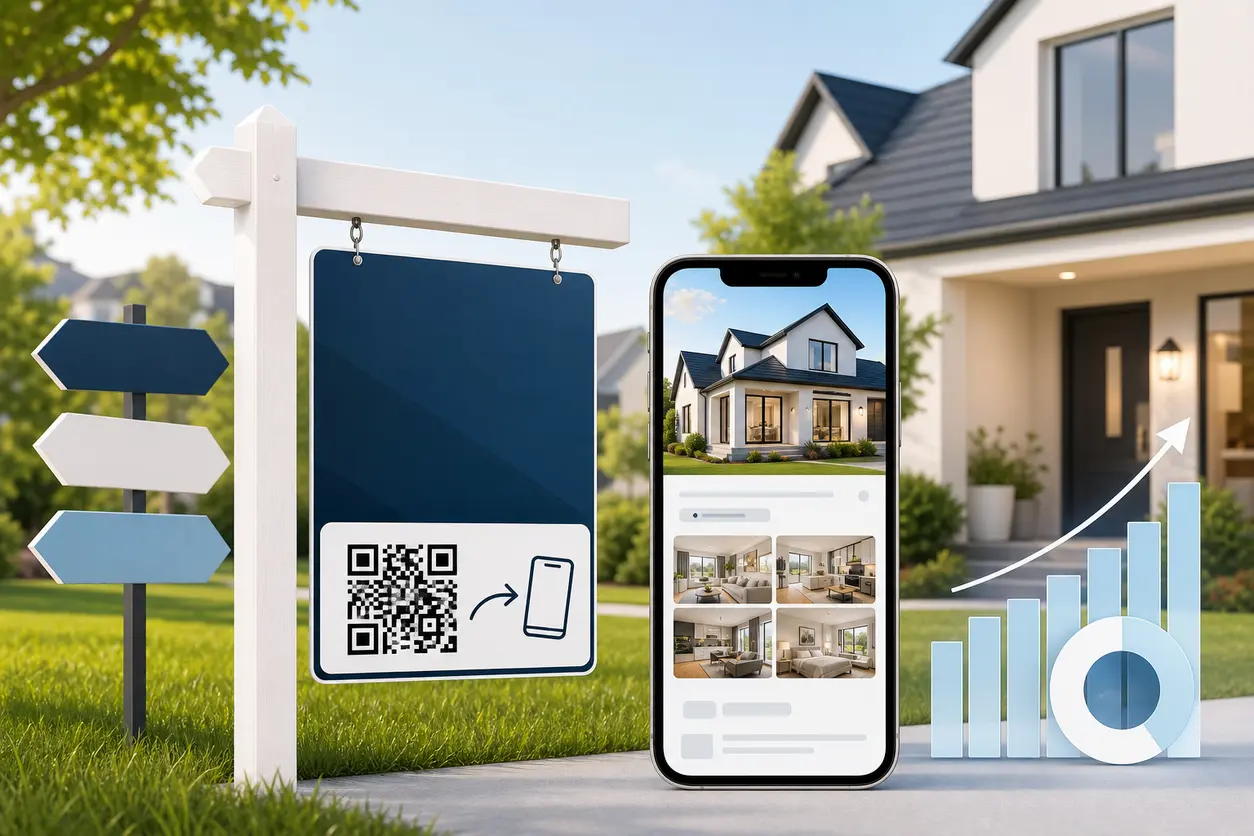
That is where real estate sign QR codes become useful. A well-placed QR code on a sign rider, directional sign, or property marker gives a passerby an immediate path to photos, price, virtual tours, open house times, and a quick contact form. Instead of hoping someone follows up later, you capture intent while it is fresh.
This article focuses specifically on roadside conversion, not open houses or flyer handouts. If your goal is to turn walk-up and drive-by attention into measurable leads, here is how to build that workflow with QR Rapid.
Why roadside QR codes work differently from other real estate QR campaigns
A prospect scanning from a yard sign is not sitting at a kitchen table comparing listings. They are usually standing on a sidewalk, parked briefly at the curb, or riding as a passenger. That context changes what works.
Your QR destination needs to answer the immediate questions fast:
- Is this property still available?
- What is the price?
- What does it look like inside?
- When can I see it?
- How do I contact the agent without making a phone call right now?
If the code sends people to your brokerage homepage, a generic IDX search page, or a slow PDF, you waste the moment. The best real estate sign QR codes are built around one property, one clear next step, and one mobile-friendly landing experience.
The best places to use real estate sign QR codes
Yard sign riders
Sign riders are the clearest use case because they sit directly below or above the main for-sale sign and can carry a focused call to action.
Good sign rider offers include:
- Scan for price, photos, and tour
- Scan for instant property details
- Scan for open house time
- Scan to request a private showing
This format works best when the QR code links to a dedicated mobile page for that property, not a general listing feed.
Directional signs
Directional signs catch people who are already following arrows into a neighborhood. These scans often come from active buyers who want quick confirmation that they are heading to the right home.
For directional signage, keep the offer simple:
- Scan for directions and photos
- Scan for today’s open house time
- Scan to preview the home before you arrive
You can link these codes to the same property page as the yard sign, or create a separate dynamic QR code for directional signs so you can compare roadside scan sources by placement.
Property markers and lot signs
Property markers work especially well for land listings, new construction communities, infill lots, and multi-home developments.
A buyer looking at a lot often needs context, not just a contact number. Link the code to:
- Lot availability
- Site plan image
- Builder options
- Exterior renderings
- Starting price range
- Inquiry form for a call back
For builders or listing teams with several active lots, QR Rapid makes it easier to create one dynamic code per lot and update destinations as availability changes.
What the QR code should open after the scan
The destination matters more than the code itself. Your sign can create curiosity, but the QR code landing page is what converts it.
Build a mobile-friendly property page, not just a link dump
A strong roadside landing page should feel usable in under a minute. Keep it short, visual, and easy to tap.
Include these elements near the top of the page:
- Main listing photo
- Address or community name
- Current listing status
- Price
- Bed, bath, and square footage summary
- One primary CTA such as Request a Showing or Ask About This Home
Then add supporting content below:
- Photo gallery
- Virtual tour or walkthrough video
- Open house date and time
- Key features
- Neighborhood highlights
- Agent contact options by form, tap-to-call, or SMS
A useful rule is this: do not make the user hunt for the next step. The form or contact button should appear without much scrolling.
Best practices for mobile conversion
For sign-based traffic, mobile-first design is mandatory.
Use these practical standards:
- Keep the page fast to load on cellular service
- Avoid pop-ups that block the screen
- Use large tap targets for calls, texts, and form buttons
- Keep forms short, usually name, email, phone, and one optional question
- Put the most important information before long property descriptions
- Make sure virtual tours open cleanly on mobile
A common mistake is forcing a full lead form before showing any photos or price. That can work for some ad traffic, but it often underperforms for drive-by prospects who want instant validation first.
Copy on the sign rider that turns curiosity into action
The CTA on the sign matters because it tells buyers why they should scan now.
Generic copy like Scan Me is weak. Better copy sets an expectation.
Here are practical examples that fit real estate sign riders and roadside signs:
For active listings
- Scan for price, photos, and tour
- See inside this home instantly
- Scan to view full listing details
- Tour this property on your phone
- Scan to request a showing
For open-house-adjacent traffic without making the article about open houses
- Scan for this weekend’s showing time
- See photos and next available tour time
- Scan for details before you drive away
For lots, land, and new construction
- Scan to view lot map and availability
- See floor plans and builder options
- Scan for pricing and available homesites
For sold or under-contract redirects
- This home is sold. Scan for similar homes nearby
- Under contract. Scan to see other listings in this area
- Missed this one? Scan for similar homes and price alerts
That last group is especially important. A sold property still attracts traffic. With a dynamic QR code, you can turn that attention into new buyer leads instead of letting the sign go dead.
Static vs dynamic QR codes for real estate signs
For real estate signage, dynamic QR codes are usually the better choice because listings change constantly.
| Need | Static QR code | Dynamic QR code |
|---|---|---|
| Change the destination later | No | Yes |
| Update available to sold without reprinting | No | Yes |
| Redirect to a new lead form or similar listings | No | Yes |
| Track scans by property or sign placement | Limited | Yes |
| Reuse sign hardware across listing stages | Difficult | Easy |
If you print a static code to a single listing URL and the property status changes, your sign can quickly become outdated. A dynamic QR code from QR Rapid lets you keep the printed code in place while changing where it goes.
That is useful for common real estate scenarios:
- The price changes
- The listing page URL changes
- The property goes under contract
- The open house schedule changes
- You want to switch from a listing page to a buyer inquiry form
- The home sells and you want to redirect traffic to similar inventory
How to track scan sources by property and sign placement
Tracking is where roadside QR campaigns become more than a nice add-on.
If you use one generic code across every sign, you learn almost nothing. If you create separate dynamic QR codes by property and placement, you can see where interest is actually coming from.
A practical naming structure looks like this:
- 123-maple-yard-rider
- 123-maple-directional-main-road
- 123-maple-directional-subdivision-entry
- 45-oak-lot-marker
- cedar-ridge-lot-12
This helps teams answer useful questions such as:
- Which property signs are getting scanned most often?
- Are yard sign riders outperforming directional signs?
- Which neighborhoods generate more roadside interest?
- Are sold signs still producing buyer demand?
- Which listings deserve faster follow-up because they attract consistent scans?
Inside QR Rapid, you can manage dynamic codes by property and keep the workflow organized instead of treating every sign as a one-off print job.
One property, one code or multiple codes?
There are two good setups.
Use one code per property when you want a simpler rollout and only need overall interest tracking.
Use multiple codes per property when you want to compare sources such as yard sign versus directional sign versus property marker.
Listing teams usually start with one code per property, then add separate codes for higher-value listings or neighborhoods where roadside traffic is strong.
A practical QR Rapid workflow for listing teams
Here is a clean setup that scales.
1. Create a mobile landing page for the property
Build a page with photos, price, features, virtual tour, and one short inquiry form. Keep the main CTA above the fold.
2. Generate a dynamic QR code in QR Rapid
Use a dynamic code so you can update the destination later without reprinting the rider.
3. Label the code by property and sign type
Name it clearly so agents, coordinators, and admins know exactly where the sign is deployed.
4. Add a direct-response CTA to the rider
Do not print the code alone. Pair it with action-focused copy such as Scan for price, photos, and tour.
5. Test it in real conditions
Scan from a few feet away, outside, on mobile data, and in bright daylight. The code needs to work where buyers actually see it.
6. Update the destination as the listing changes
When the property status changes, keep the same printed code and redirect traffic to the right next step.
7. Review scans and adjust
If one property gets scans but few inquiries, improve the landing page or CTA. If a sign gets no scans, rethink the rider copy, placement, or value offered after the scan.
Common mistakes to avoid
Sending sign traffic to a homepage
This is the fastest way to lose intent. Buyers scanned for one property, not your entire website.
Overloading the landing page
Do not make roadside traffic wade through long text, multiple menus, or too many options. One property, one flow.
Reusing one QR code across multiple listings
That may be easier operationally, but it weakens relevance and tracking.
Forgetting a sold strategy
A sold sign can still attract active buyers in the neighborhood. Redirect those scans to similar homes, a buyer questionnaire, or a neighborhood inventory page.
Using weak CTA copy
If the rider does not explain the benefit, fewer people will scan.
Why this use case is a good fit for QR Rapid
QR Rapid is especially useful for roadside listing workflows because the key need is flexibility after print. Real estate signs stay in the field while availability, pricing, and next steps keep changing.
With QR Rapid, agents and brokerages can:
- Create dynamic QR codes for each property
- Customize code design to fit brand standards
- Send scans to mobile landing pages, videos, images, or forms
- Update destinations without replacing printed riders
- Keep sold and under-contract traffic working for new lead capture
- Organize codes by listing, team, or sign placement
For teams managing several active listings at once, that operational control matters as much as the marketing benefit.
Turn sign traffic into a measurable lead source
Drive-by interest is easy to underestimate because it often goes untracked. But when you give buyers a fast, mobile-friendly way to act in the moment, roadside attention becomes part of your lead pipeline instead of background noise.
The best real estate sign QR codes do three things well:
- They offer immediate value after the scan
- They make inquiry easy on mobile
- They stay flexible as the listing changes
If you want to turn sign riders, directional signs, and property markers into active lead capture tools, start with one dynamic QR code per property in QR Rapid, connect it to a high-converting mobile page, and build a redirect plan for every listing stage from active to sold.
FAQ
What should a real estate sign QR code link to?
For roadside traffic, link to a mobile-friendly property page with price, photos, status, virtual tour, open house details, and a short contact form. Avoid sending scans to a generic homepage.
Should each property have its own QR code?
Yes. A separate QR code for each property keeps the experience relevant and makes tracking much more useful. If you want deeper attribution, create separate codes for the yard sign rider and directional signs too.
Are dynamic QR codes better for real estate signs than static codes?
Usually yes. Dynamic QR codes let you change the destination after printing, which is helpful when a listing price changes, the home goes under contract, or you want to redirect sold traffic to similar properties.
What is the best CTA to print on a sign rider?
Use a benefit-driven CTA such as Scan for price, photos, and tour or Scan to request a showing. The wording should tell buyers exactly what they get after scanning.
What should happen when the property is sold?
Keep the same printed QR code and redirect it to a page for similar homes, a buyer inquiry form, or a neighborhood inventory page. That way the sign can still capture local buyer demand instead of going dead.
Similar Blogs
The latest industry news, interviews, technologies, and resources.
 September 14, 2026
QR Codes for Loyalty Program Sign-Ups: A Measurable Offline-to-Member Workflow
QR Codes for Loyalty Program Sign-Ups: A Measurable Offline-to-Member Workflow
Read post
 August 15, 2026
QR Codes for Google Reviews: How to Get More Customer Reviews from In-Store Signage
QR Codes for Google Reviews: How to Get More Customer Reviews from In-Store Signage
Read post

Join 2,000+ subscribers
Stay in the loop with everything you need to know.
We care about your data in our privacy policy