
Dynamic QR Platform
Create QR codes Instantly
Website URL
Send users to any webpage
Website URL
Website URL
Send users to any webpage
Wi-Fi
Let users connect instantly
Wi-Fi
Wi-Fi
Let users connect instantly
Menu
Create a digital menu
Menu
Menu
Create a digital menu
Start a chat with one tap
Start a chat with one tap
Image
Showcase visuals
Image
Image
Showcase visuals
Show a downloadable file
Show a downloadable file
03 Aug 2026 • 11 min read
QR Codes for Gyms and Fitness Studios: Member Onboarding, Class Schedules, and Referral Campaigns
A workflow-led guide for gym owners and fitness marketers using QR codes across the member lifecycle, from trial passes and onboarding to class schedules, exercise tutorials, and referral offers. Learn how to set up separate dynamic codes for each placement, update destinations without reprinting, and track which in-gym touchpoints drive the most scans and conversions with QR Rapid.
IntroductionWhy QR codes for gyms work best after the first inquiryThe member lifecycle workflow to build first1. Front-desk QR code for trial passes2. Welcome-packet QR code for member onboarding3. Equipment-area QR codes for exercise tutorials and safety videos4. Locker-room QR codes for class schedules5. Referral QR codes on member cards and handoutsHow to structure your QR code system in QR RapidMobile landing page best practices for gym QR campaignsHow to track what is actually workingRecommended CTA copy by placementA 30-day rollout plan for a new-member or referral pushWhat to create first in QR RapidFinal takeawayFAQ
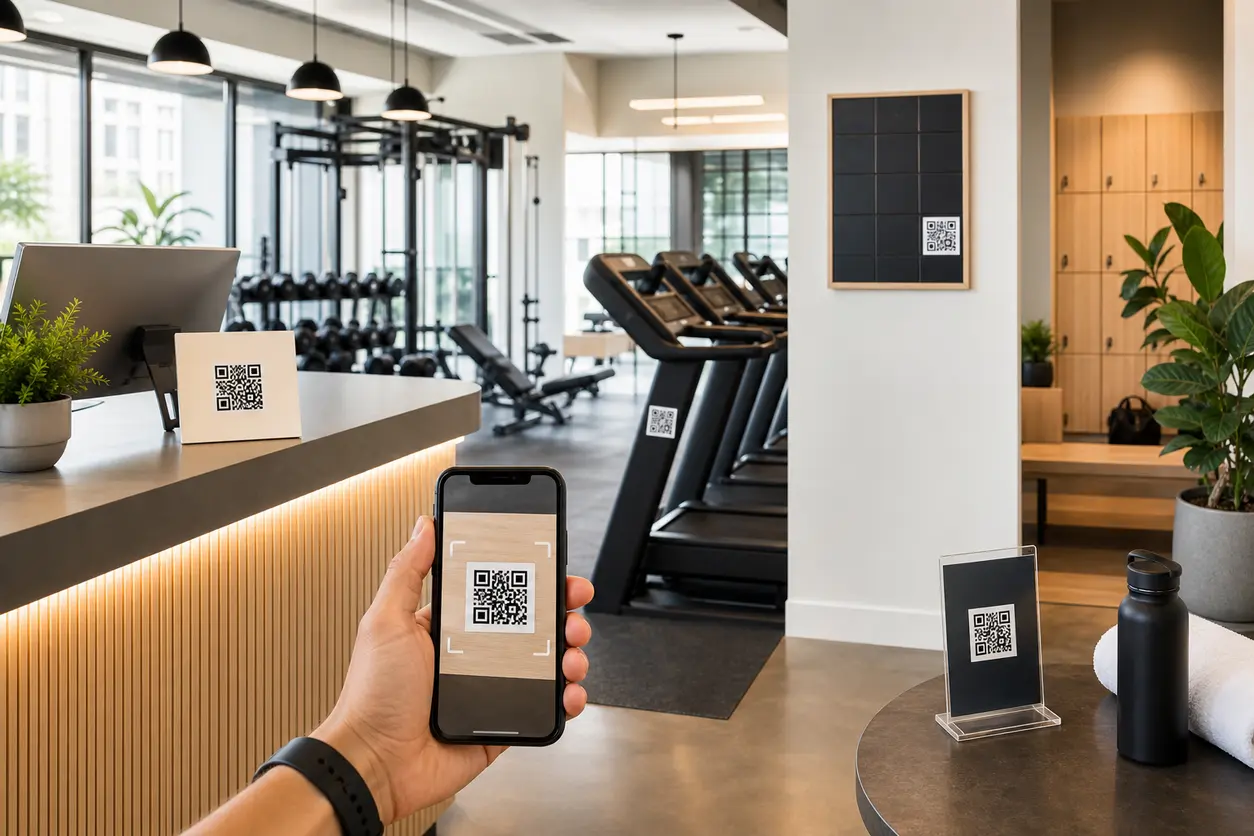
The best QR codes for gyms help people take the next step in the moment they are ready: claim a trial, learn how to use a machine, check tonight’s class times, finish onboarding, or share a referral offer with a friend. That is where QR codes become an operations tool, not just a marketing add-on.
For gym owners, boutique fitness studios, yoga studios, Pilates studios, and membership marketers, the value is simple: fewer front-desk bottlenecks, better member activation, easier schedule updates, and clearer insight into which in-venue placements actually drive action.
This guide shows how to use QR codes for gyms across the full member lifecycle, with separate dynamic codes for each placement and campaign. It also covers what to put on each mobile landing page, what CTA copy to use, and how to run a 30-day rollout in QR Rapid.
Why QR codes for gyms work best after the first inquiry
A member’s decision to stay is shaped by what happens after they walk in the door. They need quick answers, clear next steps, and easy ways to engage without waiting in line or searching your website.
That is why QR codes for gyms are especially useful inside the facility:
- At the front desk, they turn walk-ins into trial-pass signups
- In training areas, they deliver exercise tutorials and safety videos at point of need
- In locker rooms, they make class schedules easy to access on mobile
- In welcome materials, they centralize onboarding content for new members
- On referral cards, they make member sharing measurable instead of word-of-mouth guesswork
This is also why dynamic vs static QR codes matter more than static ones for fitness businesses. Your schedule changes. Intro offers change. Trainer rosters change. A static code locks you into one destination. A dynamic code in QR Rapid lets you keep the printed sign but update the destination, landing page, file, or offer later.
The member lifecycle workflow to build first
A practical gym QR setup follows the same path your members already take:
- Prospect visits the gym and scans a trial-pass code
- New member receives onboarding content after signup
- Member uses in-gym codes for equipment guidance and class discovery
- Member becomes more active because information is easier to access
- Happy member shares a referral offer with a friend
Instead of one general gym QR code, create a separate code for each step. This is what makes the system measurable.
1. Front-desk QR code for trial passes
Your front desk is the most important conversion point for first-time visitors. A printed sign with a QR code works well when staff are busy, when a prospect arrives between classes, or when someone wants to compare membership options privately on their phone.
Best destination
Use a QR code landing page not a generic homepage. Keep it focused on one action:
- Claim a free day pass
- Start a 7-day trial
- Get a first-class offer
- Book a facility tour
What to include on the landing page
- Short headline with the offer
- 3 to 5 benefits of trying the facility
- Simple form or button
- What happens next after signup
- Optional map, parking info, or staffed hours
Recommended CTA copy
- Start Your Free Trial
- Claim a 3-Day Pass
- Try Your First Class
- Get a Gym Tour Today
QR Rapid setup tip
Create this as its own dynamic code named something like Front Desk - Trial Pass - Main Location. If you run multiple clubs or seasonal offers, duplicate the code and change the destination by location or campaign.
That naming structure matters later when you compare scans and conversions.
2. Welcome-packet QR code for member onboarding
Most gyms hand new members a printed packet, email, or starter sheet full of information that gets ignored. A better approach is one onboarding QR code that opens a mobile landing page with everything a new member needs in the first week.
Good onboarding content to include
- Club hours and holiday access notes
- Intro session details
- How to reserve group classes
- Trainer introductions
- Studio etiquette and towel policies
- Link to your app, if relevant
- Contact info for member support
For boutique studios, this can also include what to bring, where to store personal items, and how early to arrive for class.
Why this placement matters
Onboarding is where many memberships stall. If members cannot quickly understand how to start, they delay their second visit. A QR code in the welcome packet removes that friction.
Recommended CTA copy
- Start Your Member Welcome Guide
- New Here? Scan for Your First-Week Checklist
- Everything You Need for Your First 7 Days
QR Rapid setup tip
Use a landing page QR code instead of sending people to a long PDF alone. You can still include downloadable files, but a landing page is easier to scan, read, and update on mobile.
3. Equipment-area QR codes for exercise tutorials and safety videos
This is where QR codes for gyms move beyond marketing and become part of the member experience.
Place codes near selected machines, rigs, or specialty stations so members can scan for:
- Short exercise demos
- Machine setup instructions
- Safety reminders
- Form cues
- Trainer tips for beginner, intermediate, and advanced variations
This is especially useful for:
- Functional training zones
- Cable machines with multiple attachments
- Rowers, ski ergs, or less familiar cardio equipment
- Reformers and studio apparatus
- Strength equipment used by new members
Best destination
A short video QR code page works better than a text-heavy document. Members are standing on the floor and want a fast answer.
Keep the video or page focused on one machine or movement. Do not make them search through a full exercise library.
Recommended CTA copy
- Watch How to Use This Machine
- Scan for Form Tips and Safety
- New to This Station? Start Here
Placement note
Use separate QR codes by station or zone, not one code for the entire floor. That way you can see whether the cable area, squat racks, or recovery corner gets more engagement.
QR Rapid setup tip
QR Rapid is a strong fit here because you can host or link to updated tutorial content without reprinting decals every time you replace a video or adjust instruction.
4. Locker-room QR codes for class schedules
Locker rooms and changing areas are natural planning spaces. Members often decide whether to stay for a class, come back later, or invite a friend while they are getting ready.
A locker-room schedule QR code should open a clean mobile class page with:
- Today’s classes first
- Filters by format, instructor, or studio room
- Beginner-friendly labels where relevant
- Last-minute cancellations or substitutions
- Special event classes or pop-ups
Why this outperforms printed timetables alone
Printed schedules go stale fast. A dynamic QR code lets you keep the wall sign in place while updating the destination as classes change.
For yoga and Pilates studios, this is especially helpful when instructor substitutions, waitlists, and workshop schedules shift throughout the month.
Recommended CTA copy
- View Today’s Class Schedule
- Scan for Live Class Times
- See This Week’s Studio Schedule
QR Rapid setup tip
Create a dedicated schedule code for each physical placement, such as Locker Room - Women, Locker Room - Men, or Hallway - Studio A. Even if all codes point to the same landing page at first, separate tracking helps you learn where members actually scan.
5. Referral QR codes on member cards and handouts
Referrals work best when the member does not have to explain the offer, spell out a URL, or remember a promo code.
A referral QR code can live on:
- Wallet-sized referral cards
- Guest-pass handouts
- Printed inserts in welcome packets
- Counter displays near exits
- Small signs at smoothie bars or retail desks
What the referral landing page should include
- Clear offer for the friend
- Brief note on what the current member receives, if anything
- Expiration date or urgency cue
- Fast mobile action such as claim pass, text the studio, or choose a location
Recommended CTA copy
- Give a Friend a Free Class
- Share This Pass With a Workout Partner
- Invite a Friend to Try Us
- Claim Your Guest Workout
QR Rapid setup tip
If you run multiple referral pushes, create separate dynamic codes for each one. For example:
- New-member referral card
- Summer bring-a-friend campaign
- Personal trainer referral offer
- Yoga workshop guest pass
This helps you measure which offer and which format drive more scans.
How to structure your QR code system in QR Rapid
The biggest mistake with QR codes for gyms is using one code everywhere. That gives you no useful insight.
Instead, build a small but organized code system.
Create one code per placement or campaign
A simple starting structure:
- Front Desk - Trial Pass
- Welcome Packet - Onboarding
- Equipment Zone - Cable Machine Tutorial
- Locker Room - Class Schedule
- Referral Card - New Member Offer
Use dynamic destinations
Dynamic codes are the better fit when you need to:
- Update class schedule links
- Swap trial offers
- Replace tutorial videos
- Change referral promotions
- Redirect by season, instructor, or campaign
Choose the right destination type
With QR Rapid, gyms can route each code to the content that best fits the action:
- Landing page for trial passes and onboarding
- Video for equipment demos
- File for policies or starter guides
- SMS for a fast text-based trial claim
- vCard for trainer contact sharing where appropriate
Mobile landing page best practices for gym QR campaigns
A gym member scanning a code is usually standing, moving, or between activities. Your landing page should feel immediate.
Keep it short
Lead with one goal per page. Trial pass pages should not also explain every membership tier and every trainer bio.
Make the next step obvious
Use one primary button above the fold.
Match the physical placement
If the code is on a treadmill area sign, the landing page should mention equipment tips, not general membership sales copy.
Keep branding consistent
Use your gym colors, logo, and tone so the scan feels trustworthy and intentional.
Avoid dead-end pages
Every page should end with a next action: claim, reserve, watch, call, or share.
How to track what is actually working
The real advantage of QR codes for gyms is not that they scan. It is that they can be measured by placement.
Track performance in three layers:
1. Scan volume by location
Which placement gets attention?
- Front desk sign
- Locker room poster
- Equipment decal
- Referral card
2. Conversion by destination
Which page gets the action you want?
- Trial signups
- Onboarding completions
- Tutorial views
- Schedule visits
- Referral claims
3. Campaign performance over time
Which offer or season performs better?
- New-year challenge
- Summer referral campaign
- Back-to-school class push
- New member first-30-days onboarding
This is why separate codes matter. If every sign points to the same QR code, you lose the ability to compare touchpoints.
Recommended CTA copy by placement
Here is a practical starting set you can test:
| Placement | Goal | CTA copy |
| --- | --- | --- |
| Front desk sign | Trial pass claim | Start Your Free Trial |
| Welcome packet | New member activation | Scan for Your First-Week Guide |
| Equipment label | Tutorial view | Watch How to Use This Machine |
| Locker room sign | Schedule check | View Today’s Class Schedule |
| Referral card | Friend offer | Give a Friend a Free Class |
Keep CTA language direct. People scan more often when they know exactly what happens next.
A 30-day rollout plan for a new-member or referral push
You do not need to launch every code at once. Start with a small system you can measure.
- Days 1-5: Build the first three codes
Create a front-desk trial pass code, a welcome-packet onboarding code, and a referral card code in QR Rapid. Build separate landing pages for each.
- Days 6-10: Print and place
Put the trial-pass sign at the front desk, add the onboarding code to printed welcome materials, and hand referral cards to new members during signup.
- Days 11-15: Add one in-gym utility code
Launch either an equipment tutorial code for a high-question machine or a locker-room schedule code if class attendance is the bigger goal.
- Days 16-20: Train staff on the script
Front-desk team: “If you want to start with a free pass, just scan here.”
Membership team: “Your first-week guide is in this QR code.”
Trainers: “Scan this to review setup and form after your session.”
- Days 21-25: Review scan activity
Compare which placements get scanned most and which landing pages lead to the intended action. If a code gets scans but few completions, improve the page or CTA.
- Days 26-30: Optimize and expand
Update the weakest-performing page, test a stronger referral offer, and add one more code in the next best location. For many gyms, that is the locker room or a second referral placement near the exit.
What to create first in QR Rapid
If you want one clear place to start, create your front-desk trial pass QR code first.
It is the fastest way to turn walk-in interest into a measurable mobile action, and it gives you a template for the rest of your gym QR system:
- one clear CTA
- one mobile landing page
- one trackable action
- one separate code for one location
After that, add onboarding and referral codes to support activation and retention.
Final takeaway
The most effective QR codes for gyms are not one-size-fits-all signs. They are small, placement-specific workflows that help members do the next useful thing.
Use one code for trial passes, another for onboarding, separate codes for equipment help and schedules, and dedicated referral codes for member sharing. Build each one as a dynamic code in QR Rapid so you can update offers, content, and destinations without reprinting signs.
If you are ready to launch, start with your front-desk trial pass code in QR Rapid today. Once that is live, use the same workflow to add onboarding, class schedule, and referral QR codes that make your gym easier to join, easier to use, and easier to recommend.
FAQ
Should gyms use one QR code everywhere or separate codes for each placement?
Use separate QR codes for each placement or campaign. That lets you track whether the front desk, locker room, equipment area, or referral card drives more scans and conversions.
What type of QR code works best for class schedules in a gym?
A dynamic QR code linked to a mobile-friendly landing page works best. You can update the destination or schedule content without reprinting the locker-room sign.
What should a gym put on a trial pass QR landing page?
Keep it focused on one action: claim the pass. Include the offer, a few benefits, simple form fields or a clear button, and a short explanation of what happens next.
Can QR codes help with gym member onboarding?
Yes. A welcome-packet QR code can centralize first-week information like hours, class access, trainer intros, policies, and support contacts so new members are easier to activate.
How do referral QR codes work for fitness studios?
A referral QR code sends the friend directly to a landing page with the offer, studio details, and a simple action such as claiming a pass or choosing a location. It makes referrals easier to share and easier to track.
Similar Blogs
The latest industry news, interviews, technologies, and resources.
 August 15, 2026
QR Codes for Google Reviews: How to Get More Customer Reviews from In-Store Signage
QR Codes for Google Reviews: How to Get More Customer Reviews from In-Store Signage
Read post
 July 30, 2026
QR Code Appointment Booking for Service Businesses
QR Code Appointment Booking for Service Businesses
Read post

Join 2,000+ subscribers
Stay in the loop with everything you need to know.
We care about your data in our privacy policy