
Dynamic QR Platform
Create QR codes Instantly
Website URL
Send users to any webpage
Website URL
Website URL
Send users to any webpage
Wi-Fi
Let users connect instantly
Wi-Fi
Wi-Fi
Let users connect instantly
Menu
Create a digital menu
Menu
Menu
Create a digital menu
Start a chat with one tap
Start a chat with one tap
Image
Showcase visuals
Image
Image
Showcase visuals
Show a downloadable file
Show a downloadable file
17 Jun 2026 • 10 min read
QR Codes for Product Manuals and Setup Guides on Retail Boxes
Learn how manufacturers and brands can use a product manual QR code on retail boxes and inserts to deliver setup guides, safety sheets, troubleshooting help, and how-to videos without overcrowding packaging.
IntroductionWhy a product manual QR code works so well on packagingWhat should a product manual QR code link to?Static vs dynamic QR codes for product manualsThe best use cases for retail boxes and insertsHow QR Rapid fits the packaging workflowPackaging placement and labeling tipsVersion control: the overlooked reason to use dynamic codesHow to decide between a PDF, video, or landing pageA simple rollout plan for packaging teamsWhat buyers should look for in a QR code platform for packagingTurn the box into a better onboarding experienceFAQ
A product manual QR code solves both problems.
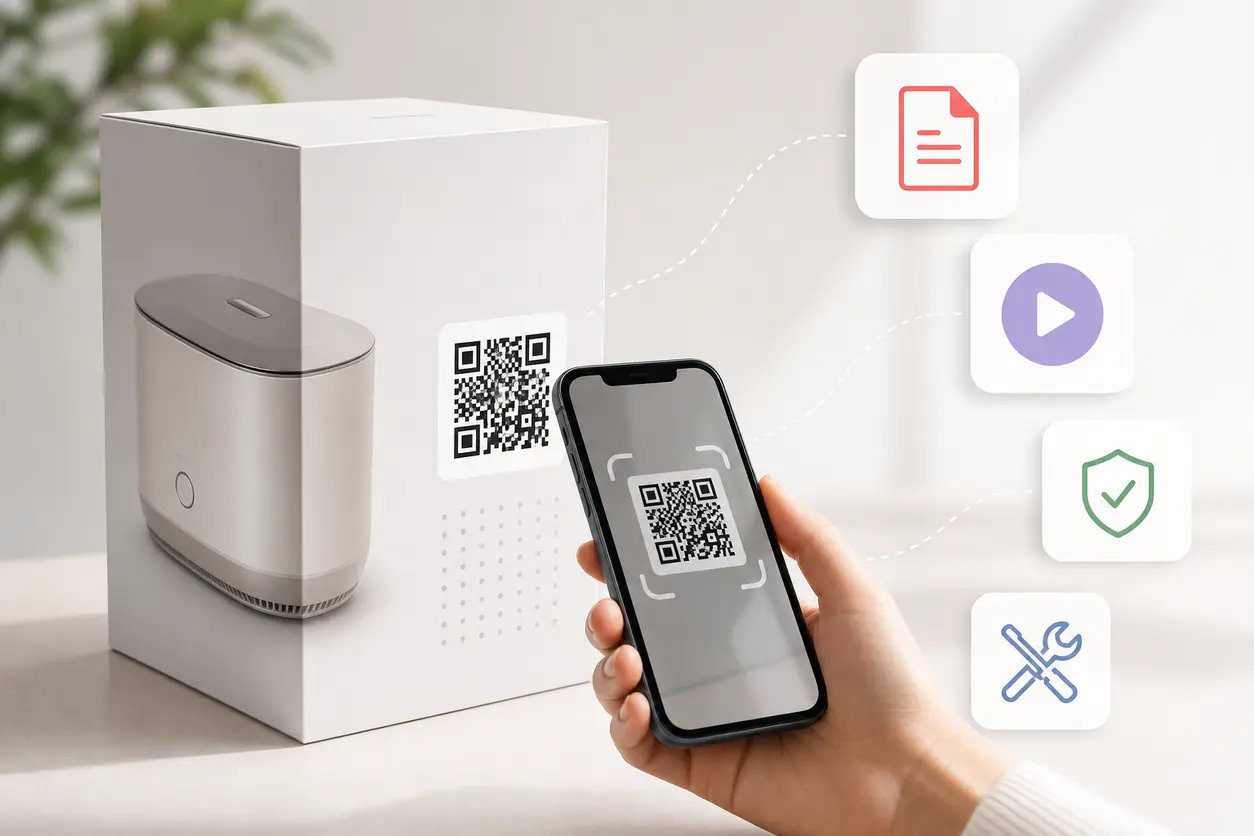
Instead of cramming a long foldout guide, warranty details, troubleshooting steps, safety notes, and setup diagrams into limited package space, you can place one scannable code on the retail box or insert and send buyers to the right digital resource. That resource might be a PDF manual, a setup video, a mobile-friendly landing page, or a support hub with multiple content types such as a multi-link QR code.
For brands that sell through retail, marketplaces, or direct-to-consumer channels, QR codes turn packaging into a post-purchase onboarding layer. Done well, they reduce friction after the sale, help customers get value faster, and deflect avoidable support tickets.
Why a product manual QR code works so well on packaging
The moment after unboxing is when customers most need help. They are assembling, charging, pairing, installing, testing, or troubleshooting. If the printed instructions are too small, missing, outdated, or translated poorly, frustration starts immediately.
A product manual QR code gives buyers fast access to richer documentation on the device already in their hand.
That creates several practical benefits:
- Less packaging clutter: Move dense documentation off the box and out of the insert while keeping access easy.
- Better onboarding: Customers can watch, scroll, zoom, and search instead of relying on a tiny folded leaflet.
- Fewer support tickets: Clear setup flows and troubleshooting content answer common issues before a customer contacts support.
- Simpler updates: If a manual changes, a dynamic QR code lets you update the destination without reprinting packaging.
- Multiple content formats: You can deliver a PDF, video, image-based guide, or a landing page with several support options.
- Useful scan tracking: Packaging teams and product marketers can see whether customers are actually using the support content.
This is especially valuable for mobile-first support behavior. Many buyers do not want to sit at a desktop, search a help center manually, or type a long URL from a box. Scanning is simply faster.
What should a product manual QR code link to?
The best destination depends on the product, setup complexity, and support goals. There is no rule that every product should link to the same asset type.
1. PDF manuals
A PDF is a good fit when you already have a formal manual approved by legal, compliance, and product teams.
Use a PDF destination when you need:
- full technical instructions
- multilingual documentation
- warranty and care guidance
- diagrams and parts lists
- downloadable offline access
This is common for appliances, home goods, and electronics with regulatory language.
2. Setup videos
Video works best when the buyer needs to see the process, not just read it.
Use setup videos when setup includes:
- cable connections
- app pairing
- assembly steps
- filter replacement
- product priming or calibration
- before-and-after demonstrations
This format is especially strong for beauty devices, smart home accessories, and kitchen products.
3. Mobile landing pages
For many brands, the best option is not a single file. It is a landing page that organizes the post-purchase journey.
A landing page can include:
- start here instructions
- a quick setup video
- a downloadable PDF manual
- safety sheets
- FAQ links
- troubleshooting steps
- contact support options
- accessory or refill recommendations
This is usually the most flexible approach because it lets one product manual QR code serve multiple customer needs without forcing everything into one document.
Static vs dynamic QR codes for product manuals
For packaging, this decision matters more than many teams realize.
Static QR codes
A static code points directly to one fixed destination. Once printed, it cannot be changed.
A static code may work if:
- the manual will never change
- the product is very simple
- the packaging run is short
- you do not need scan data
Dynamic QR codes
A dynamic code points to a short redirect that you can update later. That makes it much better for retail packaging and longer product lifecycles.
A dynamic code is usually the smarter choice when:
- manuals may be revised
- product firmware or app setup changes over time
- you want to swap a PDF for a landing page later
- you need different content by market or campaign
- you want scan tracking
- you cannot afford to reprint boxes after a support change
For most manufacturers and brands, dynamic codes are the safer operational decision. Packaging often outlives a single manual version, especially in retail channels where inventory may sit in warehouses or on shelves for months.
With QR Rapid, you can create dynamic QR codes for packaging workflows, update the destination when documentation changes, and keep the printed code on the box usable across revisions.
The best use cases for retail boxes and inserts
A product manual QR code is most effective when it is tied to the exact post-purchase task the customer needs to complete.
Consumer electronics
A headphone brand can place a QR code on the inside flap of the box labeled "Scan for 2-minute setup." The code can open a mobile landing page with:
- Bluetooth pairing steps
- a quick-start video
- a PDF manual
- firmware update instructions
- troubleshooting for charging and connection issues
This reduces the number of customers contacting support because they cannot enter pairing mode or do not know what the LED pattern means.
Appliances
A countertop appliance brand can place a product manual QR code on both the box and the printed insert. The destination can include:
- first-use cleaning instructions
- safety sheet download
- step-by-step setup guide
- descaling or maintenance video
- replacement part information
This is useful when the printed insert only has essential compliance information but the full use instructions are too long for the box.
Beauty and personal care
A skincare device brand can use a QR code to guide buyers through their first session. Instead of a thick multilingual booklet, the code can open:
- prep instructions
- product use video
- contraindications and safety warnings
- cleaning steps
- before-use checklist
This format is particularly strong for beauty products because customers often want visual guidance and reassurance before using the device on skin or hair.
Home goods and furniture
A home organization or furniture brand can place a QR code on the carton and on a parts bag insert. The code can lead to:
- illustrated assembly instructions
- a short assembly video
- missing parts request form
- care instructions
- troubleshooting for common build issues
This can cut support volume around unclear diagrams, missing hardware questions, and incorrect assembly order.
How QR Rapid fits the packaging workflow
A good packaging QR code program is not just about generating a code once. It is about managing documentation after the product ships.
QR Rapid is useful here because brands often need a mix of flexibility, branded QR codes, and measurement.
Create the right destination type
Depending on the product, you can use QR Rapid to generate a code for:
- a PDF manual
- a setup or how-to video
- a support landing page
- an image-based quick-start guide
- a URL that routes to a broader knowledge base
That lets packaging teams align the code format with the actual support workflow instead of forcing every product into one content type.
Update content without reprinting the box
If your printed manual changes because of a parts revision, compliance update, app flow change, or improved troubleshooting steps, a dynamic QR code is a major advantage. You can update the destination while keeping the same printed code in market.
That matters for:
- long retail inventory cycles
- marketplace fulfillment stock
- seasonal packaging already printed in bulk
- multi-channel distribution across regions
Track scan behavior
Scan analytics help answer questions that printed manuals never could:
- Which products drive the most manual scans?
- Do more people scan the box or the insert?
- Are customers scanning right after launch or weeks later?
- Which markets need better onboarding?
- Did the new setup video reduce support demand?
For product marketers and CX teams, those signals are useful for improving packaging, documentation, and onboarding content.
Packaging placement and labeling tips
Even a strong product manual QR code can underperform if the presentation is unclear.
Follow these best practices:
Put the code where the customer naturally looks
Good placements include:
- side panel of the retail box
- inside lid or inner flap
- quick-start insert
- warranty card
- parts bag card for assembly products
For complex products, repeating the code on both the box and insert is often worth it.
Tell people exactly what they get
Avoid vague labels like "Scan me." Use action-focused copy such as:
- Scan for setup guide
- Scan for full manual and video help
- Scan for safety sheet and instructions
- Scan for assembly steps
Specific labels increase the chance of a scan because the value is obvious.
Match the destination to the promise
If the box says "Scan for setup video," do not send people to a generic homepage. Send them directly to the most relevant resource.
Design for real packaging conditions
Make sure the code has enough quiet space, strong contrast, and a size that scans easily on curved, glossy, or textured surfaces. Test with multiple phones before final print approval.
Version control: the overlooked reason to use dynamic codes
Many competitor articles talk about convenience, but version control is the real operational win.
Manuals change. Safety language changes. Accessories change. App screens change. Products are refreshed without packaging being fully redesigned.
Without a dynamic product manual QR code, those changes create friction:
- old packaging points to outdated documents
- support teams send follow-up links manually
- customers get conflicting instructions
- reprints become expensive and slow
With a dynamic code, the box stays the same while the destination evolves. That is particularly helpful for brands managing multiple SKUs, regional documentation, or iterative product improvements.
How to decide between a PDF, video, or landing page
Use this simple framework:
Choose a PDF if:
- the product requires formal documentation
- customers may need to download or print it
- you need one approved master file
Choose a video if:
- setup is visual
- customer success depends on technique
- the main support challenge is confusion during first use
Choose a landing page if:
- buyers need more than one resource
- you want to combine video, PDF, FAQs, and support options
- you want the most flexible long-term destination
For many brands, the best setup is a landing page that includes both a quick-start video and the downloadable PDF manual.
A simple rollout plan for packaging teams
If you want to implement this across product lines, start small and operationalize the workflow.
- Pick one SKU with frequent setup questions.
- Identify the top three post-purchase support needs.
- Build the best destination format for that product.
- Create a dynamic QR code in QR Rapid.
- Place it on the box and insert with clear instructional copy.
- Track scans and compare support volume after launch.
- Expand to other SKUs once the workflow is proven.
This approach keeps the project measurable and easier to approve internally.
What buyers should look for in a QR code platform for packaging
If packaging is the use case, the platform should support more than basic code creation.
Look for:
- dynamic destination updates
- support for PDF, video, and landing page workflows
- easy customization for branded packaging
- scan tracking and analytics
- reliable management across multiple product lines
QR Rapid fits this use case well because it supports the content formats brands actually use for product documentation while making it easier to update and manage QR codes after print.
Turn the box into a better onboarding experience
A product manual QR code is not just a way to save space on packaging. It is a practical way to improve the customer experience after purchase.
When buyers can scan one code and instantly access setup steps, safety information, troubleshooting help, and how-to videos, they get to a successful first use faster. Your support team handles fewer avoidable tickets. Your packaging stays cleaner. Your documentation becomes easier to update.
If your current box is overloaded with printed instructions or your support team keeps answering the same setup questions, this is a strong workflow to implement now.
Use QR Rapid to create a dynamic product manual QR code, connect it to the right support destination, and turn every retail box into a smarter self-service touchpoint.
FAQ
What is the best destination for a product manual QR code?
It depends on the product. PDFs work well for formal manuals, videos are best for visual setup, and landing pages are ideal when customers need multiple resources like guides, FAQs, and troubleshooting.
Should I use a static or dynamic QR code on retail packaging?
Dynamic is usually better for packaging because you can update the manual, video, or landing page later without reprinting the box. It also gives you scan tracking.
Can one QR code link to both a manual and a setup video?
Yes. The simplest way is to send the QR code to a mobile landing page that includes the PDF manual, quick-start steps, video tutorials, and support links in one place.
Where should a product manual QR code be placed on a box?
Common placements include the side panel, inside flap, or a quick-start insert. Use a clear label like "Scan for setup guide" so customers know exactly what they will get.
How does a product manual QR code reduce support tickets?
It gives customers immediate access to setup help, safety sheets, and troubleshooting content at the moment they need it. That resolves common issues before they become support contacts.
Similar Blogs
The latest industry news, interviews, technologies, and resources.
 June 16, 2026
QR Codes for Event Sponsorship Booths and Sponsor Lead Capture
QR Codes for Event Sponsorship Booths and Sponsor Lead Capture
Read post
 June 15, 2026
QR Codes for Contractors: Estimate Requests, Job Site Updates, and Review Collection
QR Codes for Contractors: Estimate Requests, Job Site Updates, and Review Collection
Read post

Join 2,000+ subscribers
Stay in the loop with everything you need to know.
We care about your data in our privacy policy