
Dynamic QR Platform
Create QR codes Instantly
Website URL
Send users to any webpage
Website URL
Website URL
Send users to any webpage
Wi-Fi
Let users connect instantly
Wi-Fi
Wi-Fi
Let users connect instantly
Menu
Create a digital menu
Menu
Menu
Create a digital menu
Start a chat with one tap
Start a chat with one tap
Image
Showcase visuals
Image
Image
Showcase visuals
Show a downloadable file
Show a downloadable file
16 Aug 2026 • 11 min read
QR Codes for Wedding Invitations: RSVPs, Guest Travel Details, and Shareable Photo Galleries
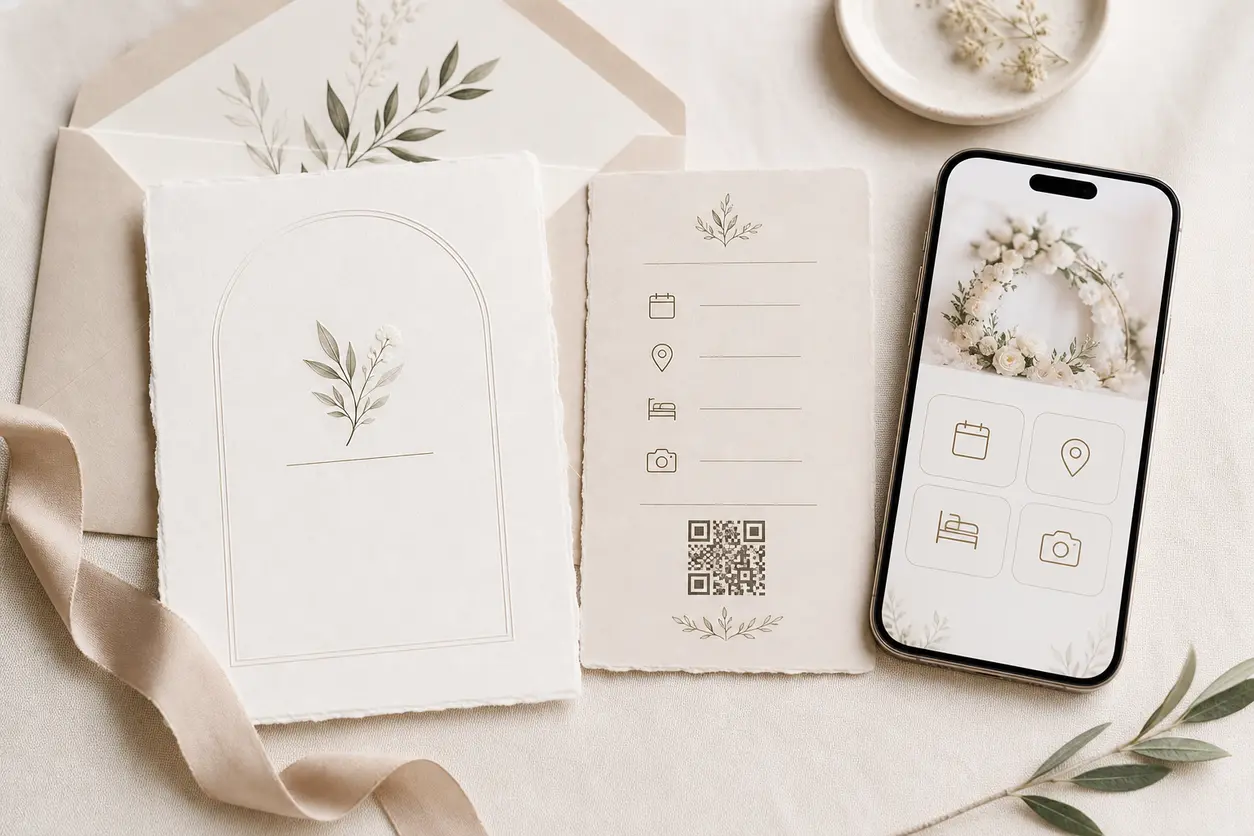
A practical guide to using a QR code for wedding invitation suites, save-the-dates, welcome bags, programs, table cards, and thank-you notes. Learn how to route guests to RSVP pages, venue maps, accommodation details, registries, dress-code guidance, digital programs, photo uploads, and post-wedding galleries while keeping printed stationery elegant and easy to update.
IntroductionWhy a wedding invitation QR code works so wellBuild the guest journey before you generate the codeWhere to place a QR code across wedding stationerySave-the-datesMain invitationsWelcome bags and hotel insertsCeremony programsTable cards, bar signs, and photo promptsThank-you notesWhen to use unique QR codes by event or guest segmentStatic vs dynamic QR codes for weddingsDesign rules for printing a tasteful wedding QR codeFormal and casual CTA copy that fits the invitation toneTest before anything goes to printPrivacy practices for wedding galleries and guest informationWhat to look for in a QR platform for wedding stationeryA simple wedding QR workflow to copyFinal takeawayFAQ
RSVP deadlines move, hotel blocks fill, rehearsal details change, weather plans shift, and guests always seem to ask for the address the day before the ceremony. A well-planned QR code for wedding invitation materials solves that gap without making your suite look overly technical.
The key is not adding random QR codes everywhere. The best approach is to create one elegant scan experience that carries guests from the first save-the-date to the final photo gallery, with separate codes only when the guest context truly changes.
For couples, planners, stationers, venues, and photographers, this is where QR Rapid becomes useful: you can create tasteful, customizable QR codes, keep destinations updated with dynamic links, and organize separate codes for different events or guest groups without reprinting expensive stationery.
Why a wedding invitation QR code works so well
A wedding invitation is a premium printed touchpoint, but it has limited space. Guests still need more than the printed essentials:
- RSVP form
- ceremony and reception addresses
- map links
- hotel recommendations or room block details
- registry links
- dress-code notes
- parking instructions
- digital ceremony program
- shared photo upload link
- post-wedding gallery
Instead of crowding the invitation with long URLs, a QR code gives guests one clean action: scan for details.
Done well, it also reduces guest questions. That matters for couples managing a deadline-driven event, and for planners and stationers who want a smoother, more polished information flow.
Build the guest journey before you generate the code
Before creating anything, decide what each printed piece should do. This is where many competitor articles stop at "add a QR code to your invitation." In practice, weddings work better when the destination architecture is planned first.
A simple mapping looks like this:
| Printed piece | Best QR destination | Why it works |
|---|---|---|
| Save-the-date | wedding website or early travel page | Gives guests dates, city, hotel guidance, and "formal invitation to follow" context |
| Main invitation | RSVP page or central wedding landing page | Handles response collection and essential event details |
| Details card | travel, accommodation, registry, dress code, FAQ | Keeps the invitation itself uncluttered |
| Welcome bag insert | weekend itinerary, shuttle schedule, local recommendations | Useful once guests arrive |
| Ceremony program | digital program, readings, wedding party bios, accessibility notes | Adds depth without adding pages |
| Table card or signage | shared photo upload link | Encourages guests to contribute photos during the celebration |
| Thank-you note | post-wedding gallery, video, memory page | Extends the experience after the event |
For many weddings, the cleanest setup is:
- one primary QR code for the invitation suite
- one arrival-weekend QR code for on-site guest logistics
- one photo-sharing QR code for uploads or gallery access
That keeps the experience elegant instead of fragmented.
Where to place a QR code across wedding stationery
Save-the-dates
Save-the-dates are ideal for guests who need lead time to book travel. The QR code should usually lead to a lightweight page with:
- date and city
- hotel area or room block info
- airport options
- early weekend schedule notes
- sign-up for updates if you are collecting emails
If you are still finalizing the exact hotel block or welcome event timing, use a dynamic QR code so you can update the destination later.
Example CTA copy
- Save our date and view travel details
- Scan for wedding weekend information
- Details and updates
Main invitations
The invitation is where the primary QR code for wedding invitation use belongs. In most cases, it should route to either:
- a mobile RSVP page, or
- a wedding landing page with a clear RSVP button plus the key event details
If your audience includes older guests or guests less comfortable with scanning, add a short fallback URL beneath the code.
Keep the main invitation focused. The printed piece still carries the formal tone; the QR code simply opens the full digital layer.
Best destinations for the main invitation QR code
- RSVP page
- wedding website home page
- private guest information page
- landing page with RSVP, venue, registry, and FAQ links
Welcome bags and hotel inserts
Once guests are on-site, they need different information than they did when the invitation arrived. This is a good reason to create a separate QR code for welcome bags or hotel room drops.
Send that code to:
- weekend itinerary
- shuttle timing
- ride-share drop-off points
- ceremony and reception maps
- local recommendations
- emergency contact info for the planner or point person
This saves everyone from hunting through old emails.
Ceremony programs
Programs are one of the best wedding-specific QR placements because they solve a real print problem: space.
A program QR code can lead to:
- a digital order of service
- readings or translations
- wedding party bios
- memorial notes
- accessibility information
- venue history
- thank-you message from the couple
For religious or multicultural ceremonies, this can be especially helpful when you want to explain traditions without creating an oversized printed booklet.
Table cards, bar signs, and photo prompts
If you want candid guest photos, do not bury the upload link in a post-event email. Put a QR code where guests are already using their phones.
Good placements include:
- reception table cards
- guest book table signage
- photo booth signage
- bar signs
- lounge area table tents
The destination can be a shared album upload page, a cloud folder request page, or a photo QR code landing page with simple instructions like "Upload your favorite moments here."
Use a different code for photo uploads than for RSVPs. These are distinct guest actions with different timing.
Thank-you notes
Thank-you cards are the perfect place to reconnect guests to the memory side of the event. A QR code here can lead to:
- the full wedding gallery
- a highlight album
- a wedding video teaser
- a page with selected candid photos
- a note from the couple
For photographers and planners, this is also a polished handoff moment. The printed note feels personal, while the QR code makes gallery access instant.
When to use unique QR codes by event or guest segment
Not every wedding needs multiple QR codes, but many multi-event weddings benefit from them.
Consider separate codes when you have:
- rehearsal dinner guests only
- out-of-town guests needing hotels and shuttle info
- VIP or family-only gatherings
- separate ceremony and reception venues
- multi-day destination wedding activities
- different language versions of guest information
A practical setup might look like this:
- Invitation suite QR code: main RSVP and master details
- Rehearsal dinner insert QR code: specific dinner address and timing
- Welcome bag QR code: shuttle and local info
- Reception photo QR code: guest uploads
- Thank-you note QR code: final gallery
With QR Rapid, this kind of structure is easier to manage because you can keep each code tied to its own destination instead of forcing every guest interaction through a single overloaded page.
Static vs dynamic QR codes for weddings
For weddings, dynamic codes are usually the safer choice.
Static QR codes
Use static codes only when the destination will never change, such as:
- a final, permanent photo gallery link
- a fixed registry page
- a simple public website that is already complete
Dynamic QR codes
Dynamic codes are better when anything might change after printing:
- RSVP deadlines
- shuttle schedules
- hotel availability notes
- rain plan venue shifts
- dress-code clarifications
- updated map links
- changing gallery destinations after the event
That flexibility matters because wedding print deadlines often happen before all digital details are locked.
A strong commercial reason to use QR Rapid here is simple: you can print once and update later, which protects both your stationery budget and your guest experience.
Design rules for printing a tasteful wedding QR code
A QR code can look elegant, but only if function comes first.
Keep it scannable before making it decorative
Follow these rules:
- use strong contrast between the code and background
- avoid very light pastel codes on cream stock
- keep a clear quiet zone around the code
- do not place it over foil, watercolor texture, or busy florals
- avoid putting it across folds, seams, or rounded edges
- print large enough to scan comfortably; around 0.8 to 1 inch square is a practical starting point for invitations
Match the suite without hiding the code
A tasteful wedding QR code can still fit the design system:
- use a subtle frame
- match surrounding typography style
- place it on a details card, back panel, or lower corner
- use a custom color only if contrast remains strong
- pair it with a short line of instruction
Add a clear CTA beside the code
Guests scan more confidently when the action is obvious.
Good examples:
- Scan to RSVP
- Scan for travel and hotel details
- Scan to view the weekend schedule
- Scan to share your photos
- Scan to view our wedding gallery
Formal and casual CTA copy that fits the invitation tone
Formal invitation CTA examples
- Kindly scan to RSVP
- Scan for wedding details and accommodations
- Scan to view the full weekend itinerary
- Scan to access the ceremony program
Casual invitation CTA examples
- Scan for all the details
- Scan to RSVP and plan your trip
- Scan for the weekend schedule
- Scan to drop your photos here
The wording matters. A QR code with no context can feel tacked on. A short, well-written CTA makes it feel intentional.
Test before anything goes to print
Never approve a wedding suite QR code based only on how it looks on screen.
Run a real scan test on:
- iPhone and Android phones
- printed samples, not only PDFs
- matte and textured stock if relevant
- the final print size
- both bright and low indoor light
Also test the destination page itself:
- Does it load fast on mobile?
- Is RSVP easy without zooming?
- Are maps opening correctly?
- Are gallery permissions working?
- Is the page still clear if guests arrive from an older email app or hotel Wi-Fi?
For planners and stationers, this step is what separates a pretty idea from a reliable workflow.
Privacy practices for wedding galleries and guest information
Some wedding information should be public. Some should not.
Good candidates for public access
- general wedding website home page
- registry links
- dress-code notes
- venue directions already meant for guests
Better kept private or limited
- private gallery links
- guest upload folders
- family-only event details
- room block codes if you want limited sharing
- direct planner contact information
Practical privacy steps:
- use separate QR codes for public info and private gallery access
- send private gallery codes only on post-wedding materials or to confirmed guests
- use password-protected or invite-only gallery destinations when needed
- avoid linking a public invitation QR code directly to a fully open upload folder if you want more control
- review who can view, upload, or download before distributing the code
This is especially important for photographers and couples who want candid sharing without making everything publicly searchable.
What to look for in a QR platform for wedding stationery
If you are choosing a tool for this workflow, look beyond basic code generation.
For weddings, the right setup should help you:
- customize the QR code so it fits premium stationery
- create multiple codes for different touchpoints
- update destinations after print deadlines
- keep links organized by event and guest segment
- route guests to mobile-friendly landing pages
- track which codes are actually being scanned, if that matters to your planning team
QR Rapid is a strong fit when you want a wedding QR workflow that feels polished rather than improvised. You can create elegant codes for each stage of the guest journey, keep changing details current with dynamic destinations, and avoid reprinting cards when plans shift.
A simple wedding QR workflow to copy
If you want the fastest path to a clean setup, use this model:
- Create one main QR code for the invitation suite.
- Send it to a mobile wedding landing page with RSVP first, then venue, travel, registry, and FAQ links.
- Create a second code for arrival-weekend materials like welcome bags and hotel inserts.
- Create a third code for reception photo uploads.
- Create a fourth code for thank-you notes linking to the final gallery.
- Make the first three dynamic so you can adjust details without reprinting.
- Test every code on printed samples before placing the full order.
That structure gives guests one elegant experience from invitation to memories, without overloading any single printed piece.
Final takeaway
The best QR code for wedding invitation design is not just decorative. It is useful, discreet, and planned around the full guest journey.
When the destination architecture is right, a QR code can reduce RSVP friction, answer travel questions, simplify on-site logistics, collect guest photos, and deliver a polished gallery experience after the wedding.
If you want that system without sacrificing the look of your stationery, create your wedding QR codes in QR Rapid, organize them by touchpoint, and use dynamic links wherever details may change. It is one of the simplest ways to make beautiful print work harder for your guests.
FAQ
Should I use one QR code or several across my wedding stationery?
Use one main QR code for the invitation suite, then add separate codes only when the guest task changes, such as arrival logistics, photo uploads, or post-wedding gallery access.
Can I change the destination after my invitations are printed?
Yes, if you use a dynamic QR code. That is especially useful for RSVP deadlines, hotel details, shuttle timing, weather plans, or gallery links that may change later.
What should a QR code on a wedding invitation link to first?
In most cases, it should link to either a mobile RSVP page or a simple wedding landing page with RSVP as the primary action and links to travel, venue, registry, and FAQ details.
How do I keep a wedding photo gallery private?
Use a separate QR code for the gallery, distribute it only to guests, and link it to a password-protected or invite-only gallery destination rather than a fully public folder.
Where should I place the QR code so it still looks elegant?
Common placements include the details card, the back of the invitation, the lower corner of a save-the-date, welcome bag inserts, ceremony programs, and thank-you notes. Keep it away from folds, foil, and busy artwork.
What CTA should I print next to the QR code?
Choose a short action-based line that matches the tone of the suite, such as "Kindly scan to RSVP" for formal invitations or "Scan for all the details" for a more casual style.
Similar Blogs
The latest industry news, interviews, technologies, and resources.
 September 14, 2026
Appointment Booking QR Code Workflows for Service Businesses
Appointment Booking QR Code Workflows for Service Businesses
Read post
 July 30, 2026
QR Code Appointment Booking for Service Businesses
QR Code Appointment Booking for Service Businesses
Read post


Join 2,000+ subscribers
Stay in the loop with everything you need to know.
We care about your data in our privacy policy