
Dynamic QR Platform
Create QR codes Instantly
Website URL
Send users to any webpage
Website URL
Website URL
Send users to any webpage
Wi-Fi
Let users connect instantly
Wi-Fi
Wi-Fi
Let users connect instantly
Menu
Create a digital menu
Menu
Menu
Create a digital menu
Start a chat with one tap
Start a chat with one tap
Image
Showcase visuals
Image
Image
Showcase visuals
Show a downloadable file
Show a downloadable file
21 Nov 2026 • 9 min read
QR Codes for Farmers Markets and Pop-Up Shops: Turn Visitors Into Returning Customers
Build a practical two- or three-code QR Rapid setup for a one-day market. Connect price cards, table signs and product inserts to current products, external reorder pages, social profiles and optional mailing-list signup.
IntroductionGive each code one jobChoose the QR type around the destinationPrepare the external pages before designing signsBuild and test the setup in QR RapidPlace codes where the next action makes senseReuse printed codes as pop-up venues changeReview scans and orders as different outcomesStart small, then improve the next marketFAQ
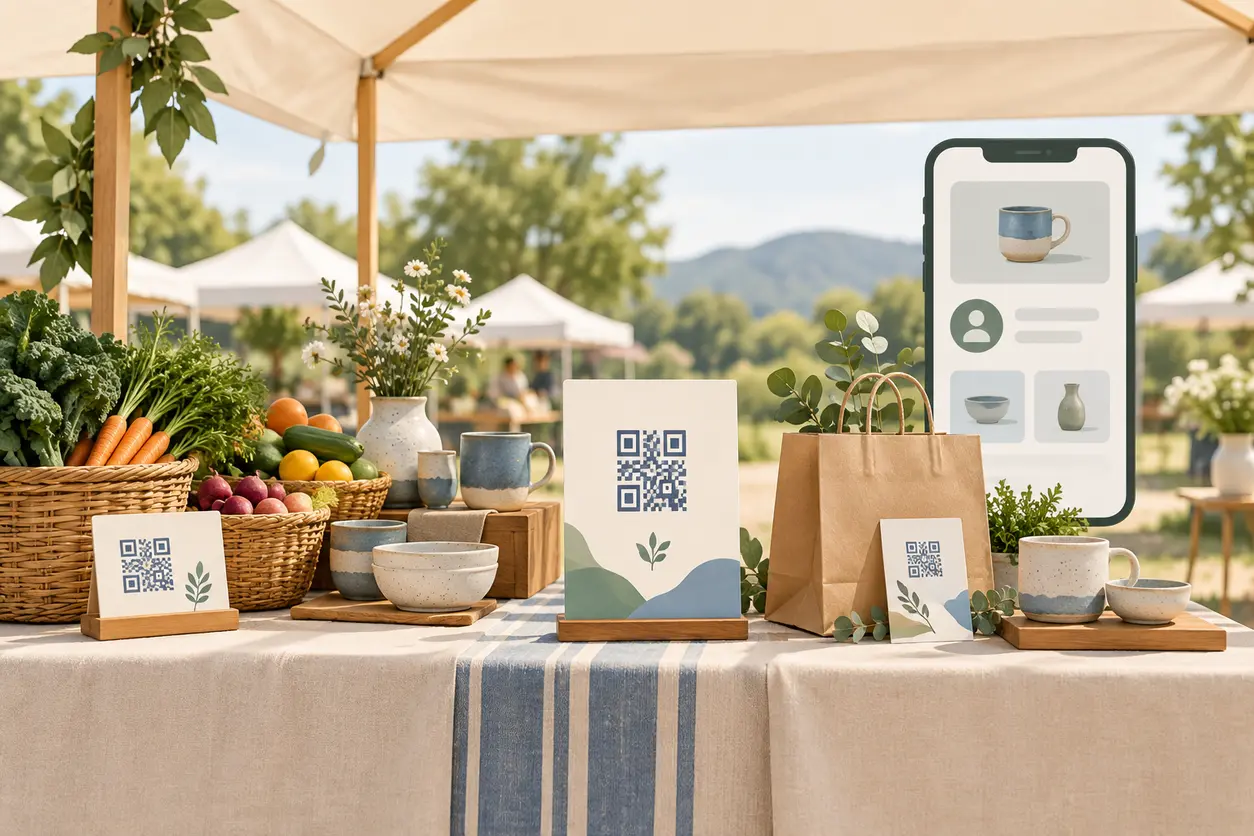
A farmers market QR code should connect that brief conversation to a specific next step: browse your current range, reorder after using a purchase, or choose to receive future market updates.
You do not need a code on every surface. Start with two or three purposeful codes in QR Rapid, prepare the destinations before the event, and review what happened afterward without treating every scan as a sale.
Give each code one job
For a one-day market, plan around the visitor’s situation rather than a long list of QR features.
1. Price-card code: keep the current range within reach
Link price cards to an external, mobile-friendly product list. Include product names, relevant sizes or variations, current prices and availability information you can maintain.
This helps someone who wants to browse while you serve another customer or revisit the range after leaving. Add a clearly labeled route to your existing ordering page if you accept orders between markets.
Suggested CTA: “Scan for the current product list.”
This is proposed sign wording, not a claim about sales results or an invented promotion.
2. Table-sign code: make future contact optional
Send visitors to a short external landing page with your next confirmed appearance, social/profile links and an optional mailing-list signup link or form.
Make the main action obvious. If email updates are the priority, place that invitation first and social links below it. If your social profile is where you publish your schedule, prioritize that instead.
Suggested CTA: “Scan for market updates and social links.”
3. Product-insert code: help buyers reorder
Put a reorder code on a small card inside the purchase bag or alongside the product. Link to the relevant external product or reorder page, not an unrelated homepage.
Suggested CTA: “Enjoyed your purchase? Scan to reorder.”
For a two-code setup, combine the current product list and reorder route into one destination used on price cards and inserts. Keep the stay-in-touch code separate. Remember that reusing the same code means its scan total will not distinguish those two placements.
Choose the QR type around the destination
QR Rapid’s supported QR types include Website URL, List of links, Social media and Coupon options. For this market workflow, choose the simplest type that matches the promised action.
- Website URL: Use it to open your external product list, reorder page or mailing-list landing page. This is the clearest starting point when one action matters most.
- List of links: Consider it when visitors genuinely need a choice between products, social profiles and future market information. Keep the list short.
- Social media: Use it when following your profile is the primary goal, rather than adding an unnecessary intermediate page.
- Coupon: Consider it only if you already have a real offer and a clear redemption process. A coupon code is not required for a useful follow-up setup.
The QR code provides the route. Your external shop handles checkout and payment processing; your mailing platform handles subscriptions; any customer records remain in your chosen systems. This workflow does not rely on a third-party commerce integration with QR Rapid.
Prepare the external pages before designing signs
A useful sign cannot compensate for a confusing destination. Open each page on a phone and check whether the visitor can immediately complete the advertised task.
Product-list page
Show your business name, current range and a visible update date if you maintain one. Separate items available now from items that require an inquiry or future collection. Do not leave a sold-out item looking ready to order.
For makers, distinguish ready-made pieces from custom work. For produce or food sellers, explain whether the list describes today’s stall stock, your broader range or availability for the next collection.
Reorder page
Make the relevant product easy to identify. Include the ordering or inquiry route you actually support, plus accurate delivery, collection or lead-time information.
If online checkout is unavailable, say so. A clearly labeled reorder inquiry form is better than a “Buy now” promise that ends in an inbox with no explanation.
Stay-in-touch page
Keep browsing available without requiring an email address. For the optional signup, explain what updates subscribers will receive and identify your business clearly. Use your external mailing platform’s consent and unsubscribe controls; a QR scan alone is not a signup.
Build and test the setup in QR Rapid
Once the destinations are ready, create the codes around those specific pages rather than choosing a design first.
- Assign a destination and goal. Write down which code serves browsing, future contact or reordering.
- Choose the appropriate type. A Website URL code is suitable for the externally hosted pages described above.
- Decide whether the destination needs to change. QR Rapid describes editable dynamic codes on its product overview. Use a dynamic option when replacing the linked destination is important to your recurring market setup.
- Customize for recognition and readability. Keep the code visually distinct from the background, preserve its clear surrounding space and avoid decorative elements that interfere with scanning.
- Record a plain-language identifier. Use names such as “Market—product list,” “Market—updates” and “Market—reorder insert” in your working notes and any available code-naming fields.
- Print a proof and complete the journey. Scan the actual-size print, open the destination and test the intended action on your phone.
Do not invent a complicated tracking system for one Saturday. A short record of code, destination, placement and intended outcome is enough to keep the setup understandable.
Place codes where the next action makes sense
The aim is not maximum coverage. It is a clear invitation at the moment someone wants more information or a way to return.
Price cards: beside the relevant products
Keep the physical price readable without scanning. The code adds the current range or follow-up route; it should not make visitors unlock basic stall information.
Use one shared product-list code across related cards unless separate product destinations serve a real need. Position it where baskets, sample trays and stock will not cover it.
Table signs: where a visitor can pause
Place the updates sign where people can scan without blocking a purchase or collection. Put the benefit above the code and your business name nearby.
Avoid displaying three competing codes together with identical “Scan me” labels. A visitor should know which action each code opens before reaching for a phone.
Product inserts: where buyers will find them later
Put the reorder card somewhere it will be noticed when the purchase is unpacked. Include your business name and a short written web address or social handle as an alternative.
Use QR Rapid’s QR placement ideas when planning your printed materials, but proof the actual market setup. Check the codes under your canopy, through any sign holder and from the customer’s side of the table.
Reuse printed codes as pop-up venues change
A reusable sign needs both an editable destination strategy and wording that will remain accurate.
A static URL code keeps the same encoded address. You can still update content on a page you control at that address, but the code itself cannot be changed to contain a different URL.
A dynamic code lets you change its destination without replacing the printed pattern. That is useful when your pop-up information moves to a different page or your ordering destination changes. Check the relevant plan and service conditions before relying on long-term printed use.
For example, a table sign labeled “Find our next market” can stay in your kit while its destination is updated for your next confirmed venue. Before each event:
- Confirm the venue, date and collection details on the destination.
- Update the dynamic destination if the page address has changed.
- Scan the existing printed sign again.
- Remove outdated information from the previous appearance.
Do not redirect an old reorder insert to an unrelated event announcement. Customers may scan it well after the original market. Preserve the printed promise: keep reordering prominent and make the next venue a secondary option.
Dynamic destinations do not automatically know which venue a visitor means. You still manage the content and routing.
Review scans and orders as different outcomes
Choose a simple review window before the event—for example, market day through the following week. This is a planning choice, not a performance benchmark.
Use one note or spreadsheet with separate entries for:
- Scans: Recorded activity for each code in the scan reporting available to your account.
- Completed signups: Subscriptions recorded by your external mailing platform, including confirmation where your process requires it.
- Completed orders: Orders recorded by your external shop or ordering process.
- Attribution evidence: Information showing whether an order can reasonably be connected to the market.
Log your own test scans. If you cannot exclude them from reporting, note that limitation. Do not assume a scan count represents unique people: one visitor can scan more than once.
Most importantly, a scan is not an order. A person may open the list, follow a profile and purchase later through another route. Equally, an order arriving after the market is not automatically caused by the QR code.
Where your external tools support it, campaign-tagged destination links or a market-source question can help identify follow-up orders. Those tools provide the order evidence; QR Rapid is not being used as a checkout or CRM.
Keep the conclusions modest and actionable:
- If inserts are scanned but reorders are not evident, check availability, ordering clarity and collection options.
- If the updates code is scanned but signups are low, inspect the signup page and its explanation of future messages.
- If a sign gets little activity, check visibility and CTA relevance before adding more codes.
If the same printed code travels between venues, record when and where it was used. Later scans of an insert may come from home, so do not label every scan as activity at the newest market.
Start small, then improve the next market
Choose your setup based on what you can maintain. Two codes are enough when browsing and reordering share a page. Add a dedicated insert code when buyers need a more direct reorder route or you want to separate that code’s scan activity.
Before choosing a QR Rapid plan, check the dynamic-code allowance, destination-editing options, print-download options and scan reporting relevant to your setup. Do not assume every capability is included in every plan.
Ready to prepare your stall? Start with QR Rapid, connect your external pages, and print one tested proof of each code. Pack the signs with your market kit—and put the post-market review on your calendar before opening day.
FAQ
How many QR codes should I use at a farmers market stall?
Start with two: one for the current product list and reorder route, and one for optional updates or social links. Add a third, dedicated reorder code on product inserts when a direct product destination or separate scan reporting would be useful.
Can I reuse the same printed QR sign at different pop-up venues?
Yes. A dynamic code can retain its printed pattern while you change its destination. Keep the sign wording evergreen, update the venue information before each appearance and test the original print again. Preserve the promised action for customers scanning older inserts.
Does QR Rapid handle payments or subscribe market visitors to my mailing list?
This setup uses QR Rapid to connect visitors to destinations. Checkout and payment processing take place through your external shop or payment provider. Mailing-list signup and subscriber management take place through your external mailing platform; scanning alone does not subscribe someone.
What should a farmers market QR code say beside the code?
Use wording that describes the destination, such as “Scan for the current product list,” “Scan for market updates and social links,” or “Enjoyed your purchase? Scan to reorder.” Avoid generic labels or offers you do not actually provide.
How can I tell whether market QR scans led to repeat orders?
Review code scans separately from completed orders in your external ordering system. Use supported campaign tracking or a market-source question for attribution evidence. Do not count scans as purchases or assume every order after the market came from the code.
Similar Blogs
The latest industry news, interviews, technologies, and resources.
Join 2,000+ subscribers
Stay in the loop with everything you need to know.
We care about your data in our privacy policy