QR Rapid
Dynamic QR Platform
Create QR codes Instantly
Website URL
Send users to any webpage
Website URL
Website URL
Send users to any webpage
Wi-Fi
Let users connect instantly
Wi-Fi
Wi-Fi
Let users connect instantly
Menu
Create a digital menu
Menu
Menu
Create a digital menu
Start a chat with one tap
Start a chat with one tap
Image
Showcase visuals
Image
Image
Showcase visuals
Show a downloadable file
Show a downloadable file
11 Jul 2026 • 11 min read
QR Codes on Product Packaging for Tutorials, Support, and Repeat Purchases
Learn how brands can use QR codes on product packaging to deliver tutorials, reduce support requests, collect reviews, and drive repeat purchases with dynamic, trackable post-purchase workflows.
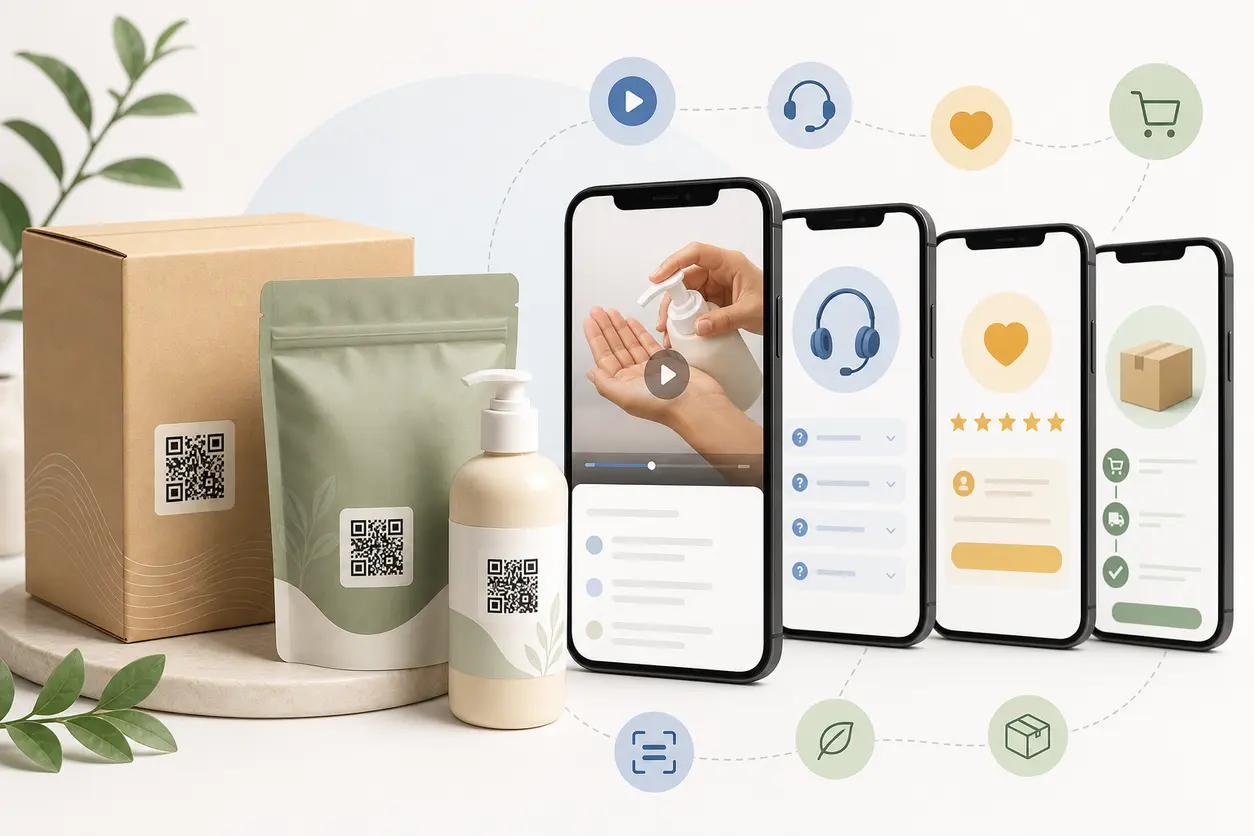
IntroductionWhy packaging QR codes matter after the saleThe best post-purchase uses for QR codes on product packagingWhere to place QR codes on product packagingStatic vs dynamic QR codes for packagingChoose the right destination type for the packaging momentHow to track scans by SKU, batch, and channelCommon mistakes to avoidA practical setup approach with QR RapidWhat to look for when choosing a packaging QR workflowFinal takeawayFAQ
Used well, QR codes on product packaging can help brands answer setup questions, reduce avoidable support tickets, deliver recipes or usage ideas, collect reviews, and make reordering easier. Used poorly, they become a generic link to a homepage that does almost nothing.
The goal is not to add a QR code because packaging has space for one. The goal is to turn one printed code into a practical post-purchase workflow that helps the customer and gives your team more control after packaging is already in the field.
For CPG brands, small manufacturers, private label sellers, and ecommerce operators, that usually means three things:
- the destination should match what the customer needs right after purchase
- the code should be editable after printing
- scan activity should be organized by SKU, batch, or channel so you can learn what happens after the box is opened
Why packaging QR codes matter after the sale
Most packaging already carries the cost of printing, handling, shipping, and shelf competition. A QR code lets you extend that investment into a digital touchpoint without adding another insert, long URL, or extra block of copy.
That matters when customers need more than a label can realistically hold, such as:
- a quick how-to video
- a digital manual or care guide
- a recipe collection
- troubleshooting steps
- refill or reorder links
- a review request after the first use
It also matters operationally. Packaging often stays in market for weeks or months. If instructions change, a campaign ends, or your support content improves, you do not want old packaging pointing to outdated information. That is why dynamic QR codes are usually the better fit for packaging workflows.
The best post-purchase uses for QR codes on product packaging
The highest-performing packaging QR codes usually answer the buyer's next question. That question changes by product category, but the pattern is consistent.
1. Deliver tutorials and setup videos
This is especially useful when a product works better after a quick visual explanation. Think water filters, beauty tools, kitchen tools, home organization products, supplements with mixing directions, or products with multiple ways to use them.
A short mobile-friendly page can include:
- a 30 to 90 second setup video
- first-use instructions
- cleaning or care steps
- a simple troubleshooting link
CTA examples:
- Scan for setup video
- Watch how to use it
- Start here before first use
- Scan for quick instructions
The key is speed. Do not send customers to a long support center if all they need is a single first-use video QR code video.
2. Link to manuals, care guides, or detailed instructions
Some products need more detail than packaging can hold, but you still do not want the code to feel like a documentation archive.
A strong packaging destination might include:
- a quick-start summary at the top
- a downloadable PDF QR code or digital guide below it
- care and storage instructions
- safety notes or usage limits
This keeps the experience practical. The customer gets the short answer first, then the full reference if needed.
3. Share recipes, usage tips, and product inspiration
For food, beverage, wellness, beauty, and household goods, packaging QR codes are often underused as an engagement and retention tool.
Instead of only answering support questions, you can help the buyer get more value from the product:
- recipe collections for sauces, powders, oils, or mixes
- usage routines for skincare or personal care products
- before-and-after care tips for cleaning products
- pairing ideas for specialty foods or drinks
CTA examples:
- Scan for recipes
- Get 5 ways to use this
- See usage tips
- Unlock care and styling ideas
This type of content is good for repeat purchase because it increases product adoption, not just support deflection.
4. Collect reviews at the right moment
A packaging QR code can support review collection, but the destination matters. Asking for a review on first scan is often too early.
A better flow is:
- customer scans from the package
- sees helpful content first
- gets a review prompt after they have had enough time to use the product
That prompt can lead to:
- a review page on your site
- a QR code for Google reviews destination where allowed
- a simple feedback form that separates private complaints from public praise
CTA examples:
- Loved it? Leave a review
- Tell us how it worked for you
- Share your experience
This keeps the QR code useful even for customers who are not ready to review yet.
5. Drive repeat purchases and replenishment
Packaging is one of the most natural places to ask for the next order because the customer already has the product in hand.
Strong destinations include:
- a reorder page for the same SKU
- a subscribe-and-save page
- a bundle page with compatible products
- a coupon or limited offer for the next purchase
- a store locator if retail replenishment matters more than DTC
CTA examples:
- Reorder in seconds
- Scan to buy again
- Refill when you are ready
- Get your next pack here
This is where a packaging QR code becomes more than support content. It becomes a retention channel.
Where to place QR codes on product packaging
Placement has a direct impact on scan rate and post-purchase behavior. The best location depends on when you want the customer to scan.
Best placement options by packaging type
Back or side panel
Best for tutorials, care instructions, and support. Customers look here when they want details.
Near usage directions
Best when the QR code expands on printed steps. This is often the strongest placement for setup, mixing, prep, or application guidance.
Inside flap or under-lid area
Best for post-purchase content you want the buyer to access after opening, such as onboarding, review requests, or reorder prompts.
Insert card or thank-you card
Useful when outer packaging is crowded or retail design rules are strict. This can also separate support content from brand storytelling.
Resealable pouch back panel
Good for repeat-use products where customers may scan more than once for recipes, care tips, or reordering.
Label wrap or bottle neck tag
Helpful when the product itself stays visible longer than the carton.
Placement rules that prevent wasted scans
- keep the code away from folds, seams, and curved distortions when possible
- leave enough white space around the code
- use strong contrast
- pair the code with a clear CTA instead of showing the code alone
- include a short fallback URL for customers who do not want to scan
- test the printed size on the actual material, not just on screen proofs
A QR code without context usually underperforms. A code with a clear action usually earns more scans.
Static vs dynamic QR codes for packaging
If you are printing at any meaningful volume, dynamic QR codes are usually the safer choice.
A static code locks the destination permanently. That can be fine for a fixed page that will never change, but packaging rarely stays that simple. Instructions change. Recipe pages evolve. Support articles move. Campaigns end. Product pages are redesigned.
A dynamic code gives your team more flexibility because the printed code can stay the same while the destination is updated later.
That matters when you need to:
- replace an outdated video
- update a PDF or instruction page
- change a seasonal offer to an evergreen reorder page
- localize content by market
- fix a broken destination without reprinting inventory
For packaging, the decision is usually less about novelty and more about risk control.
Choose the right destination type for the packaging moment
The destination should match the reason the customer is scanning.
Common destination types for packaging include:
- Mobile landing page: best when you want one place for video, FAQs, tips, review requests, and reorder links
- Video page: best for quick assembly, application, or demonstration
- PDF or digital guide: best for detailed instructions, care information, or reference material
- Recipe or inspiration page: best for food, beverage, wellness, or beauty products
- Support page: best when customers need troubleshooting or contact options
- Reorder page: best for replenishable products
In many cases, the most effective option is a lightweight landing page that puts the top task first and secondary links below it.
For example:
- top section: watch setup video
- second section: read care tips
- third section: leave a review
- fourth section: reorder now
That structure turns one packaging code into a small post-purchase hub instead of forcing the customer into multiple disconnected links.
How to track scans by SKU, batch, and channel
This is where many brands lose useful data. They print one code for the entire product line, then cannot tell which package actually drove the scan.
A better approach is to create separate dynamic codes whenever one of these variables matters to reporting or customer experience:
- SKU or product variation
- package size or format
- sales channel such as Amazon, DTC, wholesale, or retail
- region or language
- packaging version or artwork revision
- batch or lot, if instructions or engagement may differ
A simple naming structure
Use a consistent internal naming format such as:
brand-sku-channel-packversion-batch-region
Example:
clearflow-filter3-amazon-v2-b2405-us
That naming pattern makes it easier for marketing, ops, and customer support to identify exactly which printed code belongs to which packaging run.
Concise implementation example
Imagine a private label water filter brand selling the same 3-pack through DTC, Amazon, and retail.
Instead of printing one QR code across every package, the brand creates separate dynamic codes such as:
- clearflow-filter3-dtc-v2-b2405-us
- clearflow-filter3-amazon-v2-b2405-us
- clearflow-filter3-retail-v2-b2405-us
All three codes can route to the same mobile page concept, but each code is tracked separately. If batch B2406 introduces a slightly different cap design and needs an updated install video, the brand creates a new batch-specific code for that run. Older inventory can keep pointing to the old instructions, while new packaging points to the revised version.
That gives the team practical visibility into questions like:
- which channel drives the most first-use scans
- whether a new packaging CTA improved engagement
- whether one batch triggered more support-page visits than another
- how often support content leads to reorder clicks
This is the real value of packaging QR data: not vanity scan counts, but clearer post-purchase behavior.
Common mistakes to avoid
Sending scans to the homepage
This is the most common packaging mistake. A homepage creates friction because customers still have to find the content they needed.
Using one code for every product
A single code for the entire catalog makes reporting vague and limits your ability to tailor content by SKU.
Treating every scan the same
A first-use tutorial scan is different from a reorder scan. Structure the destination so the main action matches the likely customer moment.
Forgetting packaging version control
If your print vendor, packaging designer, and ecommerce team are not aligned on which code belongs to which revision, reporting becomes messy fast.
Overloading the landing page
The best post-purchase pages are simple. Put the primary action first, then secondary links below it.
A practical setup approach with QR Rapid
If you want to build this workflow in QR Rapid, keep the setup simple and operational.
- Create a dynamic QR code for each packaging variant you want to manage separately.
- Name each code by SKU, channel, packaging version, and batch so reporting stays readable.
- Send scans to a mobile-friendly destination built for one clear post-purchase task, such as a tutorial page, recipe page, support page, or reorder page.
- Test the printed code on the real package material before a full run.
- After launch, update the destination as content changes rather than treating the packaging link as permanent.
The point is not to make packaging more complicated. The point is to give your team a way to improve support, education, and retention without wasting printed inventory.
What to look for when choosing a packaging QR workflow
If you are evaluating tools or processes for QR codes on product packaging, focus on a few practical requirements:
- dynamic destination editing after printing
- organized code naming for SKU and batch management
- reliable print exports for packaging production
- simple routing to mobile-friendly content
- reporting that helps your team interpret scans by product variation or channel
Those are the capabilities that make packaging QR programs sustainable beyond a one-off campaign.
Final takeaway
The best QR codes on product packaging do not just link somewhere. They solve the next customer need.
For one product, that may be a setup video. For another, it may be recipes, care tips, a support flow, or a reorder page. The strongest packaging programs combine those moments into one clear post-purchase journey, then organize the codes so each SKU, batch, or sales channel can be measured and improved over time.
If you want a practical starting point, begin with one high-volume SKU, give it a dedicated dynamic code, place it near the usage instructions, and send scans to a page with one primary action and one secondary retention action. From there, expand the system across more SKUs and packaging runs using QR Rapid as the tool for creating and managing the codes you need.
FAQ
Where should I place a QR code on product packaging for the highest scan rate?
Place it where the customer naturally looks for help or next steps, usually near usage directions, on the back or side panel, or inside the opening area for post-purchase actions.
Should every SKU have its own packaging QR code?
Yes, if you want cleaner tracking and better customer routing. Separate codes by SKU help you measure engagement accurately and send each buyer to the most relevant content.
When does batch-level QR code tracking make sense?
Use batch-level tracking when packaging revisions, instruction changes, regional differences, or manufacturing updates could affect customer behavior or support needs.
What should a packaging QR code link to first?
Link to the most likely post-purchase need first, such as a setup video, quick-start instructions, recipe page, care tips, or reorder page. Do not send customers to a generic homepage.
Are dynamic QR codes better than static QR codes for packaging?
Usually yes. Dynamic codes are better for packaging because you can update the destination after printing, which is useful when instructions, campaigns, or support content change.
Can QR codes on product packaging help drive repeat purchases?
Yes, especially for replenishable or repeat-use products. A packaging QR code can lead customers from helpful post-purchase content to a reorder, bundle, or subscription page when they are ready to buy again.
Similar Blogs
The latest industry news, interviews, technologies, and resources.
 June 27, 2026
QR Codes for Real Estate Open Houses and Property Flyers
QR Codes for Real Estate Open Houses and Property Flyers
Read post
 August 5, 2025
Video QR Codes: Captivate Viewers & Deliver Dynamic Content Fast
Video QR Codes: Captivate Viewers & Deliver Dynamic Content Fast
Read post
Join 2,000+ subscribers
Stay in the loop with everything you need to know.
We care about your data in our privacy policy