
Dynamic QR Platform
Create QR codes Instantly
Website URL
Send users to any webpage
Website URL
Website URL
Send users to any webpage
Wi-Fi
Let users connect instantly
Wi-Fi
Wi-Fi
Let users connect instantly
Menu
Create a digital menu
Menu
Menu
Create a digital menu
Start a chat with one tap
Start a chat with one tap
Image
Showcase visuals
Image
Image
Showcase visuals
Show a downloadable file
Show a downloadable file
05 Oct 2026 • 12 min read
QR Codes and the EU Digital Identity Wallet: How QR-Based Payment Authentication Works
A practical guide to EUDI Wallet QR-based payment authentication, covering the end-of-2026 rollout, request handoff, consent, privacy, online and in-store journeys, and merchant preparation.
IntroductionWhat the end-of-2026 rollout meansWhat the QR code actually doesThe Commission's e-commerce scan journeyConsent, identity attributes and age checksOnline versus in-store wallet handoffsWhy this differs from a generic payment QR codeSecurity considerations to build into testingA practical readiness plan for merchants and fintech teamsWhere QR Rapid fits—and where it does notFAQ
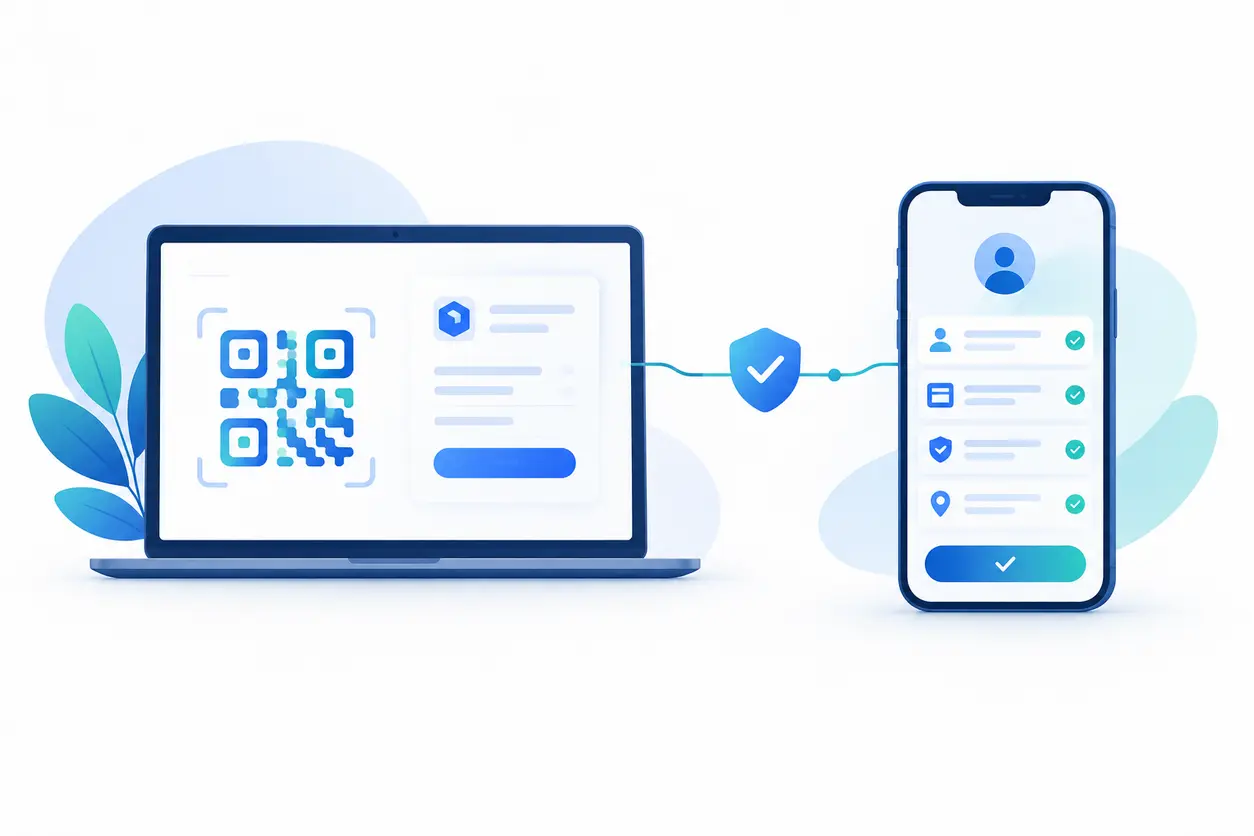
That distinction matters for European merchants, fintech teams and payment providers preparing for wallet adoption. The European Commission's 2026 Payment Authentication manual explicitly illustrates an e-commerce journey in which the customer scans a QR code with the EUDI Wallet to proceed.
The square on the checkout screen is only the visible handoff. The important work happens behind it: creating the request, establishing who is asking, showing the customer what they are approving, validating the response and returning the result to the correct checkout session.
This guide explains that pattern and how to prepare for it. QR Rapid is a QR code generator, not an EUDI identity or payment-authentication provider. Its useful role here is supporting clearly separated informational QR destinations, such as wallet guidance and merchant help pages—not replacing the wallet integration.
What the end-of-2026 rollout means
EU Member States are required to provide European Digital Identity Wallets by the end of 2026, according to the Commission's EUDI Regulation overview. This is a wallet-provision milestone, not a promise that every checkout, terminal or payment provider will support every wallet journey on that date.
The Commission describes the wallet as a way for people to identify themselves digitally and share identity-related information while retaining control over their data. Its European Digital Identity Wallet factpage explains the wider purpose beyond payments.
For businesses, the practical question is therefore not just whether customers will have a wallet. It is whether your payment provider, checkout platform and authentication infrastructure can support the relevant journey together.
Keep three readiness questions separate:
- Wallet availability: Which wallets will customers actually be able to use?
- Integration availability: Which wallet interactions does your provider support and validate?
- Operational readiness: Can your checkout handle approval, refusal, timeout and recovery without confusing customers?
Do not treat the rollout date as a universal merchant acceptance deadline. Any acceptance obligations, implementation scope or contractual requirements should be reviewed separately with your provider and legal team.
What the QR code actually does
In this use case, the QR code is a request-handoff mechanism. It gives the customer's wallet a way to enter the authentication interaction associated with checkout.
Think of it as an entrance to a controlled conversation, rather than the conversation itself. Reading the code does not independently prove identity, authorize a payment or establish that a merchant is trustworthy.
Depending on the implemented protocol, a QR payload might contain request information or a reference that lets the wallet retrieve it. The exact payload, supported URI handling and validation rules must come from the integration specification—not from a general-purpose QR generator.
For planning purposes, distinguish three layers:
The visible QR symbol
This is the code rendered on the merchant's screen. It must be readable, clearly associated with the active checkout and accompanied by an accurate instruction.
The authentication request
This is the structured interaction behind the symbol. The responsible provider must define what is being requested, how the requester is identified and how the request relates to the payment session.
The verified result
This is the outcome the checkout receives after the wallet interaction has been processed and checked. A successful scan is not a verified result, and a verified authentication result is not necessarily a completed payment.
A team that measures only scans will miss the most important distinction: the difference between opening a journey and completing the required backend checks.
The Commission's e-commerce scan journey
The Commission's Payment Authentication manual provides the concrete starting point: a customer scans a checkout QR code with the EUDI Wallet to proceed with payment authentication.
The following sequence is a practical explanation of the handoff pattern, not a substitute for the manual's technical implementation or a claim that every wallet uses identical screens.
1. Checkout creates an authentication context
The shopper reaches the relevant payment stage. The merchant's checkout and payment infrastructure need an identifiable session to which the authentication interaction can be attached.
Before displaying anything, agree which system owns request creation. A merchant frontend should not improvise its own wallet request simply because it can render a QR image.
2. The checkout displays the provider-generated handoff
The checkout presents the QR code and explains what the customer should do. For example, an illustrative instruction could be: “Open your supported identity wallet and scan to continue payment authentication.”
The instruction should name the intended action without promising that scanning completes the purchase. Display waiting, expiry and cancellation states alongside the handoff.
3. The customer scans with the wallet
The scan moves the interaction from the checkout display to the customer's phone. The wallet then handles the request according to its supported integration.
This is particularly useful in a cross-device journey: checkout is on a laptop, while the wallet is on the customer's phone. The customer does not need to manually copy a long request reference between devices.
4. The customer reviews and approves or declines
The wallet interaction should make the requester, purpose and relevant approval details understandable. Design the surrounding checkout copy so that customers expect a review step, not an automatic transfer after scanning.
Do not describe opening the wallet, unlocking it, sharing an attribute and approving payment authentication as one interchangeable action. Your provider should explain which actions occur in its implementation and what each result means.
5. The backend checks the response
The responsible authentication infrastructure validates the response and associates it with the original session. The merchant should consume the documented result through the agreed backend interface.
Do not accept a customer's screenshot or a frontend animation as evidence of successful authentication. Those are presentation artifacts, not trustworthy payment-status messages.
6. Checkout proceeds and shows the correct outcome
After authentication, the payment process still needs its own status handling. Use separate messages for authentication completed, payment processing, payment successful and payment unsuccessful where appropriate.
This avoids a costly support problem: a customer believing they have paid because the wallet interaction succeeded when the payment itself did not complete.
Consent, identity attributes and age checks
The wallet's wider purpose includes sharing identity information under user control, as explained in the Commission's wallet factpage. That does not mean every payment authentication journey should collect the customer's full identity profile.
Start with the business purpose, then determine the minimum information needed. Treat these as distinct requirements:
- Payment authentication: Establishing the authentication outcome required for the payment journey.
- Identity verification: Checking identity information for a separately defined purpose.
- Age verification: Checking whether the customer meets an age threshold.
A retailer selling an age-restricted product might need both an age check and payment authentication. That is an illustrative design scenario, not evidence that the Commission's payment scan flow automatically includes an age request.
For such a scenario, ask the integration provider whether an appropriate age-threshold attribute is supported. Do not default to requesting a complete date of birth or identity document when a narrower result could meet the purpose.
Also distinguish user approval within the wallet from the legal basis for your business's data processing. A consent-looking screen should not be treated as a complete privacy compliance assessment.
Practical review questions include:
- What information does the merchant receive, rather than just the wallet display?
- Which party requests each attribute, and for what purpose?
- Can the user understand and decline the request?
- What happens to checkout if an optional attribute is refused?
- Which data enters logs, support tools and analytics?
Design the merchant interface around clear purpose statements. Avoid vague prompts such as “Share your details to continue” when the actual request can be explained more precisely.
Online versus in-store wallet handoffs
The Commission's cited manual shows the e-commerce QR journey. In-store preparation should be treated as a separate design exercise, not assumed to be an identical supported deployment.
Desktop e-commerce: a natural cross-device scan
A laptop or desktop checkout can display the code while the customer scans with their phone. The desktop should remain in a waiting state and recover gracefully if the request expires or the shopper cancels.
Test display readability across browser zoom levels, small windows and different screen brightness settings. Keep sufficient clear space around the symbol and avoid decorative overlays on the authentication code.
Mobile e-commerce: avoid a scan-only dead end
A customer cannot conveniently point their phone's camera at a code displayed on that same phone. Ask your provider what supported same-device handoff exists, such as an approved app-opening interaction.
Do not assume an ordinary web link is equivalent to a wallet handoff. Test the supported browsers, operating systems and wallet combinations before offering the option in production.
In-store: establish support before designing signage
A customer-facing checkout display could be considered for a wallet authentication handoff if the payment and wallet integration supports that scenario. Confirm the supported proximity flow and terminal architecture first.
For an illustrative implementation, the displayed request should relate to the active sale, and staff should receive the result through the checkout system. Cashiers should not need to inspect personal information on the shopper's phone.
A permanent counter sticker linking to wallet instructions is different from a transaction-specific authentication request. Label those two codes differently and keep them physically separate.
Why this differs from a generic payment QR code
A generic payment QR code might open a hosted payment page or provide payment details. Its purpose is usually to help the customer reach a payment destination or populate payment information.
An EUDI Wallet authentication handoff instead brings a request into an identity-wallet interaction. Its value depends on the participating systems validating that interaction, not merely on encoding a destination correctly.
Compare the operational requirements:
- Destination QR: The main question is whether the intended page or payment details open correctly.
- Wallet authentication QR: The main questions include requester validation, session association, customer approval, response checking and payment-provider interpretation.
- Informational QR: The main question is whether customers reach useful guidance without disclosing unnecessary information.
This is also why a marketing-style dynamic redirect is not automatically appropriate for authentication. An editable web destination and a transaction-specific security request solve different problems.
Do not insert an extra redirect or tracking service into the authentication path unless the provider explicitly supports it. Additional routing could affect handling, privacy or trust assumptions and needs integration-specific review.
Security considerations to build into testing
The following are implementation-review recommendations, not a complete statement of EUDI protocol requirements. Use them to structure questions for your payment provider and security team.
Request substitution
Test what happens if the displayed code is replaced with another request or destination. The wallet and backend should not rely on the appearance of the merchant page alone to establish trust.
For physical environments, include display and signage inspection in staff procedures. Teach customers to check the requester shown in the wallet rather than trusting the square simply because it is near a checkout.
Expiry, replay and session confusion
Ask how the integration handles expired requests, reuse attempts and multiple open browser tabs. Test approval after cancellation, refreshing the checkout and scanning the same code more than once.
The desired result is unambiguous: an old or unrelated response must not complete the wrong active order. Your provider should document how it achieves and signals that result.
Transaction review and strong customer authentication
The Commission frames the wallet journey as payment authentication. Do not turn that into a blanket claim that any wallet scan satisfies strong customer authentication obligations.
Ask the payment provider to explain where the wallet interaction fits in its authentication model, how transaction details are bound to approval where required, and which party assesses the applicable requirements. A QR code itself is not an authentication factor or a compliance certificate.
Data exposure and logging
Review QR payloads, browser logs, telemetry and support exports. Avoid placing unnecessary personal information in visible codes or analytics fields.
Separate scan diagnostics from credential and payment records. Support teams generally need an actionable status and a safe reference, not unrestricted access to identity attributes.
A practical readiness plan for merchants and fintech teams
Assign ownership before building the screen
Identify the owner of request creation, wallet compatibility, response verification, payment authorization and customer support. Document the boundaries between the merchant, payment provider and wallet-facing infrastructure.
An attractive checkout prototype cannot resolve missing ownership of the verification step.
Obtain a supported integration specification
Request documentation for payload generation, wallet handoff, supported environments, response states and test tooling. Ask explicitly whether the implementation supports the Commission-style cross-device scan journey, same-device checkout and any proposed in-store flow.
Do not infer compatibility from the phrase “QR payments” in a provider's product description.
Test failures as carefully as success
Include customer refusal, unsupported wallet, lost connectivity, expired request, duplicate callbacks and payment failure after authentication success. Define what shoppers and staff see in each case.
Keep a usable fallback for customers who cannot or choose not to complete the wallet journey, subject to the requirements of your payment setup.
Measure stages without overcollecting
Track the difference between handoff displayed, wallet interaction started, authentication result received and payment completed. Use provider-supported telemetry rather than assuming generic QR scan analytics can report authenticated outcomes.
Aggregate operational events where possible, and review any identity-linked measurement separately with your privacy team.
Where QR Rapid fits—and where it does not
QR Rapid can help create ordinary QR codes that point to merchant-controlled educational destinations: a wallet readiness guide, checkout help page or staff training resource.
For example, a clearly labeled “Learn about wallet authentication” code on a help card can open a page explaining what the customer should expect. It should not be presented as the code that approves the current transaction.
Use a simple boundary:
- QR Rapid: Generate supporting informational QR codes and test their destinations and presentation.
- Wallet and payment integration: Generate and validate authentication requests, handle identity attributes and process verified results.
Do not claim QR Rapid provides EUDI Wallet protocol compatibility, identity verification, age verification or payment authentication. Creating a readable QR symbol is not the same as implementing those capabilities.
For preparation work, create an informational QR code with QR Rapid that links to your approved wallet help page. Keep production authentication codes under the control of the implemented payment and wallet integration. That gives customers useful guidance without confusing an emerging identity-wallet journey with a generic scan-to-pay link.
FAQ
Does scanning an EUDI Wallet QR code complete the payment?
Not by itself. Scanning starts or continues the wallet interaction. Authentication must be validated, and the payment system must separately confirm the payment outcome.
Will every merchant need an EUDI Wallet QR code by the end of 2026?
The end-of-2026 milestone concerns Member States providing wallets. It should not be interpreted as a universal deadline for every merchant to implement a QR-based checkout. Review your specific obligations and provider readiness separately.
Can QR Rapid generate a production EUDI payment-authentication request?
Do not assume that capability. QR Rapid can generate supporting informational QR codes, but EUDI request generation, protocol compatibility and response verification require an implemented wallet and payment integration.
Does wallet payment authentication automatically share the customer's age?
No. Payment authentication and age verification are separate purposes. Any age-related attribute request needs its own supported implementation and clear explanation to the customer.
How should a mobile checkout handle a QR code displayed on the same phone?
Ask the integration provider for its supported same-device handoff. Do not make scanning the phone's own screen the only option or assume that a generic link can replace the required wallet interaction.
Similar Blogs
The latest industry news, interviews, technologies, and resources.
Join 2,000+ subscribers
Stay in the loop with everything you need to know.
We care about your data in our privacy policy