
Dynamic QR Platform
Create QR codes Instantly
Website URL
Send users to any webpage
Website URL
Website URL
Send users to any webpage
Wi-Fi
Let users connect instantly
Wi-Fi
Wi-Fi
Let users connect instantly
Menu
Create a digital menu
Menu
Menu
Create a digital menu
Start a chat with one tap
Start a chat with one tap
Image
Showcase visuals
Image
Image
Showcase visuals
Show a downloadable file
Show a downloadable file
21 Jun 2026 • 11 min read
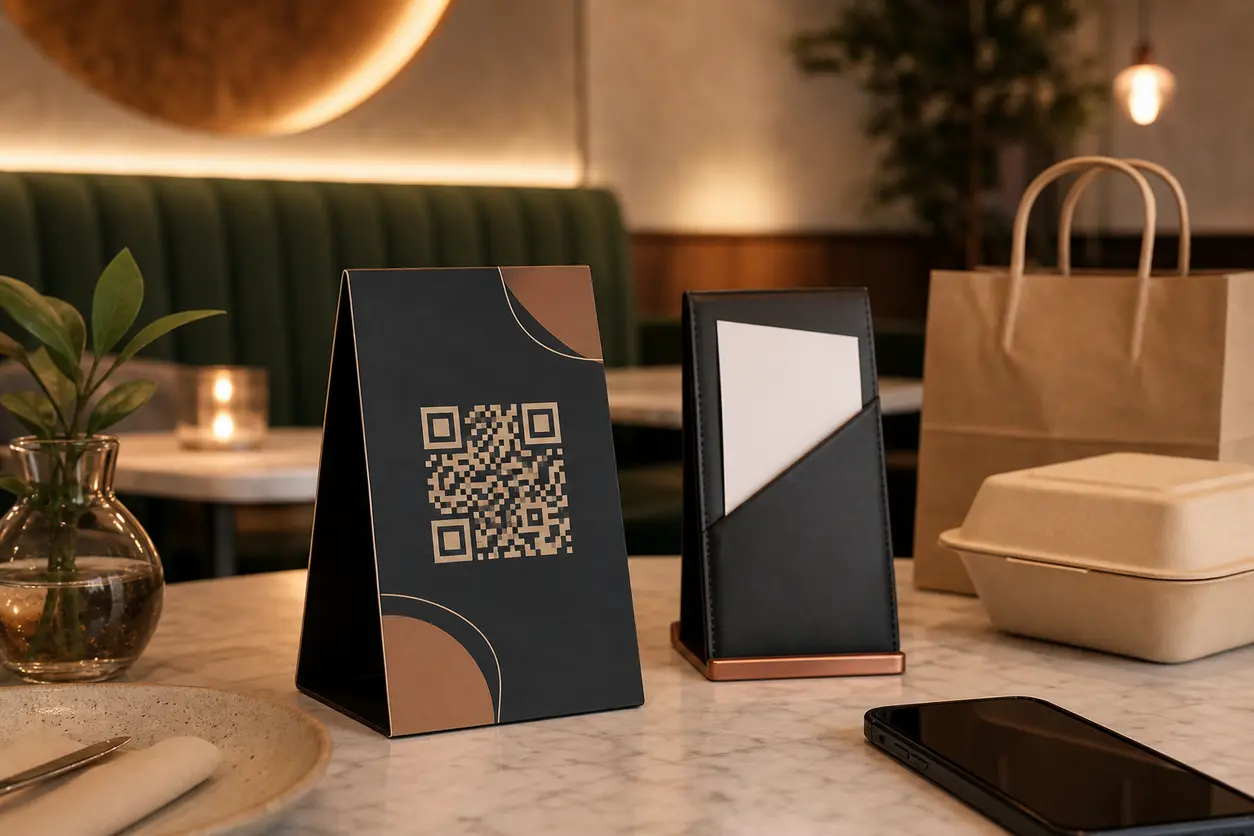
QR Codes for Restaurant Table Tents That Drive Reviews and Repeat Visits
Learn how to use a restaurant review QR code on table tents, receipts, and takeout packaging to collect more Google reviews, capture private feedback, grow loyalty signups, and drive return visits with trackable QR workflows.
IntroductionFinal takeawayFAQHow to separate public reviews from private feedback without creating frictionA real-world example: one table tent, two outcomes, one repeat-visit offerReady-to-use CTA lines for your table tent or receiptWhy dynamic QR codes are the right fit for restaurant campaignsHow to track which locations, shifts, or placements actually drive resultsCommon mistakes that hurt scan rates and conversionHow to launch this workflow with QR RapidWhy a table tent QR code works better than a passive review reminderPick the right destination before you generate the codeWhere to place a restaurant review QR code for the most scans
- Track scan activity for two to four weeks
- Adjust copy, placement, or destination based on which surface performs best
- Roll the improved version out to additional locations
That approach keeps the launch simple while giving you clean attribution from the beginning.
Final takeaway
Restaurants do not need another generic QR code on the table. They need a post-meal workflow that turns attention into action.
A smart restaurant review QR code can help you collect more public reviews, route private issues into the right channel, capture loyalty signups, and create clear next-visit prompts from table tents, receipts, and takeout packaging.
The best setup is usually not a single direct link pasted everywhere. It is a structured system: dynamic codes, a short landing page, separate tracking by placement, and messaging that matches the moment.
If you want to launch a campaign that drives both reviews and repeat visits, build it in QR Rapid. Start with one dynamic code set for table tents, receipts, and takeout packaging, track what gets scanned, and refine the flow before expanding across every location.
FAQ
What is the best destination for a restaurant review QR code?
For many restaurants, the best destination is a short landing page that asks about the guest experience first, then routes happy guests to a public review page and unhappy guests to a private feedback form.
Should I use the same QR code on table tents, receipts, and takeout packaging?
You can, but separate dynamic codes usually work better. They let you track which placement drives the most scans, reviews, feedback submissions, or return-visit actions.
Can a restaurant review QR code also support loyalty and repeat visits?
Yes. A single workflow can invite guests to leave a review or submit feedback, then show a loyalty signup or bounce-back offer after that step. This is a practical way to connect reputation management with retention.
Why is a dynamic QR code better than a static code for restaurants?
Dynamic QR codes let you change the destination without reprinting table tents, receipts, or packaging. They also make it easier to track scans by location, placement, shift, or campaign.
Are there compliance risks when asking for reviews with QR codes?
Yes. Restaurants should avoid offering rewards specifically for positive reviews or asking only for 5-star ratings. Ask for honest feedback, keep your flow neutral, and review the policies of the review platform you use.
Where should restaurants place review QR codes for the highest scan rate?
Table tents are usually the best dine-in placement because guests see them while seated. Receipts and check presenters are strong secondary placements, and takeout bags or to-go receipts work well for off-premise orders.
How to separate public reviews from private feedback without creating friction
This is where the workflow becomes valuable.
If every guest goes directly to a public review page, unhappy customers may vent there first. If every guest only sees a private survey, you miss the chance to capture positive social proof.
A practical middle ground is a neutral landing page.
Recommended split-flow setup
The QR code opens a short page with a question such as:
How was your visit today?
Then present two simple choices:
- Excellent experience
- Could have been better
From there:
- positive responses go to your public review destination
- negative responses go to a private form for details
Keep the page short. No long survey. No multiple fields before the first choice.
Important compliance note
Be careful with review platform policies and review incentives.
Use these rules as a baseline:
- ask for honest feedback, not only positive feedback
- do not offer rewards in exchange for a positive review
- do not promise a discount only if the guest leaves a 5-star rating
- keep the feedback step focused on service recovery and operational insight
- review the terms of the platform you use, since policies can vary
A loyalty perk or bounce-back offer can be shown after the interaction, but it should not be conditional on leaving a favorable public review.
A real-world example: one table tent, two outcomes, one repeat-visit offer
Here is a simple workflow a neighborhood café could launch in a week.
Scenario
The café wants three things:
- more Google reviews
- fewer unresolved complaints posted publicly
- more weekday repeat visits
Setup
- Create a dynamic QR code in QR Rapid for dine-in table tents
- Send scans to a mobile landing page that asks, 'How was your visit today?'
- If the guest taps 'Loved it,' send them to the Google review page
- If the guest taps 'Needs work,' send them to a short private feedback form
- After either path, show a bounce-back message for a weekday pastry-and-coffee offer
- Create separate dynamic codes for receipts and takeout bags so performance can be compared later
What the manager learns after launch
Because each placement has its own code, the team can see:
- table tents produce the most scans overall
- takeout packaging produces fewer scans but more offer redemptions
- dinner shift generates more review completions than lunch
- the patio section gets strong scan volume but more negative feedback about speed
That gives the café something actionable. It is no longer guessing whether the campaign works or where the guest experience breaks down.
Ready-to-use CTA lines for your table tent or receipt
Most restaurants weaken their campaign with vague copy like 'Scan me' or 'Follow us.' Be specific about what happens next.
Try one of these:
- Loved your meal? Scan to leave a quick review
- Tell us how we did and get your next-visit perk
- Scan to rate your visit and join rewards
- Enjoyed your experience? Share it in a quick Google review
- Ordered takeout? Scan to review it and come back soon
If the goal is reputation, lead with the review. If the goal is recovery, lead with feedback. If the goal is frequency, lead with rewards.
Why dynamic QR codes are the right fit for restaurant campaigns
A static code locks you into one destination forever. That is a poor match for restaurants, where offers, landing pages, and review priorities change often.
A dynamic vs static QR codes setup gives you flexibility:
- change the destination without reprinting the code
- swap from a review push to a loyalty signup later
- test different landing pages by location
- keep seasonal promotions fresh on the same printed materials
- track scans from each placement
For example, a bar could keep the same branded tabletop print piece for months while changing the campaign destination from review capture to event signup to a slow-night bounce-back offer.
How to track which locations, shifts, or placements actually drive results
A restaurant review QR code should never be a black box. Tracking is what turns the campaign from a nice idea into an operational tool.
Track by location
If you run multiple locations, create separate codes for each store. Even if the landing page looks the same, location-level codes help you compare scan volume and engagement patterns.
Track by placement
Use different codes for:
- table tents
- receipts
- takeout packaging
- bar tops
- host stand signage
This shows which touchpoint deserves more attention and which one is mostly decorative.
Track by shift or daypart
If you want deeper insight, create separate code versions for lunch and dinner, or weekday and weekend. This can reveal useful patterns such as stronger review completion on dinner service or higher bounce-back uptake from weekday takeout.
Track by dining area
Larger restaurants can assign different codes to patio, bar, dining room, or private event sections. If one area creates far more complaints or far more reviews, you can investigate staffing, timing, or service flow.
Common mistakes that hurt scan rates and conversion
Avoid these issues when launching your campaign:
- sending scans to your homepage instead of a focused destination
- using the same untracked code on every placement
- making the QR code too small or cluttered
- adding too many offers to one table tent
- forcing guests through a long survey before the main action
- printing static codes for campaigns that will change
- asking for positive reviews in exchange for rewards
- skipping staff training entirely
A short explanation from staff often lifts performance because it gives the code context.
How to launch this workflow with QR Rapid
QR Rapid is a strong fit for this use case because restaurant teams need flexibility after printed materials are already in the building.
With QR Rapid, you can:
- create dynamic QR codes for review, feedback, loyalty, or return-visit campaigns
- build separate codes for each location, placement, or shift
- update destinations later without replacing existing table tents or packaging
- use branded/custom QR codes that fit your restaurant's visual style
- monitor scan activity so you know which placements deserve expansion
A practical rollout looks like this:
- Start with one location
- Create three codes in QR Rapid: table tent, receipt, and takeout
Restaurants already use QR codes for menus. The bigger revenue opportunity starts after the meal.
A well-planned restaurant review QR code can turn the last few minutes of a visit into a measurable conversion point. Instead of hoping guests remember to review you later, you can guide them to the next best action while the experience is still fresh: leave a Google review, share private feedback, join your loyalty program, claim a bounce-back offer, or submit an email or SMS opt-in through your landing page.
For restaurant owners, cafés, bars, and hospitality marketers, that matters because post-visit actions directly affect reputation and repeat traffic. Reviews strengthen local visibility. Private feedback helps fix service issues before they spread. Loyalty capture gives you a reason to bring guests back.
With QR Rapid, you can build this workflow with dynamic QR code generator technology, track scans by placement or location, and update destinations later without reprinting every table tent or receipt.
Why a table tent QR code works better than a passive review reminder
A generic line on the receipt often gets ignored because it asks guests to take action later. A table tent puts the scan prompt in front of them while they are still seated, phone in hand, and deciding whether to linger for another minute.
That changes the behavior window.
A good table tent QR code for restaurants works because it appears when guests can actually act on it:
- the meal is still top of mind
- the service experience feels recent and specific
- the phone is already out for payment, photos, or messages
- the next step takes seconds instead of becoming a later task
Used well, the same code can support more than one business goal. It can collect reviews, route complaints into a private form, and follow up with a repeat-visit incentive or loyalty signup.
Pick the right destination before you generate the code
The code itself is not the strategy. The destination is.
Before creating your campaign, decide what outcome matters most this month.
1. Direct to Google reviews
If your priority is volume on your public profile, a Google review QR code restaurant setup can link straight to your review form.
This works best when:
- guest satisfaction is already consistently strong
- your restaurant needs fresher review activity
- staff can naturally prompt tables at the right moment
Good direct CTAs include:
- Loved your visit? Scan to leave a quick Google review
- Tell other diners what you ordered
- Enjoyed dinner? Share your experience in under a minute
2. Send guests to a feedback page first
For many restaurants, this is the smarter long-term workflow.
The QR code opens a simple mobile landing page with one question: *How was your visit today?*
From there, guests choose a path:
- Great experience -> public review page
- Need improvement -> private feedback form
This structure gives you two benefits at once:
- happy guests get a clean route to leave public praise
- frustrated guests get a direct service-recovery channel
A restaurant feedback QR code is especially useful for full-service restaurants, bars, and venues where wait times, staff interaction, and order accuracy vary by shift.
3. Route into loyalty signup after feedback
If repeat traffic is more valuable than pure review count, combine feedback with membership capture.
Example flow:
- Guest scans the code
- Guest rates the visit
- Happy guests are invited to leave a review
- All guests see a loyalty signup or return-visit offer
This is a strong fit for coffee shops, neighborhood restaurants, casual dining groups, and bars that depend on frequency.
4. Lead with a bounce-back offer
A bounce-back offer is useful when you want to influence the next visit, not just the current one.
Examples:
- Scan for a weekday lunch offer
- Join our list for next month's tasting event
- Share feedback and get your next-visit perk
This can help fill slower dayparts without changing your printed materials every time the promotion changes.
5. Capture email or SMS through a landing page
If your team wants more owned audience data, use the QR code to send guests to a landing page that collects opt-ins for:
- happy hour alerts
- seasonal menu drops
- birthday offers
- live music announcements
- catering updates
This turns a review moment into a retention asset.
Where to place a restaurant review QR code for the most scans
Placement determines whether guests notice the code at all. The highest-performing surfaces are the ones that appear at the end of the meal or travel home with the order.
Table tents
Table tents should be the main placement for dine-in. They create the clearest scan opportunity between the last bite and payment.
Best practices:
- print the QR code on both sides
- keep one main CTA instead of listing five different actions
- use a short supporting line under the headline
- make the code large enough to scan from a seated position
- avoid crowding it with social icons, full menus, and long paragraphs
A simple table tent structure:
Front
- Headline: Loved your visit?
- QR code centered
- Support line: Scan to review us or share quick feedback
Back
- Small reminder: Join rewards for your next visit
- Secondary note: Takes less than a minute
Check presenters and receipts
A receipt QR code for reviews works because it appears at the payment moment. It is especially effective when paired with a short verbal mention from staff.
Example server prompt:
'There's a quick feedback QR code on the receipt if you'd like to share anything from tonight.'
Use receipts and check presenters for:
- review prompts
- private feedback
- loyalty signup
- next-visit offers
Takeout bags, cups, and packaging
Off-premise orders are easy to overlook, but they are ideal for repeat-visit campaigns. A takeout packaging QR code lets you capture feedback from guests who never sat at a table.
Good placements include:
- bag stickers
- cup labels
- to-go receipts
- insert cards
- catering handouts
Off-premise CTA examples:
- How was your order? Scan to rate it
- Review your takeout experience and get a next-visit offer
- Join rewards before your next order
Exit signage and counter displays
These are useful supporting placements, but they should reinforce your main flow rather than carry the whole campaign. If guests only see the code at the door, many will keep walking.
Similar Blogs
The latest industry news, interviews, technologies, and resources.
 June 16, 2026
QR Codes for Event Sponsorship Booths and Sponsor Lead Capture
QR Codes for Event Sponsorship Booths and Sponsor Lead Capture
Read post
 June 15, 2026
QR Codes for Contractors: Estimate Requests, Job Site Updates, and Review Collection
QR Codes for Contractors: Estimate Requests, Job Site Updates, and Review Collection
Read post
Join 2,000+ subscribers
Stay in the loop with everything you need to know.
We care about your data in our privacy policy