
Dynamic QR Platform
Create QR codes Instantly
Website URL
Send users to any webpage
Website URL
Website URL
Send users to any webpage
Wi-Fi
Let users connect instantly
Wi-Fi
Wi-Fi
Let users connect instantly
Menu
Create a digital menu
Menu
Menu
Create a digital menu
Start a chat with one tap
Start a chat with one tap
Image
Showcase visuals
Image
Image
Showcase visuals
Show a downloadable file
Show a downloadable file
06 Jul 2026 • 10 min read
QR Codes for Rental Properties: Leasing Flyers, Amenity Guides, and Maintenance Requests
Learn how rental property QR codes help leasing teams market vacancies, share tours and floor plans, distribute move-in information, and collect maintenance requests from printed materials.
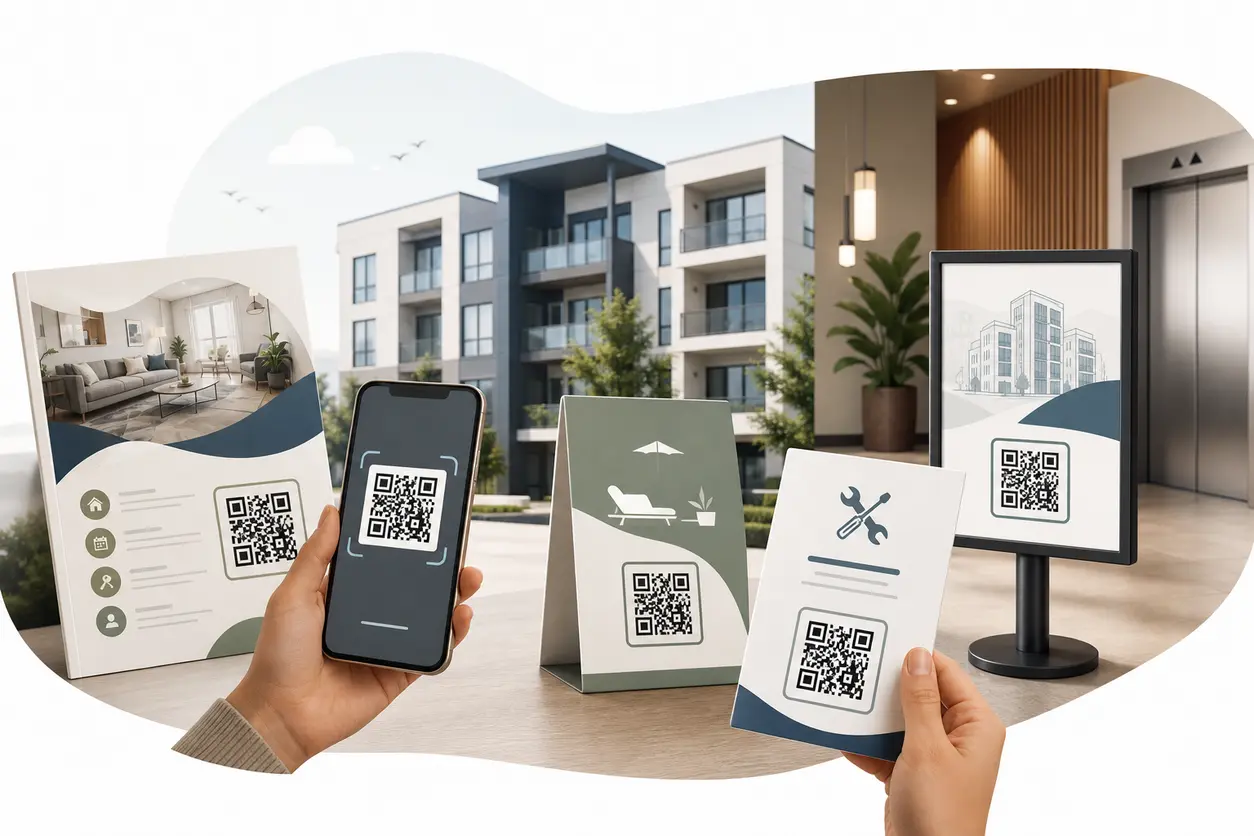
IntroductionWhy rental property QR codes work so well for multifamily teams1. Use leasing flyer QR codes to turn print into live inventory2. Share floor plans and virtual tours without crowding your print pieces3. Place QR codes where renters and residents already pause4. Use amenity guide QR codes to cut down on outdated handouts5. Make move-in and onboarding easier with resident guide QR codes6. Use maintenance request QR codes to reduce resident friction7. Dynamic QR codes are the better fit for rental operations8. Track which units, buildings, and placements generate engagement9. A simple QR workflow for rental teams using QR Rapid10. What to look for before you choose a QR code setupFinal takeawayFAQ
That is where rental property QR codes become useful. Instead of treating print as a dead end, leasing teams can turn it into a direct path to live listings, floor plans, virtual tours, resident guides, and maintenance forms.
For property managers, landlords, and multifamily leasing teams, the real value is not just adding a code to a flyer. It is building a workflow that connects offline materials to current digital content without constant reprints. With QR Rapid, you can create dynamic QR codes for leasing and resident-service touchpoints, update destinations later, and track which placements generate scans.
Why rental property QR codes work so well for multifamily teams
Rental operations have two constant challenges:
- marketing units while inventory changes quickly
- communicating with residents without overprinting outdated materials
A QR code solves both when it is tied to the right destination.
A prospect standing in front of a building sign can scan to view available units immediately. A resident in the lobby can scan for pool hours, parking rules, or move-in instructions. A maintenance request handout can send tenants to a mobile-friendly form instead of a phone number that gets ignored after hours.
The biggest advantage is speed. People do not want to type long URLs from a flyer, and staff do not want to keep replacing paper every time a link changes.
1. Use leasing flyer QR codes to turn print into live inventory
Leasing flyers are one of the best use cases for rental property QR codes because they sit at the top of the conversion path. Prospects are already interested. Your job is to remove friction.
A leasing flyer QR code can send renters to:
- a current availability page
- a specific floor plan landing page
- a virtual tour video
- a gallery for a unit type
- a contact or tour booking form
The key is to match the QR destination to the flyer itself.
Better flyer workflows for rental teams
If the flyer promotes a specific unit type, do not send scans to the general homepage. Send them to that exact unit category with current pricing, square footage, photos, and a clear next step.
For example:
- A studio flyer links to a studio floor plan page
- A two-bedroom flyer links to the live two-bedroom availability page
- A luxury building flyer links to a branded landing page with amenities, video tour, and a schedule-a-tour button
With QR Rapid, a dynamic QR code lets you keep the printed flyer in circulation while changing the destination later. If Unit 304 is leased, you can update the code to the next available unit or the broader floor plan page instead of throwing away the full flyer stack.
That matters for:
- sidewalk sign inserts
- brochure boxes
- direct-mail leasing pieces
- employer relocation packets
- partner referral handouts
2. Share floor plans and virtual tours without crowding your print pieces
Printed leasing materials have limited space. That is why rental property QR codes are especially useful for content that is visual, detailed, or frequently updated.
Floor plan QR codes
A floor plan QR code can open:
- an image gallery of layouts
- a downloadable PDF QR code
- a landing page with dimensions and finishes
This is helpful when leasing staff want one clean flyer but still need to provide deeper detail for serious prospects.
Virtual tour QR codes
A video QR code works well on:
- leasing window signs
- community maps
- rack cards
- event tables for housing fairs
Instead of asking prospects to schedule a tour before they have seen the space, you let them self-qualify. That can save time for the leasing team and improve lead quality because prospects arrive better informed.
If you use QR Rapid, you can create a video QR code or a dynamic URL QR code that points to your latest tour page. If the tour hosting link changes later, the printed code stays the same.
3. Place QR codes where renters and residents already pause
Placement matters as much as the code itself. Rental property QR codes work best where someone naturally has a few seconds to scan.
Good placement ideas for leasing
Leasing signs
- exterior monument signs
- temporary vacancy signs
- window posters at the leasing office
- sign riders near parking or entry areas
Printed marketing
- leasing flyers
- neighborhood mailers
- referral cards
- employer or university housing packets
- brochure stands in local businesses
Good placement ideas for resident communication
Building lobbies
- welcome board with move-in guide QR code
- resident notice board with office hours and policy updates
- package pickup instructions
Amenity areas
- gym rules and hours
- pool guidelines
- clubhouse reservation info
- pet station reminders
Resident handouts
- move-in packets
- renewal packets
- parking guides
- trash and recycling instructions
- seasonal community update sheets
A practical rule: each placement should answer one clear question. If a lobby sign says "Scan for move-in instructions," the code should open exactly that, not a generic resident portal page with five more clicks.
4. Use amenity guide QR codes to cut down on outdated handouts
Amenity information changes more often than teams expect. Hours shift on holidays. Access rules change. Reservation links change. A printed sign with static information becomes inaccurate quickly.
An amenity guide QR code can point to:
- a mobile landing page for each amenity
- a PDF QR code with rules and hours
- a video walkthrough for shared spaces
- an image-based map showing where amenities are located
This works especially well for larger apartment communities where residents may not know where package lockers, coworking rooms, dog wash stations, or guest parking are located.
A simple setup is to create one QR code per amenity area and link each one to a lightweight page with:
- current hours
- rules
- reservation instructions if needed
- contact details for questions
With QR Rapid, you can keep the same printed sign in place and update the linked landing page or file whenever policies change.
5. Make move-in and onboarding easier with resident guide QR codes
The rental lifecycle does not stop after the lease is signed. One of the strongest differentiators for QR Rapid in this use case is that the same platform can support both leasing and resident communication.
A resident onboarding QR code can be added to move-in folders, welcome letters, or lobby signage and link to:
- a move-in checklist
- utility setup instructions
- building access details
- parking information
- mailbox or package guidance
- trash collection rules
- contact information for the leasing office or management team
Instead of printing a long packet that becomes outdated, you can keep a concise handout with one clear scan path.
A good example is a two-page move-in sheet that includes separate QR codes for:
- move-in guide PDF
- building map
- resident policies page
- maintenance request form
That structure is cleaner than forcing every resident into one crowded page.
6. Use maintenance request QR codes to reduce resident friction
Maintenance is one of the most practical uses for rental property QR codes because it solves a real operational problem. Residents often notice an issue when they are away from their desk, after office hours, or in a shared area. If reporting the problem takes too much effort, they delay it.
A maintenance request QR code removes that barrier.
You can place it on:
- refrigerators or welcome packets for in-unit issues
- lobby boards for general support access
- laundry rooms or elevators for common-area issues
- resident newsletters and handouts
The QR code should link to a mobile-friendly request form that asks for the information your team actually needs:
- unit number
- issue type
- description
- urgency
- permission to enter
- photo upload if your form supports it on the destination side
A smarter setup for maintenance routing
Instead of one code for the entire property, consider separate dynamic QR codes for:
- each building
- each common area
- different request categories such as plumbing or HVAC
That gives you cleaner tracking and better context. If the laundry room QR code gets repeated scans, your team can quickly spot a recurring issue in that space.
QR Rapid is useful here because you can create distinct codes by location and edit their destinations later if your maintenance software, form link, or internal workflow changes.
7. Dynamic QR codes are the better fit for rental operations
Static QR codes still have a place for permanent, unchanging destinations, but most property teams should use dynamic codes for leasing and resident-service materials.
Why? Because rental information changes constantly.
A dynamic vs static QR codes lets you update the destination without reprinting the code itself. That is especially valuable for:
- pricing updates on leasing flyers
- unit availability changes
- replacing a virtual tour link
- updating resident guide PDFs
- changing maintenance form destinations
- redirecting seasonal amenity information
This reduces waste and keeps physical materials usable longer.
In practical terms, one flyer can stay posted in a leasing office window for weeks while the linked page keeps changing with current inventory.
8. Track which units, buildings, and placements generate engagement
One reason to use rental property QR codes instead of plain URLs is visibility. When each placement has its own code, you can see where interest is coming from.
Useful tracking examples include:
- which building sign gets the most scans
- which flyer version drives more tour-page visits
- which amenity board residents actually use
- whether move-in packet codes are being opened
- which maintenance intake code gets the most activity
That insight helps with both marketing and operations.
For leasing, you can compare scan activity across:
- property locations
- unit types
- referral partners
- print campaigns
For resident communication, you can identify which resources need better placement or clearer calls to action.
With QR Rapid, the practical approach is to create separate dynamic codes instead of reusing one generic code everywhere. That gives you a cleaner read on performance and makes future updates easier.
9. A simple QR workflow for rental teams using QR Rapid
If you want a system that is easy to manage, start with three core workflows.
Workflow 1: Leasing flyer QR code
Create a dynamic QR code in QR Rapid that links to a landing page or listing URL for current availability. Add it to flyers, signs, and brochure inserts. Use a clear CTA such as "Scan to view available floor plans and book a tour."
Workflow 2: Resident guide QR code
Create a second code that links to a PDF or mobile landing page for move-in instructions, policies, parking, and contact details. Add it to welcome materials and lobby signage.
Workflow 3: Maintenance request QR code
Create separate dynamic codes for resident handouts and common areas that link directly to your maintenance form. Label each one clearly so residents know when to use it.
From there, customize the design to match your property branding, test on iPhone and Android, and assign each code to a distinct placement so tracking stays clean.
10. What to look for before you choose a QR code setup
If you are evaluating tools for rental property QR codes, focus on the workflow rather than just the code image.
Look for:
- dynamic QR codes so print materials do not become obsolete
- easy destination editing for listings, PDFs, and tour pages
- tracking by code so you can measure placements
- support for landing pages, files, images, and video destinations
- simple duplication for multiple buildings or unit types
- branding controls so codes fit leasing materials
That combination is what makes QR codes practical for property management instead of just decorative.
Final takeaway
The best rental property QR codes are not generic. They are built around specific moments in the renter and resident journey: viewing a vacancy, comparing floor plans, touring remotely, finding amenity details, moving in, or reporting a repair.
Used that way, QR codes help leasing teams keep printed materials useful, reduce outdated information, and create clearer paths from offline interest to online action.
If you want a concrete next step, start with one high-impact workflow in QR Rapid: create a dynamic leasing flyer QR code that links to your live availability page. Then add a resident guide QR code and a maintenance request QR code so your property uses one system across marketing, onboarding, and operations.
FAQ
What should a leasing flyer QR code link to?
It should link to the most relevant next step for that flyer, such as a live availability page, a specific floor plan, a virtual tour, or a tour booking form. Avoid sending prospects to a generic homepage.
Should each rental unit or floor plan have its own QR code?
Usually, yes. Separate codes for unit types, buildings, or campaigns make tracking clearer and let you update destinations independently when availability changes.
Why are dynamic QR codes better for rental properties?
Dynamic codes let you change the destination without reprinting the code. That is useful when pricing, availability, PDFs, or tour links change frequently.
Where should apartment communities place QR codes?
High-value placements include leasing signs, window posters, lobby boards, mailers, amenity signs, move-in packets, and resident handouts where people naturally pause and can scan.
What should a maintenance request QR code collect?
At minimum, collect unit number, issue type, description, urgency, and permission to enter. If your form supports it, photo upload is also helpful for faster triage.
Can QR Rapid support both leasing and resident communication workflows?
Yes. QR Rapid can be used to create dynamic QR codes for leasing pages, PDFs, videos, image-based guides, and maintenance form links, which makes it practical for both marketing and ongoing resident service.
Similar Blogs
The latest industry news, interviews, technologies, and resources.
 September 14, 2026
Appointment Booking QR Code Workflows for Service Businesses
Appointment Booking QR Code Workflows for Service Businesses
Read post
 July 16, 2026
QR Codes for Lead Capture at Trade Shows and Conferences
QR Codes for Lead Capture at Trade Shows and Conferences
Read post
Join 2,000+ subscribers
Stay in the loop with everything you need to know.
We care about your data in our privacy policy