
Dynamic QR Platform
Create QR codes Instantly
Website URL
Send users to any webpage
Website URL
Website URL
Send users to any webpage
Wi-Fi
Let users connect instantly
Wi-Fi
Wi-Fi
Let users connect instantly
Menu
Create a digital menu
Menu
Menu
Create a digital menu
Start a chat with one tap
Start a chat with one tap
Image
Showcase visuals
Image
Image
Showcase visuals
Show a downloadable file
Show a downloadable file
14 Jul 2026 • 11 min read
QR Codes for Storefront Windows and Door Signs
A practical guide for local businesses using storefront QR codes on windows, doors, and exterior signs to turn walk-by traffic into bookings, menu views, loyalty signups, sales, and measurable online actions.
IntroductionWhy storefront QR codes work so wellBest use cases for storefront QR codesWhat makes a storefront QR code convertPlacement tips for windows, doors, and exterior signsDynamic vs static storefront QR codesHow to measure offline-to-online performanceStorefront QR code ideas by business typeA simple setup process with QR RapidCommon mistakes to avoidTurn your storefront into a measurable conversion channelFAQ
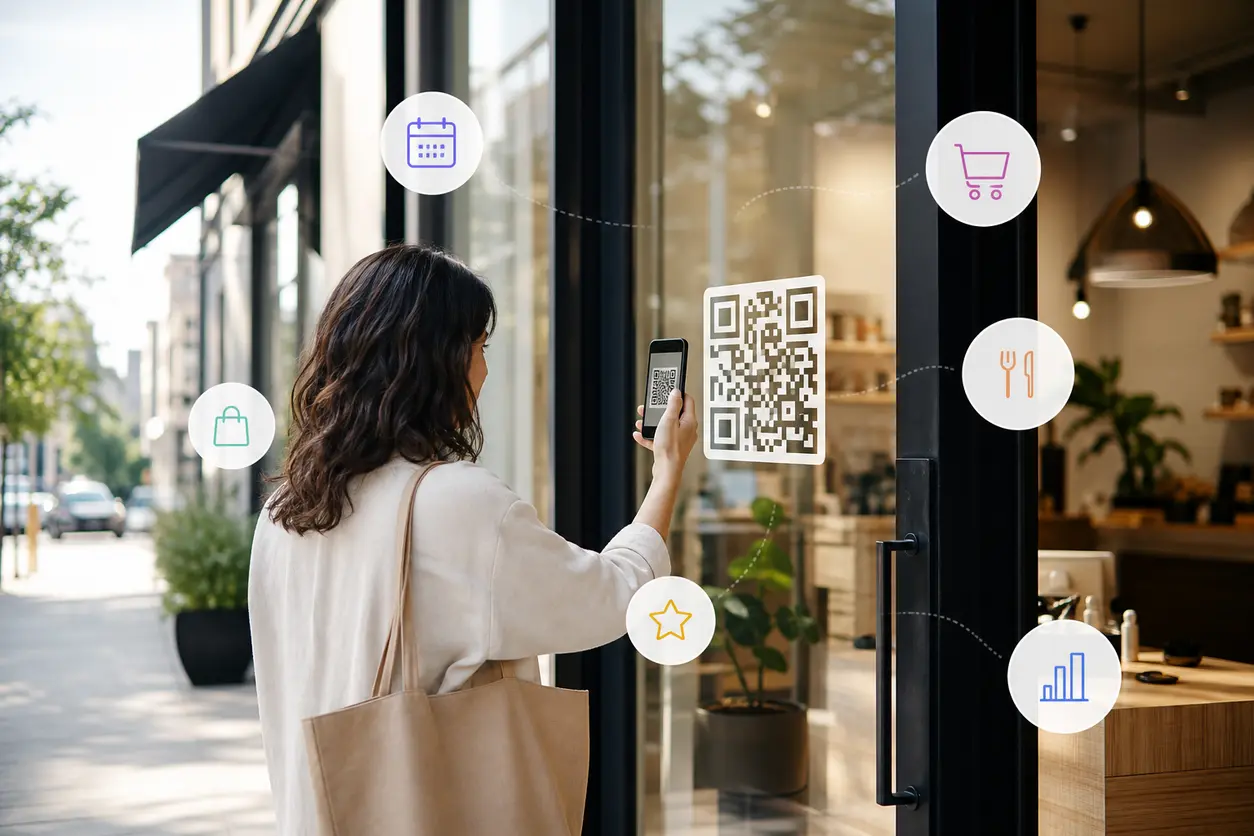
Storefront QR codes make that same space interactive. A passerby can scan your window or door sign and preview a menu, book an appointment, browse products, claim an offer, join your loyalty list, or follow your brand before they ever step inside.
That matters because exterior foot traffic is often high intent. People are already near your business. They may be deciding whether to come in now, come back later, or move on to the next option. A well-placed QR code gives them a fast next step instead of asking them to remember your name and search later.
For local businesses, that turns glass, vinyl, sandwich boards, and door signage into a measurable lead and sales channel. With QR Rapid, you can create dynamic storefront QR codes, update the destination without reprinting signage, and track which signs actually drive scans.
Why storefront QR codes work so well
Exterior signage reaches customers at a decision point. They are standing outside your business, checking hours, comparing options, waiting for a friend, or passing by after seeing something in the window. That is a very different moment from someone casually browsing social media.
Storefront QR codes reduce friction in that moment.
Instead of:
- searching for your business name
- finding the right page
- navigating to booking or menu info
- getting distracted by competitors
They can go straight to the action you want.
The best campaigns do not treat the QR code as a novelty. They treat it as a storefront conversion tool with one job.
Examples:
- A cafe window sends people to a menu QR code and online ordering page
- A salon door sign sends after-hours visitors to a booking calendar
- A gym window poster sends prospects to a free trial signup page
- A boutique window sends shoppers to a curated product collection tied to the display
Best use cases for storefront QR codes
The strongest storefront QR code campaigns match the outdoor context. A person standing outside needs a quick answer or a quick action.
1. Menu previews for cafes, bakeries, and restaurants
A menu preview works especially well on front windows because many people decide whether to enter based on price range, dietary options, drinks, or current specials.
Good destinations include:
- mobile menu landing page
- breakfast or lunch specials page
- online ordering page
- seasonal drinks or featured items page
Practical tip: if your menu changes often, use a dynamic QR code generator so the printed sign stays the same while the destination updates for brunch, holiday drinks, or limited-time items.
2. Booking links for salons, spas, clinics, and fitness studios
A person walking by at night or during a busy period may not want to call. A QR code on the door lets them book while the intent is still fresh.
Good destinations include:
- online booking calendar
- new client consultation form
- class schedule with registration
- waitlist signup page
For salons and service businesses, this is one of the simplest ways to capture demand after hours.
3. Product catalogs for boutiques and retail shops
If your display window is doing its job, people will stop and look. A QR code helps them keep going even if the store is closed or crowded.
Good destinations include:
- product collection tied to the window display
- new arrivals page
- lookbook or gift guide
- preorder page for featured items
A smart approach is to rotate the destination with each display change instead of reprinting a new sign every time.
4. Loyalty signups and first-visit offers
Exterior signage is a good place to turn anonymous foot traffic into owned audience.
Good destinations include:
- email or SMS signup page
- loyalty program enrollment
- first-visit coupon landing page
- birthday club or VIP list signup
Keep the value obvious. A generic scan me message is weak. A specific offer is stronger, such as join for 10 percent off your first visit or scan for this week’s member perk.
5. Social follows and community building
Not every passerby is ready to buy today. Some are willing to follow, save, and come back later.
Good destinations include:
- Instagram profile
- TikTok page
- link-in-bio style landing page
- community calendar or events page
This works well for cafes, pop-ups, local artists, and lifestyle brands with strong visual identity.
6. Store hours, parking, and visit information
A basic but underrated use case: answering the practical questions that block a visit.
Good destinations include:
- live hours page
- holiday schedule page
- parking and entrance instructions
- accessibility info
- waitlist or join-the-queue page
This is especially useful when hours change seasonally or when multi-tenant buildings make the entrance hard to find.
7. Promo landing pages for seasonal campaigns and pop-ups
Storefront QR codes are ideal for short campaigns because the sign can stay in place while the destination changes.
Good destinations include:
- holiday sale page
- sidewalk sale signup
- pop-up event RSVP
- limited-time coupon page
- neighborhood campaign page
This is where dynamic QR codes become much more valuable than static ones.
What makes a storefront QR code convert
A storefront QR code should do one thing clearly. The more generic the sign, the worse the result.
Start with one primary action
Do not put one code on the door and expect it to serve every goal at once. If the sign says menu, booking, loyalty, and follow us, people hesitate.
Instead, match one sign to one intent:
- On the entrance door: Book your next appointment
- On the main front window: Preview the menu
- On a promotional cling: Unlock this week’s offer
- On a display card: Shop the window collection
If you need multiple actions, use separate signs with separate codes.
Write the CTA like a benefit, not an instruction
Better CTA examples:
- Preview today’s menu
- Book in under a minute
- Shop what’s in the window
- Join rewards before you enter
- See store hours and holiday updates
- Claim this week’s offer
Weaker CTAs include scan me or learn more because they do not explain the payoff.
Send people to a mobile-ready page
A storefront scan usually happens on a phone, often while standing, walking, or multitasking. The landing page should load quickly and make the next step obvious.
Before printing, check that the page:
- loads cleanly on mobile
- has one clear CTA near the top
- does not require unnecessary scrolling
- does not force a login before the value is visible
- matches the promise on the sign
If the sign says preview the menu, do not send people to your home page and make them hunt for it.
Placement tips for windows, doors, and exterior signs
This is where many businesses lose scans. A good destination cannot fix bad placement.
Minimize glare
Sunlight and reflections can make a code hard to scan even when it looks fine from inside. If possible:
- avoid placing the code where direct sun hits during peak foot-traffic hours
- test scans at different times of day
- use matte print finishes instead of glossy materials when possible
- place the code on a solid high-contrast backing rather than directly over a busy transparent window view
A code that is technically visible can still fail if the phone camera keeps catching reflection.
Match size to real scanning distance
A code on a pull handle or door sign can be smaller than one meant to be scanned from the sidewalk. Think about where the user will actually stand. Then test from that spot with different phones.
Practical rule: do not approve artwork from your laptop alone. Print a sample, tape it to the window, step back to real-world distance, and scan it in daylight.
Keep the code easy to isolate
Exterior windows often have decals, pricing, posters, and reflections competing for attention. Give the QR code breathing room.
Best practices:
- use strong contrast between the code and background
- leave clear empty space around the code
- avoid placing it over patterned graphics
- keep it separate from dense paragraphs of text
Place it where people naturally pause
The best scanning zones are the places where people already stop:
- next to door handles
- beside posted hours
- near window displays
- on eye-level promotional decals
- on sidewalk signs facing foot traffic
Avoid placing the code too low on glass, where it becomes awkward to scan, or too high, where people must tilt their phone uncomfortably.
Repeat winning placements
If you have a wider storefront, one code may not be enough. A small duplicate on the door plus a larger version on the main window can capture different traffic patterns. Just make sure each code either serves the same destination intentionally or is tracked as a separate placement.
Dynamic vs static storefront QR codes
Static QR codes can work if the destination will never change. That is rare for storefront signage.
Dynamic QR codes are usually the better choice because you can:
- change the destination without reprinting the sign
- rotate from one promotion to another
- update holiday hours or seasonal menus
- switch a sold-out collection to a waitlist page
- keep old signage useful during pop-ups or short campaigns
- track scans by code and campaign
Example: a boutique prints one attractive window cling for new arrivals. In spring, the code leads to dresses. In summer, it leads to sandals. In December, it leads to a gift guide. The physical sign stays, but the destination evolves.
That flexibility is exactly why QR Rapid fits storefront campaigns. You can keep signage stable while adjusting the action behind it.
How to measure offline-to-online performance
The biggest missed opportunity with storefront signage is running it without attribution.
If you cannot tell which sign drives scans, you cannot improve it.
With QR Rapid, you can make each exterior placement measurable.
Track by placement
Create separate dynamic QR codes for:
- front door
- left display window
- right display window
- sidewalk board
- temporary promo decal
Even if two codes point to similar pages, separate tracking shows which placement actually gets used.
Track by campaign
Use a different code for each offer or season.
Examples:
- spring menu preview
- back-to-school booking push
- holiday gift guide
- grand opening weekend
This keeps your reporting clean and helps you compare performance without guessing.
Measure the full path, not just scans
A scan is useful, but the business result matters more. Pair QR code tracking with landing page actions such as:
- completed bookings
- loyalty signups
- coupon claims
- product page visits
- add-to-cart sessions
- direction requests
A simple setup is to send each storefront code to a dedicated landing page rather than your generic homepage. That makes performance easier to interpret.
Learn from timing patterns
Exterior scans often reveal useful behavior. You may notice that:
- after-hours scans convert into next-day bookings
- morning sidewalk traffic prefers menu previews
- weekend scans respond best to short promos
- one window display outperforms another
Those insights help you adjust both signage and destination content.
Storefront QR code ideas by business type
Cafe
Put a QR code on the front window with a CTA such as preview today’s menu. Send it to a lightweight mobile page with drinks, food, hours, and online ordering. Add a second code on a promo decal for seasonal specials.
Salon
Place a code on the door for after-hours traffic with a CTA such as book your next appointment. Use a dynamic destination so you can change between new client offers, slow-day promotions, or stylist-specific booking pages.
Gym or studio
Use a window poster with a CTA such as claim a free class pass. Send scanners to a landing page with class schedule, coach intro, and trial signup.
Retail boutique
Add a code beside the main display with a CTA such as shop the window. Route it to a curated collection page that mirrors what people see behind the glass.
A simple setup process with QR Rapid
- Choose one storefront goal per sign.
- Build a mobile landing page or use your existing booking, menu, catalog, or offer page.
- Create a QR code in QR Rapid.
- Customize the design so it fits your brand but stays easy to scan.
- Assign separate codes for each exterior placement you want to measure.
- Print test versions and scan them in real conditions.
- Launch, monitor scans, and update the destination as offers change.
This workflow is simple enough for a single-location business and structured enough for teams managing multiple stores.
Common mistakes to avoid
- Sending every storefront scan to the homepage
- Using one code for too many actions
- Printing on reflective material without testing
- Making the code too small for the actual viewing distance
- Hiding the value behind a weak CTA
- Reusing one untracked code across every sign
- Forgetting to update old promotions
Turn your storefront into a measurable conversion channel
A window or door sign does not need to be passive branding. With the right setup, it becomes a direct path from foot traffic to action.
The best storefront QR codes are not just scannable. They are intentional. They answer a question, remove friction, and give you data you can use.
If you want to turn walk-bys into menu views, bookings, signups, or sales, build your storefront QR codes around one clear action, test them in the real environment, and use custom QR code design and dynamic tracking so the sign keeps working long after it is printed.
QR Rapid makes that process easier by giving you flexible dynamic QR codes, simple updates, and scan tracking built for real campaigns. If your storefront already gets attention, the next step is making that attention measurable.
FAQ
What should storefront QR codes link to?
Link each code to one high-intent action, such as a menu preview, booking page, loyalty signup, product collection, store hours page, or seasonal offer landing page.
Are dynamic QR codes better for storefront signs?
Usually yes. Dynamic codes let you change the destination without reprinting the sign, which is useful for rotating offers, updated hours, seasonal menus, and campaign tracking.
Where should I place a QR code on a storefront window or door?
Place it where people naturally pause, such as near the entrance, posted hours, display window focal points, or a sidewalk sign. Always test for glare, reflections, and real scanning distance.
How can I track whether storefront QR codes are working?
Use separate dynamic codes for each placement and send scans to dedicated landing pages. Then measure scans alongside actions like bookings, signups, coupon claims, or product visits.
Should I use one storefront QR code for everything?
No. A single code with multiple possible outcomes creates confusion and weakens conversion. Use one code per sign and one clear CTA per customer intent.
Similar Blogs
The latest industry news, interviews, technologies, and resources.
 September 14, 2026
QR Codes for Google Review Collection at the Point of Service
QR Codes for Google Review Collection at the Point of Service
Read post
 September 14, 2026
Appointment Booking QR Code Workflows for Service Businesses
Appointment Booking QR Code Workflows for Service Businesses
Read post

Join 2,000+ subscribers
Stay in the loop with everything you need to know.
We care about your data in our privacy policy