
Dynamic QR Platform
Create QR codes Instantly
Website URL
Send users to any webpage
Website URL
Website URL
Send users to any webpage
Wi-Fi
Let users connect instantly
Wi-Fi
Wi-Fi
Let users connect instantly
Menu
Create a digital menu
Menu
Menu
Create a digital menu
Start a chat with one tap
Start a chat with one tap
Image
Showcase visuals
Image
Image
Showcase visuals
Show a downloadable file
Show a downloadable file
18 Jul 2026 • 10 min read
Open House QR Codes for Lead Capture, Brochures, and Buyer Follow-Up
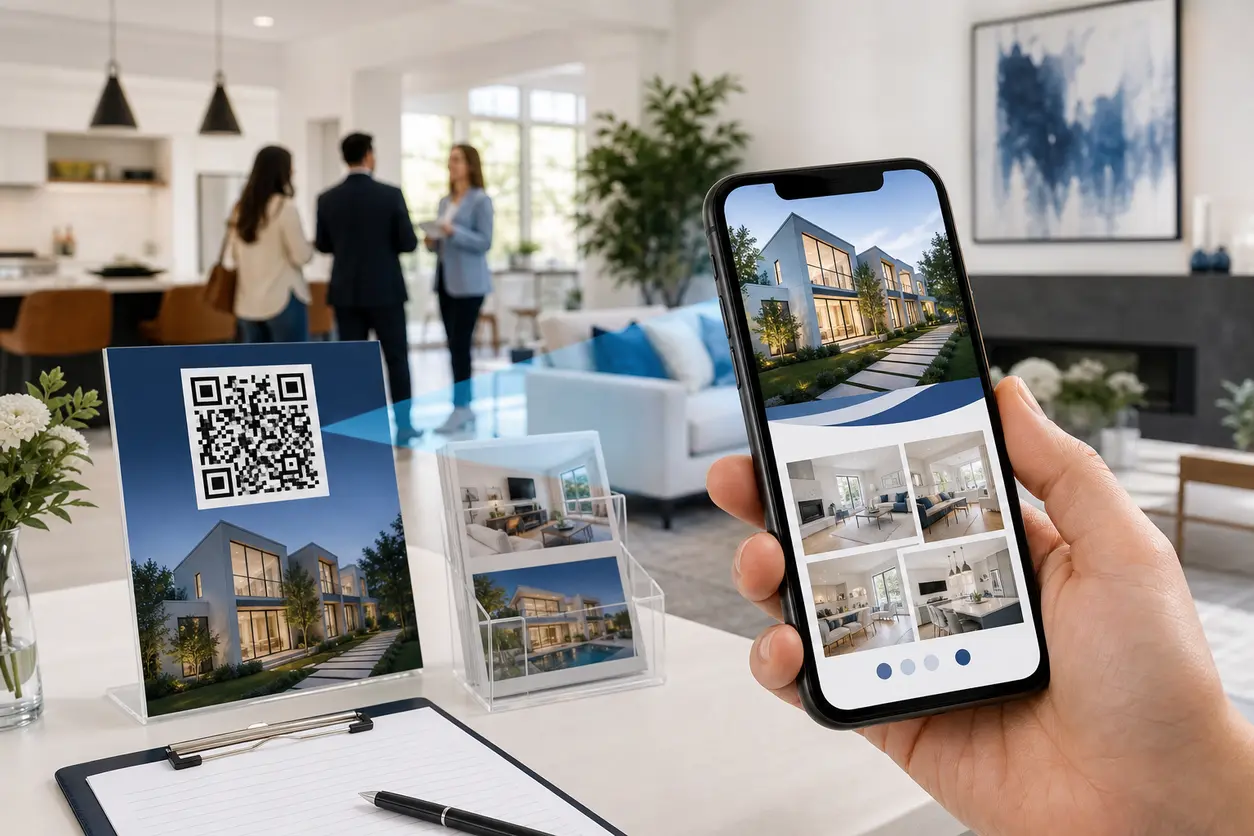
A practical guide for real estate agents and brokers using open house QR codes to share brochures, floor plans, neighborhood guides, seller disclosures, and signup forms while capturing buyer questions, booking follow-up calls, and tracking scan activity by property.
IntroductionWhy open house QR codes work better than paper aloneThe best open house workflow: one primary QR code, multiple buyer actionsUse open house QR codes to capture contacts before buyers leaveWhat buyers actually want from the scanStatic vs dynamic QR codes for open housesHow to track which properties generate the most scansA practical QR Rapid setup for an open houseCommon mistakes with open house QR codesWhen this approach is worth itTurn open house traffic into follow-up conversationsFAQ
That is where open house QR codes become more than a convenience. Used well, they turn a walk-through into a measurable lead capture workflow. Instead of handing out one brochure and hoping for a callback, you can give buyers immediate access to the exact materials they want and a simple way to take the next step before they leave.
This guide focuses on a specific open house setup for agents and brokers: share the right property assets, capture buyer intent, route questions, book follow-ups, and track scan activity by property and placement using QR Rapid.
Why open house QR codes work better than paper alone
At an open house, buyers want quick answers:
- What does the full floor plan look like?
- Are the seller disclosures available?
- What is included with the property?
- What is the neighborhood like?
- How do I ask a question without tracking down the agent again?
- Can I schedule a second showing now?
Paper handouts can help, but they are limited. They go out of date, they only hold so much information, and they do not tell you who engaged after the event. Open house QR codes solve those gaps by connecting printed signs and handouts to a mobile-friendly next step.
The biggest win is not just document delivery. It is capturing buyer intent while it is still fresh.
The best open house workflow: one primary QR code, multiple buyer actions
A common mistake is creating one QR code for a generic listing page and stopping there. That may get a few scans, but it does not move buyers toward contact.
A better setup is this:
- Create one primary QR code for the open house.
- Send scans to a branded landing page for that specific property.
- Give buyers a few clear actions on that page.
- Track scans by property and by placement.
- Update the destination after the event without reprinting the code.
With QR Rapid, this is a strong use case for a dynamic QR code linked to a branded landing page.
What to include on the landing page
Your open house landing page should feel like a digital handout plus a response tool. Keep it focused on the in-person event, not a broad property portal. Good sections include:
- Property brochure download for buyers who want a clean summary they can save
- Floor plan for visitors comparing room flow and dimensions
- Neighborhood guide with nearby schools, parks, dining, commute notes, or local highlights
- Seller disclosures so serious buyers can review details immediately
- Ask a question form for buyers who want clarity on timing, condition, or offer process
- Book a follow-up call or second showing link to your calendar or scheduling page
- Simple sign-up form for visitors who want updates on this property or similar homes
This structure keeps the QR experience useful for both casual visitors and high-intent buyers.
Use open house QR codes to capture contacts before buyers leave
If the only result of a scan is a brochure download, you are missing the best part of the opportunity.
The conversion-focused version of this workflow gives buyers a reason to identify themselves while interest is highest.
1. Put the main QR code at the entrance
At the front door or sign-in table, use a clear CTA such as:
- Scan for brochure, floor plan, and disclosures
- Scan to save this home and book a follow-up
- Scan for full property details and neighborhood guide
This first scan should land on the property page and offer a short sign-up option. Keep the form simple. Name, email, and one qualifier is usually enough.
Useful qualifier examples:
- Are you actively touring homes this month?
- Do you want disclosures emailed to you?
- Would you like a second showing?
That gives you both contact info and a buying signal without creating too much friction.
2. Place supporting QR codes where questions naturally happen
Open house QR codes work well when they match the buyer's moment of curiosity.
Examples:
- In the kitchen: "Scan for appliance info and seller disclosures"
- In the primary suite: "Scan for floor plan and room dimensions"
- Near the backyard: "Scan for lot details and neighborhood guide"
You do not need a different destination for every room. In many cases, these can all point to the same branded landing page. What changes is the placement label in your QR Rapid naming system so you can see what part of the house prompted the scan.
3. Add an exit QR code for follow-up
The exit point is one of the highest-intent moments in the event. Buyers have just formed an opinion. Make the next step easy before they get back in the car.
A strong exit CTA might be:
- Interested? Scan to book a 10-minute follow-up call
- Have questions after your walk-through? Scan to send them now
- Want comps, disclosures, and next steps? Scan before you go
This is often where you collect the most qualified leads because the visitor already knows whether the property is a contender.
What buyers actually want from the scan
Agents sometimes overload open house QR codes with too many choices. Keep the content aligned with what buyers usually need in the moment.
Brochures
A digital brochure is still useful, especially for buyers who want something concise they can review later. Make sure it is current and mobile-friendly. If price, features, or showing instructions change, a dynamic QR code lets you update the file or destination without reprinting signs.
Floor plans
Floor plans are one of the most practical assets at an open house because buyers often forget layout details after visiting several homes in one day. A QR link to a crisp floor plan helps them compare flow, bedroom placement, and usable space later.
Neighborhood guides
Neighborhood context can be the deciding factor for buyers who are still choosing between areas. Instead of cramming a flyer with local details, use the QR destination to provide a short neighborhood guide with maps, nearby amenities, and commute notes.
Seller disclosures
Serious buyers often ask for disclosures early. If you can provide a simple path to review them, you reduce back-and-forth and keep the process moving. This also helps your team separate casual interest from active intent.
Signup and question forms
Do not make buyers hunt for a contact option. Every property page tied to your open house QR codes should include a short form for questions and a separate clear option to request next steps.
Static vs dynamic QR codes for open houses
If you run open houses regularly, dynamic QR codes are usually the better choice.
Static QR codes may work if:
- The destination will never change
- You only need a simple permanent link
- You do not need scan analytics
Dynamic QR codes are better if you want to:
- Update brochure or disclosure links without reprinting
- Reuse the same printed sign for a new destination during the campaign
- Track scans by property, event date, or sign placement
- Shift the post-event CTA from "tour details" to "book a second showing"
- Fix a broken link without replacing printed materials
For agents managing multiple listings, dynamic open house QR codes are easier to operate because the event does not end when the doors close. Your follow-up workflow continues after the showing.
How to track which properties generate the most scans
The tracking side is where this tactic becomes much more useful than a paper-only process.
With QR Rapid, create separate dynamic codes or landing page variants for each property and, when helpful, for each placement. That gives you cleaner insight into what is driving attention.
Track by property
Use a naming structure like:
- 123-Oak-OpenHouse-FrontDoor
- 123-Oak-OpenHouse-ExitSign
- 89-Lake-OpenHouse-SignIn
This helps you compare scan volume across listings and events.
Track by placement
If a property gets scans from the entry sign but none from the exit sign, your follow-up CTA may need work. If the kitchen placement gets more scans than the flyer table, that tells you buyers are engaging when questions happen in context.
Track by date or event
Running the same property across two weekends? Use separate codes or tracking labels so you can compare event performance. That gives you a clearer picture of whether traffic quality improved, not just raw attendance.
Track by action, not just scan count
A scan matters, but the next step matters more. Look at which destinations are tied to:
- form submissions
- follow-up call requests
- disclosure requests
- brochure downloads
This is how you find out which property events are generating actual sales conversations, not just curiosity.
A practical QR Rapid setup for an open house
Here is a straightforward workflow you can set up quickly.
Step 1: Build a branded landing page for the property
In QR Rapid, create a page for the open house with your branding, property photos, and a short summary. Add clear buttons or sections for brochure, floor plan, neighborhood guide, disclosures, and next-step actions.
Step 2: Create the main dynamic QR code
Use one primary code for the entrance sign, flyer table, and printed leave-behind materials. This is your core property access point.
Step 3: Create one or two secondary codes
If you want deeper measurement, add a separate code for the exit sign or question station. Keep the user experience simple, but give yourself better attribution.
Step 4: Connect forms and booking links
Route question submissions to your inbox or CRM workflow, and link the booking button to your preferred scheduling tool. The goal is speed: buyers should be able to act in under a minute.
Step 5: Update the page after the event
Once the open house ends, you can keep the same QR code active and change the call to action. For example, replace "Join today's open house details" with "Request a private showing" or "Ask about offer timeline."
That extends the value of your printed materials beyond the event itself.
Common mistakes with open house QR codes
Sending scans to a generic homepage
A buyer scanning at an open house wants property-specific information now. A homepage creates friction and weakens intent.
Making the form too long
If the first interaction asks for too much, many buyers will bounce. Keep initial capture short and collect deeper details later.
Using too many disconnected QR codes
If every surface has a different code leading somewhere different, visitors get confused. Use one main path and only add secondary codes when there is a clear purpose.
Forgetting the follow-up CTA
A brochure link is useful, but it should not be the final step. Every open house page should include a strong next action.
Not tracking by property
If all your events use the same general code, you lose the ability to compare performance across listings.
When this approach is worth it
Open house QR codes are especially useful when:
- you host frequent open houses across multiple listings
- you want fewer printed handouts and faster updates
- buyers regularly ask for disclosures or floor plans on-site
- you want better lead capture than a basic sign-in sheet
- you need visibility into which properties actually generate follow-up interest
For teams and brokers, this also creates a repeatable process. Once you have a template in QR Rapid, each new open house becomes faster to launch and easier to measure.
Turn open house traffic into follow-up conversations
The real value of open house QR codes is not that they look modern on a sign. It is that they let you turn in-person traffic into digital intent signals while the property is still top of mind.
Instead of relying on paper brochures and memory, you can give buyers immediate access to the materials they want, offer a simple way to ask questions, and make follow-up booking easy before they leave.
If you want a practical system for this, QR Rapid gives you the pieces that matter: dynamic QR codes, branded landing pages, editable destinations, and scan tracking you can use across properties and events.
Set up one high-converting open house workflow, reuse it for each listing, and make every showing easier to manage and easier to measure.
FAQ
What should open house QR codes link to?
The best destination is usually a branded property page with the brochure, floor plan, neighborhood guide, seller disclosures, a question form, and a follow-up booking link.
Should I use one QR code or multiple QR codes at an open house?
Start with one main QR code for the full property experience. Add one or two secondary codes only if you want to track specific placements such as the entrance, kitchen, or exit sign.
Are dynamic QR codes better for open houses?
Yes for most agents. Dynamic QR codes let you update links after printing, switch the post-event call to action, and track scans by property or placement.
How can I capture buyer questions with a QR code?
Send the QR code to a landing page with a short question form or a button that routes visitors to your preferred contact method. Keep the form short so buyers can respond quickly on mobile.
Can open house QR codes help me compare listing interest?
Yes. Create separate codes for each property and label them clearly in your dashboard. That lets you compare scan activity and follow-up actions across open houses.
Where should I place QR codes during an open house?
Use them at the entrance, sign-in area, brochure table, and exit. You can also place supporting codes in areas where buyers naturally ask questions, such as the kitchen or backyard.
Similar Blogs
The latest industry news, interviews, technologies, and resources.
 September 14, 2026
QR Codes for Google Review Collection at the Point of Service
QR Codes for Google Review Collection at the Point of Service
Read post
 September 14, 2026
Appointment Booking QR Code Workflows for Service Businesses
Appointment Booking QR Code Workflows for Service Businesses
Read post

Join 2,000+ subscribers
Stay in the loop with everything you need to know.
We care about your data in our privacy policy