
Dynamic QR Platform
Create QR codes Instantly
Website URL
Send users to any webpage
Website URL
Website URL
Send users to any webpage
Wi-Fi
Let users connect instantly
Wi-Fi
Wi-Fi
Let users connect instantly
Menu
Create a digital menu
Menu
Menu
Create a digital menu
Start a chat with one tap
Start a chat with one tap
Image
Showcase visuals
Image
Image
Showcase visuals
Show a downloadable file
Show a downloadable file
27 Aug 2026 • 12 min read
QR Codes for Classrooms: Share Lesson Materials, Videos, and Worksheets
A practical guide for teachers, tutors, school administrators, and instructional designers who want to use a classroom QR code to connect printed materials to digital resources. Learn where to place QR codes in classrooms, what to link them to, how they support classroom management and accessibility, and why dynamic QR codes help you update lesson materials without reprinting.
IntroductionWhat is a classroom QR code?Why teachers use QR codes in the classroomThe best places to put a classroom QR codeWhat to link a classroom QR code toClassroom examples by grade level and subjectClassroom management benefitsAccessibility advantages of classroom QR codesWhy dynamic QR codes are especially useful for teachersHow to set up a classroom QR code that students will actually useCommon mistakes to avoidA practical classroom QR toolkit to start withWhen QR Rapid is a strong fit for classroom workflowsFinal takeawayFAQ
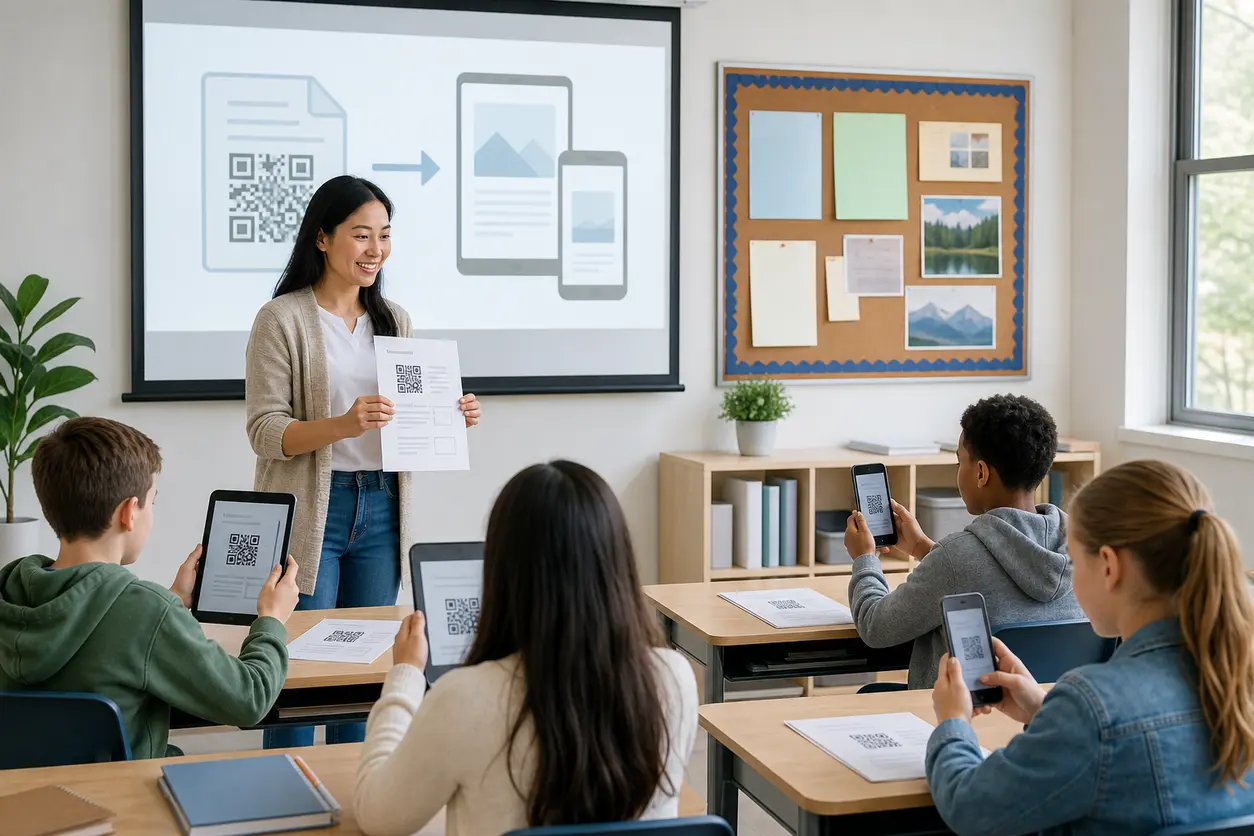
That simple workflow is what makes QR codes so useful in classrooms: they reduce instructions, speed up transitions, and keep physical and digital materials connected.
What is a classroom QR code?
A classroom QR code is a scannable code placed on a teaching material or in a classroom space that opens a digital resource on a student device. The destination might be:
- a lesson video
- a PDF worksheet or reading
- a slide deck
- a digital assignment
- an online quiz or form
- an image set or diagram
- an audio recording
- a class landing page with multiple links
In practice, a classroom QR code works best when it removes a small but repeated point of friction. If students usually lose a link, mistype a web address, or need different materials at different stations, a QR code solves that quickly.
Why teachers use QR codes in the classroom
The biggest advantage is not that QR codes look modern. It is that they make distribution easier.
Instead of saying, "Open your LMS, click Unit 4, find today's folder, and open the third file," you can say, "Scan the code on your handout."
That matters in everyday classroom routines:
- faster bellwork starts
- simpler small-group rotations
- fewer repeated directions
- cleaner handouts with less clutter
- easier access to make-up work
- smoother transitions between paper and digital tasks
For instructional designers and school leaders, a classroom QR code can also standardize how digital resources are attached to physical materials across grade levels, departments, or programs.
The best places to put a classroom QR code
Where you place the code should match when students need the resource.
1. On handouts and worksheets
This is one of the most practical uses. A QR code on a worksheet can open:
- a short explainer video
- a read-aloud version of the text
- answer recording instructions
- a digital extension activity
- a reference sheet or glossary
This works especially well for homework packets, intervention materials, guided notes, and absent-student folders.
Example: An elementary reading worksheet includes a classroom QR code in the top corner that opens a teacher-recorded read-aloud and vocabulary support for students who need extra scaffolding.
2. On bulletin boards and classroom displays
Bulletin boards do not have to be static. A code can turn a display into an interactive resource hub.
You might link to:
- book trailers on a reading wall
- student exemplar videos
- a class calendar
- audio pronunciation clips on a language board
- extension resources tied to a science display
Example: A middle school science bulletin board about ecosystems includes one code for a food web animation and another for a short review quiz.
3. At classroom stations or centers
Stations are where QR codes often make the biggest difference because students are moving independently.
A station card can link to:
- task directions
- a timer or pacing video
- a practice game
- an audio prompt
- a response form
- a differentiated version of the task
Example: In a math rotation, each station has its own classroom QR code. One opens a fractions tutorial video, one opens digital manipulatives, and one opens a quick check form for the teacher.
4. On presentation slides
A code on the final slide, warm-up slide, or transition slide gives students a fast way to continue the lesson on their own devices.
This is useful for:
- exit tickets
- labs or project instructions
- nearpod-style companion resources
- homework links
- copied slide decks or notes
Example: A high school history teacher places a QR code on the last slide that opens the primary-source packet and discussion prompt for the next day's seminar.
5. Near the classroom entrance or agenda board
A standing code near the door can support recurring routines.
Use it for:
- daily agenda access
- bellringer directions
- weekly homework overview
- absent work pickup
- class newsletter or resource page
This helps students get started without waiting for teacher directions, especially during arrival, late entry, or after an absence.
What to link a classroom QR code to
The best destination is the one that removes the most friction for students.
Videos
Video is ideal when students need to see a process, hear a model, or review instructions.
Use video QR codes for:
- phonics modeling
- lab procedure demos
- worked math examples
- pronunciation practice
- art technique demonstrations
- teacher directions for asynchronous work
Keep videos short and task-specific. A two-minute video attached to a worksheet is usually more useful than a long lecture recording.
PDFs and reading resources
PDF QR codes are useful when you want every student to access the same file quickly from paper.
Common classroom uses include:
- reading passages
- lab sheets
- make-up packets
- syllabus documents
- graphic organizers
- annotated reference pages
This is especially helpful when printed materials are limited, when students need a zoomable digital copy, or when a resource may change later.
Assignments and forms
A classroom QR code can open a submission page, quiz, reflection form, or check-in.
Good fits include:
- exit tickets
- station accountability forms
- attendance or SEL check-ins
- project proposal forms
- peer review forms
- homework submission instructions
If you use separate codes for each form, students spend less time asking where to turn work in.
Interactive learning activities
These are perfect for review days and active classrooms.
Link students to:
- vocabulary games
- drag-and-drop sorting activities
- digital flashcards
- scavenger hunt clues
- virtual manipulatives
- self-check quizzes
A classroom QR code works particularly well here because it lets you combine movement with digital interaction.
Class landing pages
Sometimes one link is too narrow. In that case, link the QR code to a simple mobile-friendly landing page that contains several resources.
For example, one code on a unit packet might open a page with:
- the lesson video
- the PDF notes
- the assignment link
- optional enrichment
- office hours or contact details
With QR Rapid, this type of setup is useful when you want one scannable entry point but expect the resource mix to change throughout the unit.
Classroom examples by grade level and subject
A generic education article often stops at "use QR codes for engagement." In real classrooms, the value comes from matching the code to the workflow.
Elementary school
Reading: Put a classroom QR code on take-home reading folders that opens a read-aloud, sight word practice, or a parent support video.
Math: Add codes to problem-solving sheets so students can scan for one worked example if they get stuck.
Centers: Use one code per center for directions, audio prompts, or a simple digital check-in.
Classroom library: Place codes on recommendation cards that open book trailers or author read-alouds.
Middle school
Science: Add QR codes to lab sheets for safety reminders, setup videos, or data tables.
ELA: Put codes on novels or discussion packets that open vocabulary lists, annotation models, or response prompts.
Social studies: Use bulletin-board codes that open maps, timelines, or short source clips.
Intervention: Differentiate independent work by giving one group a code for extra support and another for extension tasks.
High school
Math: Put a classroom QR code on review packets that opens worked solutions for selected problems, not the whole set.
Chemistry or biology: Use codes on lab stations for procedure videos, microscope image references, or cleanup instructions.
CTE: Attach codes to equipment stations that open safety steps, machine setup videos, or practice checklists.
English and history: Link printed source packets to audio commentary, archival footage, or discussion boards.
Tutoring and small-group instruction
Tutors and interventionists can use a classroom QR code on progress folders to give students direct access to practice sets, recordings, and home reinforcement materials.
This is also useful for mixed-age programs where each learner has a different digital destination but the printed workflow stays simple.
Classroom management benefits
A classroom QR code is not just a content-sharing tool. It can support classroom management when used consistently.
Fewer repeated directions
If students can scan for instructions at the point of use, you spend less time re-explaining the same task.
Better independence at stations
Students can access directions, examples, and follow-up forms without waiting for teacher help. That makes rotation models run more smoothly.
Easier absent-work systems
A make-up work bin with codes for each week or unit is often easier to maintain than a stack of printed extras.
Cleaner visual design
Instead of cramming tiny links onto a handout, syllabus, or poster, you can keep the page readable and move the digital details behind the code.
Faster updates during a unit
When a resource changes midweek, a dynamic QR code lets you point students to the latest version without replacing every printed item.
Accessibility advantages of classroom QR codes
QR codes can also support accessibility when paired with the right destination.
Audio support
A QR code can open an audio version of directions, a teacher read-aloud, or pronunciation support. This helps students who benefit from listening in addition to reading.
Device-friendly document access
A digital PDF can be enlarged, read with accessibility tools, or viewed with higher contrast more easily than some printed copies.
Multimodal instruction
The same classroom QR code can connect students to text, audio, video, and images, which makes it easier to offer multiple paths into the same lesson.
Family access at home
When a code is printed on take-home materials, caregivers can scan it too. That is helpful for homework support, translated instructions, or review resources.
Reduced copying of long URLs
Students who struggle with typing or attention do not have to manually enter a link from the board.
Accessibility still depends on the destination. If the linked file is poorly organized, hard to read on mobile, or missing captions, the QR code will not solve that on its own. The code should point to a resource that is already usable.
Why dynamic QR codes are especially useful for teachers
Static QR codes work if the destination will never change. But many classroom resources do change.
You may need to:
- replace a draft worksheet with the final version
- swap a video link after noticing an error
- update a station activity for a new class period
- redirect a code from a daily agenda to next week's agenda
- reuse a poster or slide template across several units
That is where dynamic QR codes are usually the better fit. You keep the printed code the same while updating the destination behind it.
For schools and teachers trying to reduce reprinting, this is one of the most practical reasons to use a tool like QR Rapid.
Dynamic vs Static QR Codes also make it easier to organize by workflow. For example, you can create separate codes for:
- unit packets
- station sets
- bulletin boards
- absent-work folders
- homework routines
- department-wide templates
If you want more control, QR Rapid can also help you manage different code types such as URLs, PDFs, videos, images, and landing pages from one place instead of creating one-off codes in multiple tools.
How to set up a classroom QR code that students will actually use
A good classroom QR code is not complicated. It is clear, scannable, and attached to a useful action.
- Pick one specific classroom task. Start with a real friction point such as station directions, absent work, or video access on worksheets.
- Choose the right destination type. Use a video for modeling, a PDF for reading or handouts, a form for responses, or a landing page if students need several links.
- Decide whether the code should be static or dynamic. If the resource may change later, use a dynamic QR code.
- Add a clear call to action next to the code. Write exactly what students get, such as "Scan for lab demo" or "Scan to submit exit ticket."
- Test the code on student-type devices. Check scan speed, mobile readability, loading time, and whether the destination works without extra logins.
- Place the code where the action happens. Put it on the worksheet, next to the station materials, on the slide, or by the classroom entrance rather than only in one central spot.
In QR Rapid, this process is straightforward because you can create a QR code, choose the content format, customize the design, and keep it manageable if the destination changes later.
Common mistakes to avoid
Linking to a cluttered destination
If the code opens a crowded page with too many choices, students may still need extra directions. Keep the destination focused.
Using tiny printed codes
A classroom QR code on a handout should still be easy to scan from a desk. Do not shrink it so much that students need to fight with the camera.
Skipping the CTA
Students should not have to guess what the code does. Tell them clearly: watch, read, submit, listen, or practice.
Sending students to desktop-only content
Always check the link on a phone or tablet. A resource that works on a laptop may be frustrating on a mobile device.
Putting one code everywhere without a system
If every code in the room looks identical and has no label, students can get confused. Name or label codes by task or location.
Overusing codes for simple directions
Not every instruction needs a QR code. Use one when it meaningfully improves access, not just because the option exists.
A practical classroom QR toolkit to start with
If you are just getting started, you do not need a complex rollout. Build a small toolkit first.
Try these five classroom QR codes:
- Worksheet support code: links to a model example or read-aloud
- Station directions code: links to instructions and accountability form
- Absent work code: links to the week's make-up folder
- Exit ticket code: links to a short response form
- Unit hub code: links to a landing page with slides, PDFs, and assignments
That set covers most of the high-frequency moments where students need quick access to digital materials.
When QR Rapid is a strong fit for classroom workflows
Teachers do not need more tools unless those tools reduce workload. QR Rapid is most useful when you want to:
- create QR codes for different classroom content types
- update links after printing materials
- keep recurring codes active across units
- use mobile-friendly landing pages instead of long link lists
- organize classroom, grade-level, or department resources more cleanly
For example, a teacher can place one classroom QR code on a reusable lab handout and update the linked video or PDF each term instead of redesigning the handout from scratch.
Final takeaway
A classroom QR code is most effective when it solves a specific classroom access problem. Put it where students already look, link it to the exact resource they need, and use dynamic codes when materials may change.
Used well, QR codes can turn handouts, bulletin boards, stations, and slides into flexible access points for videos, PDFs, assignments, and interactive learning. If you want to build that system without constantly remaking codes, QR Rapid gives you a practical way to create, manage, and update them as your lessons evolve.
FAQ
What should a classroom QR code link to most often?
The best destination is the one students need at the moment of use, usually a lesson video, PDF, form, assignment, or simple landing page with unit resources.
Should teachers use static or dynamic QR codes in the classroom?
Use static codes only for links that will never change. Use dynamic codes for lesson materials, station activities, agendas, or unit resources that may need updates later.
Where is the best place to put a classroom QR code?
Place it where students need to act: on worksheets, station cards, slides, bulletin boards, absent-work folders, or near the daily agenda. Avoid making students hunt for it.
How can QR codes improve accessibility in a classroom?
They can link students to audio directions, read-alouds, mobile-friendly PDFs, captioned videos, translated instructions, and other supports that are easier to access digitally than through print alone.
Can a classroom QR code work for younger students?
Yes, especially when paired with simple instructions and teacher modeling. In elementary classrooms, QR codes are useful for read-alouds, center directions, phonics practice, and take-home family resources.
How can schools avoid reprinting materials when links change?
Use dynamic QR codes. They let you keep the printed code the same while changing the destination behind it, which is helpful for reusable handouts, posters, and station materials.
Similar Blogs
The latest industry news, interviews, technologies, and resources.
 September 14, 2026
Appointment Booking QR Code Workflows for Service Businesses
Appointment Booking QR Code Workflows for Service Businesses
Read post
 July 30, 2026
QR Code Appointment Booking for Service Businesses
QR Code Appointment Booking for Service Businesses
Read post


Join 2,000+ subscribers
Stay in the loop with everything you need to know.
We care about your data in our privacy policy